> ## Documentation Index
> Fetch the complete documentation index at: https://docs.repromptai.com/llms.txt
> Use this file to discover all available pages before exploring further.
# Monthly Refresh
> How place enrichment refreshes run and how to review what changed
## Overview
Monthly refreshes re-run enrichment for places you’ve marked, so you can detect changes over time. Refresh runs execute on the **9th of every month**.
Refresh behavior:
* By default, we refresh **only the attributes that were already enriched** for that place.
* If you have a custom agreement with Reprompt, we can scope refreshes to specific attributes (for example, only `open_closed_status`).
## 1) Mark places for refresh
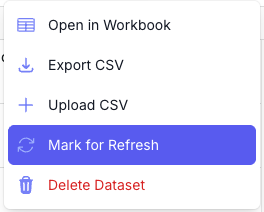
To include places in the monthly refresh, use the batch actions menu in the UI:
Click the **Actions** button.
 Then select **Mark for refresh** in the dropdown.
 ## 2) Check what changed
To see updates, list your refresh batches, then inspect the jobs inside each batch. For each place, compare the `job_metadata.last_enriched` timestamp (and, if needed, the output values) against your prior snapshot.
### List recent batches
Use this to find the batch IDs you want to review (especially the batches you marked for refresh).
Expect `batches[]` with `id`, `status`, `status_counts`, and `refresh` so you can pick the batch IDs to inspect.
[List batches API reference](https://docs.repromptai.com/api-reference/batches/list-batches)
```bash theme={null}
curl --request GET \
--url 'https://api.repromptai.com/v1/reprompt/place_enrichment/batches?limit=10' \
--header 'Authorization: Bearer YOUR_API_KEY'
```
### Fetch a batch to get its place IDs
Use this to see which place IDs are included in a specific batch.
Expect a `jobs` object with arrays by status; `jobs.completed` can be large, so you’ll typically sample or page through.
[Get batch status API reference](https://docs.repromptai.com/api-reference/batches/get-batch-status)
```bash theme={null}
curl --request GET \
--url 'https://api.repromptai.com/v1/reprompt/place_enrichment/batches/{batch_id}' \
--header 'Authorization: Bearer YOUR_API_KEY'
```
### Fetch a job by place ID
Use this to inspect the updated enrichment results for each place so you can scan for changes.
Expect `job_metadata.last_enriched` (timestamp with microseconds) plus `attribute_status` and `outputs` for validation.
[Get a single enrichment job API reference](https://docs.repromptai.com/api-reference/jobs/get-a-single-enrichment-job)
```bash theme={null}
curl --request GET \
--url 'https://api.repromptai.com/v1/reprompt/place_enrichment/jobs/{place_id}' \
--header 'Authorization: Bearer YOUR_API_KEY'
```
### Inspect `last_enriched`
Example response (trimmed). Focus on `job_metadata.last_enriched`:
```jsonc theme={null}
{
"place_id": "place_123",
"status": "completed",
"job_metadata": {
"attribute_status": {},
"last_enriched": "2023-11-07T05:31:56Z", // last refresh time
"enrichment_metadata": {},
"country_code": "US"
},
"inputs": {
"type": ""
},
"outputs": {},
"reasoning": {},
"confidence_scores": {
"open_closed_status": "VERY_HIGH",
"phone": "VERY_HIGH",
"website": "VERY_HIGH",
"address": "VERY_HIGH",
"categories": "VERY_HIGH",
"opening_hours": "VERY_HIGH",
"entity_type": "VERY_HIGH",
"name": "VERY_HIGH",
"parking_spaces": "VERY_HIGH",
"parking_spaces_total": "VERY_HIGH",
"parking_spaces_street": "VERY_HIGH",
"parking_spaces_shared": "VERY_HIGH",
"parking_spaces_dedicated": "VERY_HIGH",
"chain": "VERY_HIGH",
"tiktok": "VERY_HIGH",
"price_tier": "VERY_HIGH",
"approximate_user_reviews": "VERY_HIGH",
"menu": "VERY_HIGH",
"school_geofence": "VERY_HIGH"
}
}
```
Notes:
* **Key field**: `job_metadata.last_enriched` indicates the most recent enrichment timestamp for that place.
* A refresh can complete **without** changing `last_enriched`. That means the data matched the prior enrichment and **you are not charged** for that refresh.
* Use `job_metadata.last_enriched` to confirm a refresh ran (e.g., a timestamp on or after the 9th of the month).
* If you need a deeper diff, compare the `outputs` object to your stored snapshot.
## 2) Check what changed
To see updates, list your refresh batches, then inspect the jobs inside each batch. For each place, compare the `job_metadata.last_enriched` timestamp (and, if needed, the output values) against your prior snapshot.
### List recent batches
Use this to find the batch IDs you want to review (especially the batches you marked for refresh).
Expect `batches[]` with `id`, `status`, `status_counts`, and `refresh` so you can pick the batch IDs to inspect.
[List batches API reference](https://docs.repromptai.com/api-reference/batches/list-batches)
```bash theme={null}
curl --request GET \
--url 'https://api.repromptai.com/v1/reprompt/place_enrichment/batches?limit=10' \
--header 'Authorization: Bearer YOUR_API_KEY'
```
### Fetch a batch to get its place IDs
Use this to see which place IDs are included in a specific batch.
Expect a `jobs` object with arrays by status; `jobs.completed` can be large, so you’ll typically sample or page through.
[Get batch status API reference](https://docs.repromptai.com/api-reference/batches/get-batch-status)
```bash theme={null}
curl --request GET \
--url 'https://api.repromptai.com/v1/reprompt/place_enrichment/batches/{batch_id}' \
--header 'Authorization: Bearer YOUR_API_KEY'
```
### Fetch a job by place ID
Use this to inspect the updated enrichment results for each place so you can scan for changes.
Expect `job_metadata.last_enriched` (timestamp with microseconds) plus `attribute_status` and `outputs` for validation.
[Get a single enrichment job API reference](https://docs.repromptai.com/api-reference/jobs/get-a-single-enrichment-job)
```bash theme={null}
curl --request GET \
--url 'https://api.repromptai.com/v1/reprompt/place_enrichment/jobs/{place_id}' \
--header 'Authorization: Bearer YOUR_API_KEY'
```
### Inspect `last_enriched`
Example response (trimmed). Focus on `job_metadata.last_enriched`:
```jsonc theme={null}
{
"place_id": "place_123",
"status": "completed",
"job_metadata": {
"attribute_status": {},
"last_enriched": "2023-11-07T05:31:56Z", // last refresh time
"enrichment_metadata": {},
"country_code": "US"
},
"inputs": {
"type": ""
},
"outputs": {},
"reasoning": {},
"confidence_scores": {
"open_closed_status": "VERY_HIGH",
"phone": "VERY_HIGH",
"website": "VERY_HIGH",
"address": "VERY_HIGH",
"categories": "VERY_HIGH",
"opening_hours": "VERY_HIGH",
"entity_type": "VERY_HIGH",
"name": "VERY_HIGH",
"parking_spaces": "VERY_HIGH",
"parking_spaces_total": "VERY_HIGH",
"parking_spaces_street": "VERY_HIGH",
"parking_spaces_shared": "VERY_HIGH",
"parking_spaces_dedicated": "VERY_HIGH",
"chain": "VERY_HIGH",
"tiktok": "VERY_HIGH",
"price_tier": "VERY_HIGH",
"approximate_user_reviews": "VERY_HIGH",
"menu": "VERY_HIGH",
"school_geofence": "VERY_HIGH"
}
}
```
Notes:
* **Key field**: `job_metadata.last_enriched` indicates the most recent enrichment timestamp for that place.
* A refresh can complete **without** changing `last_enriched`. That means the data matched the prior enrichment and **you are not charged** for that refresh.
* Use `job_metadata.last_enriched` to confirm a refresh ran (e.g., a timestamp on or after the 9th of the month).
* If you need a deeper diff, compare the `outputs` object to your stored snapshot.