# API Reference
Explore the Reprompt API. Authenticate with your API key to try requests directly from the reference.
Get your API key from [Organization Settings](https://app.repromptai.com/organization). Place enrichment V1 uses your organization slug in the URL; Search, Ask, and V2 resolve it from your key.
## Place enrichment
- [Enrich a single place synchronously](/api-reference/enrich-a-single-place-synchronously) — `POST /place_enrichment/enrich`
- [Get enrichment jobs](/api-reference/jobs/get-enrichment-jobs) — `GET /place_enrichment/jobs`
- [Submit a single enrichment job](/api-reference/jobs/submit-a-single-enrichment-job) — `POST /place_enrichment/jobs`
- [Get a single enrichment job](/api-reference/jobs/get-a-single-enrichment-job) — `GET /place_enrichment/jobs/{place_id}`
- [Delete a job](/api-reference/jobs/delete-a-job) — `DELETE /place_enrichment/jobs/{place_id}`
- [Reprocess Jobs](/api-reference/jobs/reprocess-jobs) — `POST /place_enrichment/jobs/reprocess`
- [List batches](/api-reference/batches/list-batches) — `GET /place_enrichment/batches`
- [Submit a batch of places for enrichment](/api-reference/batches/submit-a-batch-of-places-for-enrichment) — `POST /place_enrichment/batches`
- [Get batch status](/api-reference/batches/get-batch-status) — `GET /place_enrichment/batches/{batch_id}`
- [Rename or update a batch](/api-reference/batches/rename-or-update-a-batch) — `PUT /place_enrichment/batches/{batch_id}`
- [Delete a batch](/api-reference/batches/delete-a-batch) — `DELETE /place_enrichment/batches/{batch_id}`
- [Reprocess a batch](/api-reference/batches/reprocess-a-batch) — `POST /place_enrichment/batches/{batch_id}/reprocess`
- [List durable exports](/api-reference/exports/list-durable-exports) — `GET /place_enrichment/exports`
- [Create a CSV export](/api-reference/exports/create-a-csv-export) — `POST /place_enrichment/exports`
- [Get export status](/api-reference/exports/get-export-status) — `GET /place_enrichment/exports/{export_id}`
- [Download a completed export](/api-reference/exports/download-a-completed-export) — `GET /place_enrichment/exports/{export_id}/download`
- [Get all available attributes](/api-reference/attributes/get-all-available-attributes) — `GET /place_enrichment/attributes`
## Search & Answers
- [Search the web](/api-reference/search-&-answers/search-the-web) — `POST /search`
- [Get a fast, source-backed answer](/api-reference/search-&-answers/get-a-fast-source-backed-answer) — `POST /ask`
## V2 experimental
- [Enrich](/api-reference/enrichments/enrich) — `POST /enrich`
- [List Attributes](/api-reference/enrichments/list-attributes) — `GET /attributes`
## OpenAPI downloads
- [Place enrichment V1](/openapi-v1.json)
- [Search and Ask](/openapi-search-ask-v1.json)
- [V2 experimental](/openapi-v2.json)
---
# Get all available attributes
Get metadata for all available enrichment attributes
Get metadata for all available enrichment attributes
## Endpoint
`GET /place_enrichment/attributes`
## OpenAPI operation
```json
{
"tags": [
"attributes"
],
"summary": "Get all available attributes",
"description": "Get metadata for all available enrichment attributes",
"operationId": "get_enrichment_attributes__org_slug__place_enrichment_attributes_get",
"security": [
{
"HTTPBearer": []
}
],
"parameters": [
{
"name": "apiKey",
"in": "header",
"required": false,
"schema": {
"anyOf": [
{
"type": "string"
},
{
"type": "null"
}
],
"title": "Apikey"
}
}
],
"responses": {
"200": {
"description": "Successful Response",
"content": {
"application/json": {
"schema": {
"$ref": "#/components/schemas/V1AttributesResponse"
}
}
}
}
}
}
```
Full schemas and authentication: [OpenAPI specification](/openapi-v1.json).
---
# Delete a batch
## Endpoint
`DELETE /place_enrichment/batches/{batch_id}`
## OpenAPI operation
```json
{
"tags": [
"batches"
],
"summary": "Delete a batch",
"operationId": "delete_batch_endpoint__org_slug__place_enrichment_batches__batch_id__delete",
"security": [
{
"HTTPBearer": []
}
],
"parameters": [
{
"name": "batch_id",
"in": "path",
"required": true,
"schema": {
"type": "string",
"title": "Batch Id"
}
},
{
"name": "apiKey",
"in": "header",
"required": false,
"schema": {
"anyOf": [
{
"type": "string"
},
{
"type": "null"
}
],
"title": "Apikey"
}
}
],
"responses": {
"200": {
"description": "Successful Response",
"content": {
"application/json": {
"schema": {}
}
}
}
}
}
```
Full schemas and authentication: [OpenAPI specification](/openapi-v1.json).
---
# Get batch status
## Endpoint
`GET /place_enrichment/batches/{batch_id}`
## OpenAPI operation
```json
{
"tags": [
"batches"
],
"summary": "Get batch status",
"operationId": "get_batch_status_endpoint__org_slug__place_enrichment_batches__batch_id__get",
"security": [
{
"HTTPBearer": []
}
],
"parameters": [
{
"name": "batch_id",
"in": "path",
"required": true,
"schema": {
"type": "string",
"title": "Batch Id"
}
},
{
"name": "enrichments",
"in": "query",
"required": false,
"schema": {
"anyOf": [
{
"type": "string"
},
{
"type": "null"
}
],
"description": "Comma-separated list of enrichment names to get status for",
"title": "Enrichments"
},
"description": "Comma-separated list of enrichment names to get status for"
},
{
"name": "apiKey",
"in": "header",
"required": false,
"schema": {
"anyOf": [
{
"type": "string"
},
{
"type": "null"
}
],
"title": "Apikey"
}
}
],
"responses": {
"200": {
"description": "Successful Response",
"content": {
"application/json": {
"schema": {
"$ref": "#/components/schemas/SubmittedPlaceBatchResponse"
}
}
}
}
}
}
```
Full schemas and authentication: [OpenAPI specification](/openapi-v1.json).
---
# List batches
Retrieve batches for an organization with pagination and optional search by name.
Retrieve batches for an organization with pagination and optional search by name.
Returns a paginated list of batch jobs with their metadata including batch ID,
creation timestamp, and job counts. If 'query' is provided, only batches whose name matches (case-insensitive, substring) will be returned.
## Endpoint
`GET /place_enrichment/batches`
## OpenAPI operation
```json
{
"tags": [
"batches"
],
"summary": "List batches",
"description": "Retrieve batches for an organization with pagination and optional search by name.\n\nReturns a paginated list of batch jobs with their metadata including batch ID,\ncreation timestamp, and job counts. If 'query' is provided, only batches whose name matches (case-insensitive, substring) will be returned.",
"operationId": "list_all_batches_endpoint__org_slug__place_enrichment_batches_get",
"security": [
{
"HTTPBearer": []
}
],
"parameters": [
{
"name": "limit",
"in": "query",
"required": false,
"schema": {
"type": "integer",
"maximum": 500,
"minimum": 1,
"description": "Number of batches to return per page",
"default": 10,
"title": "Limit"
},
"description": "Number of batches to return per page"
},
{
"name": "offset",
"in": "query",
"required": false,
"schema": {
"type": "integer",
"minimum": 0,
"description": "Number of batches to skip",
"default": 0,
"title": "Offset"
},
"description": "Number of batches to skip"
},
{
"name": "query",
"in": "query",
"required": false,
"schema": {
"anyOf": [
{
"type": "string"
},
{
"type": "null"
}
],
"description": "Optional search string to filter batches by name (case-insensitive)",
"title": "Query"
},
"description": "Optional search string to filter batches by name (case-insensitive)"
},
{
"name": "apiKey",
"in": "header",
"required": false,
"schema": {
"anyOf": [
{
"type": "string"
},
{
"type": "null"
}
],
"title": "Apikey"
}
}
],
"responses": {
"200": {
"description": "List of all batches for the organization with pagination",
"content": {
"application/json": {
"schema": {
"$ref": "#/components/schemas/PaginatedBatchesResponse"
},
"example": {
"batches": [
{
"id": "batch_2025_03_10_123456",
"name": "NYC Restaurants March 2025",
"created_at": "2025-03-10T15:30:00Z",
"organization_id": "org-abc123",
"job_count": 150,
"completed_count": 142,
"failed_count": 3,
"pending_count": 0,
"in_progress_count": 5
}
],
"total": 42,
"limit": 10,
"offset": 0
}
}
}
}
}
}
```
Full schemas and authentication: [OpenAPI specification](/openapi-v1.json).
---
# Rename or update a batch
Update batch name and/or refresh flag; omitted fields keep their current value.
Update batch name and/or refresh flag; omitted fields keep their current value.
## Endpoint
`PUT /place_enrichment/batches/{batch_id}`
## OpenAPI operation
```json
{
"tags": [
"batches"
],
"summary": "Rename or update a batch",
"description": "Update batch name and/or refresh flag; omitted fields keep their current value.",
"operationId": "update_batch_endpoint__org_slug__place_enrichment_batches__batch_id__put",
"security": [
{
"HTTPBearer": []
}
],
"parameters": [
{
"name": "batch_id",
"in": "path",
"required": true,
"schema": {
"type": "string",
"title": "Batch Id"
}
},
{
"name": "apiKey",
"in": "header",
"required": false,
"schema": {
"anyOf": [
{
"type": "string"
},
{
"type": "null"
}
],
"title": "Apikey"
}
}
],
"requestBody": {
"required": true,
"content": {
"application/json": {
"schema": {
"$ref": "#/components/schemas/UpdateBatchRequest"
}
}
}
},
"responses": {
"200": {
"description": "Batch updated successfully",
"content": {
"application/json": {
"schema": {}
}
}
},
"401": {
"description": "Invalid API credentials"
},
"403": {
"description": "Forbidden"
},
"404": {
"description": "Batch not found"
}
}
}
```
Full schemas and authentication: [OpenAPI specification](/openapi-v1.json).
---
# Reprocess a batch
Reprocess jobs in a specific batch.
Reprocess jobs in a specific batch.
You can specify which attributes to process by providing:
- 'attributes': A list of specific attributes to enrich (e.g., ["websites", "phoneNumbers", "categories"])
If not provided, "core" attributes will be processed: websites, phoneNumbers, openingHours, names, address, categories, closed_permanently
Options:
- failed_only: When true, only reprocess jobs with 'failed' status. When false, reprocess all jobs in the batch.
- incomplete_only: When true, only reprocess jobs with 'pending' or 'in_progress' status. When false, reprocess all jobs in the batch (unless failed_only is true).
## Endpoint
`POST /place_enrichment/batches/{batch_id}/reprocess`
## OpenAPI operation
```json
{
"tags": [
"batches"
],
"summary": "Reprocess a batch",
"description": "Reprocess jobs in a specific batch.\n\nYou can specify which attributes to process by providing:\n- 'attributes': A list of specific attributes to enrich (e.g., [\"websites\", \"phoneNumbers\", \"categories\"])\n\nIf not provided, \"core\" attributes will be processed: websites, phoneNumbers, openingHours, names, address, categories, closed_permanently\n\nOptions:\n- failed_only: When true, only reprocess jobs with 'failed' status. When false, reprocess all jobs in the batch.\n- incomplete_only: When true, only reprocess jobs with 'pending' or 'in_progress' status. When false, reprocess all jobs in the batch (unless failed_only is true).",
"operationId": "reprocess_batch_endpoint__org_slug__place_enrichment_batches__batch_id__reprocess_post",
"security": [
{
"HTTPBearer": []
}
],
"parameters": [
{
"name": "batch_id",
"in": "path",
"required": true,
"schema": {
"type": "string",
"title": "Batch Id"
}
},
{
"name": "apiKey",
"in": "header",
"required": false,
"schema": {
"anyOf": [
{
"type": "string"
},
{
"type": "null"
}
],
"title": "Apikey"
}
}
],
"requestBody": {
"required": true,
"content": {
"application/json": {
"schema": {
"$ref": "#/components/schemas/ReprocessBatchRequest",
"properties": {
"failed_only": {
"type": "boolean",
"description": "When true, only reprocess jobs with 'failed' status. When false, reprocess all jobs in the batch.",
"default": true
},
"incomplete_only": {
"type": "boolean",
"description": "When true, only reprocess jobs with 'pending' or 'in_progress' status. When false, reprocess all jobs in the batch (unless failed_only is true).",
"default": false
},
"refresh": {
"type": "boolean",
"description": "When true, force fresh enrichment ignoring cached data.",
"default": false
},
"attributes": {
"type": "array",
"items": {
"type": "string"
},
"description": "List of specific attributes to enrich (e.g. 'websites', 'phoneNumbers')."
}
}
},
"example": {
"failed_only": true,
"incomplete_only": false,
"refresh": false,
"attributes": [
"websites",
"phoneNumbers",
"categories"
]
}
}
}
},
"responses": {
"200": {
"description": "Successfully initiated batch reprocessing",
"content": {
"application/json": {
"schema": {},
"example": {
"status": "success",
"message": "Started reprocessing 42 FAILED jobs from batch batch_2024_04_01_123456",
"job_count": 42,
"batch_id": "batch_2024_04_01_123456",
"excluded_deferred_count": 5
}
}
}
},
"400": {
"description": "No jobs found in batch"
},
"401": {
"description": "Invalid API credentials"
},
"404": {
"description": "Batch not found"
}
}
}
```
Full schemas and authentication: [OpenAPI specification](/openapi-v1.json).
---
# Submit a batch of places for enrichment
Submit a batch of places for enrichment
Submit a batch of places for enrichment
```
## Endpoint
`POST /place_enrichment/batches`
## OpenAPI operation
```json
{
"tags": [
"batches"
],
"summary": "Submit a batch of places for enrichment",
"description": "Submit a batch of places for enrichment\n```",
"operationId": "submit_batch__org_slug__place_enrichment_batches_post",
"security": [
{
"HTTPBearer": []
}
],
"parameters": [
{
"name": "apiKey",
"in": "header",
"required": false,
"schema": {
"anyOf": [
{
"type": "string"
},
{
"type": "null"
}
],
"title": "Apikey"
}
}
],
"requestBody": {
"required": true,
"content": {
"application/json": {
"schema": {
"$ref": "#/components/schemas/PlaceBatchPayload"
},
"examples": {
"basic_batch": {
"summary": "Basic batch without prefilled data",
"value": {
"batch_id": "d98e206f-ff1d-4b5a-b0d8-18fff0757fef",
"batch_name": "NYC Restaurants March 2024",
"jobs": [
{
"place_id": "place_nyc_123",
"inputs": {
"name": "Joe's Pizza",
"latitude": 40.7359,
"longitude": -73.9911,
"full_address": "7 Carmine St, New York, NY 10014"
}
}
],
"attributes": [
"websites",
"phoneNumbers",
"socialHandles",
"openingHours",
"categories",
"closed_permanently"
],
"kick_off_jobs_now": true
}
},
"upload_only_batch": {
"summary": "Upload-only batch (no immediate processing)",
"value": {
"batch_id": "d98e206f-ff1d-4b5a-b0d8-18fff0757fef",
"batch_name": "NYC Restaurants Upload Only",
"jobs": [
{
"place_id": "place_nyc_999",
"inputs": {
"name": "Upload Only Test Place",
"latitude": 40.7128,
"longitude": -74.006,
"full_address": "1 City Hall Park, New York, NY 10007"
}
}
],
"kick_off_jobs_now": false
}
}
}
}
}
},
"responses": {
"200": {
"description": "Successfully submitted batch for processing",
"content": {
"application/json": {
"schema": {
"$ref": "#/components/schemas/SubmittedPlaceBatchResponse"
},
"example": {
"id": "batch_2024_03_15_123456",
"batch_name": "NYC Restaurants March 2024",
"status": "pending",
"jobs": {
"pending": [
"place_nyc_123",
"place_nyc_456"
],
"in_progress": [],
"completed": [],
"failed": []
}
}
}
}
},
"400": {
"description": "Batch size exceeds maximum limit of 50,000 records or invalid input format"
},
"401": {
"description": "Invalid API credentials"
}
}
}
```
Full schemas and authentication: [OpenAPI specification](/openapi-v1.json).
---
# Enrich a single place synchronously
## Endpoint
`POST /place_enrichment/enrich`
## OpenAPI operation
```json
{
"summary": "Enrich a single place synchronously",
"operationId": "submit_enrichment__org_slug__place_enrichment_enrich_post",
"security": [
{
"HTTPBearer": []
}
],
"parameters": [
{
"name": "apiKey",
"in": "header",
"required": false,
"schema": {
"anyOf": [
{
"type": "string"
},
{
"type": "null"
}
],
"title": "Apikey"
}
}
],
"requestBody": {
"required": true,
"content": {
"application/json": {
"schema": {
"$ref": "#/components/schemas/PlaceJob"
}
}
}
},
"responses": {
"200": {
"description": "Successfully enriched place data",
"content": {
"application/json": {
"schema": {
"$ref": "#/components/schemas/PlaceJobResult"
},
"example": {
"place_id": "place_nyc_123",
"status": "completed",
"inputs": {
"name": "Joe's Pizza",
"latitude": 40.7359,
"longitude": -73.9911,
"full_address": "7 Carmine St, New York, NY 10014"
},
"outputs": {
"website": "https://www.joespizzanyc.com",
"phone": "+12122555803",
"social_profiles": {
"instagram": "joespizzanyc",
"facebook": "joespizzanyc"
},
"open_closed_status": "Open",
"price_tier": "$$",
"last_enriched": "2024-03-15T10:35:00Z"
},
"job_metadata": {
"last_enriched": "2024-03-15T10:35:00Z",
"attribute_status": {
"website": "RUN",
"phone": "RUN",
"address": "RUN",
"name": "RUN"
}
}
}
}
}
},
"400": {
"description": "Invalid input format"
},
"401": {
"description": "Invalid API credentials"
},
"404": {
"description": "Enrichment not found"
},
"429": {
"description": "Rate limit exceeded"
}
}
}
```
Full schemas and authentication: [OpenAPI specification](/openapi-v1.json).
---
# Enrich
Enrich a single place live
Enrich a single place live
## Endpoint
`POST /enrich`
## OpenAPI operation
```json
{
"tags": [
"Enrichments"
],
"summary": "Enrich",
"description": "Enrich a single place live",
"operationId": "enrich_enrich_post",
"security": [
{
"bearerAuth": []
}
],
"parameters": [
{
"name": "org_slug",
"in": "query",
"required": false,
"schema": {
"anyOf": [
{
"type": "string"
},
{
"type": "null"
}
],
"title": "Org Slug"
}
},
{
"name": "apiKey",
"in": "header",
"required": false,
"schema": {
"anyOf": [
{
"type": "string"
},
{
"type": "null"
}
],
"title": "Apikey"
}
}
],
"requestBody": {
"required": true,
"content": {
"application/json": {
"schema": {
"$ref": "#/components/schemas/V2EnrichRequest"
}
}
}
},
"responses": {
"200": {
"description": "Successful Response",
"content": {
"application/json": {
"schema": {}
}
}
},
"422": {
"description": "Validation Error",
"content": {
"application/json": {
"schema": {
"$ref": "#/components/schemas/HTTPValidationError"
}
}
}
}
}
}
```
Full schemas and authentication: [OpenAPI specification](/openapi-v2.json).
---
# List Attributes
List available attributes including custom attributes
List available attributes including custom attributes
## Endpoint
`GET /attributes`
## OpenAPI operation
```json
{
"tags": [
"Enrichments"
],
"summary": "List Attributes",
"description": "List available attributes including custom attributes",
"operationId": "list_attributes_attributes_get",
"security": [
{
"bearerAuth": []
}
],
"parameters": [
{
"name": "org_slug",
"in": "query",
"required": false,
"schema": {
"anyOf": [
{
"type": "string"
},
{
"type": "null"
}
],
"title": "Org Slug"
}
},
{
"name": "apiKey",
"in": "header",
"required": false,
"schema": {
"anyOf": [
{
"type": "string"
},
{
"type": "null"
}
],
"title": "Apikey"
}
}
],
"responses": {
"200": {
"description": "Successful Response",
"content": {
"application/json": {
"schema": {
"$ref": "#/components/schemas/V2AttributesResponse"
}
}
}
},
"422": {
"description": "Validation Error",
"content": {
"application/json": {
"schema": {
"$ref": "#/components/schemas/HTTPValidationError"
}
}
}
}
}
}
```
Full schemas and authentication: [OpenAPI specification](/openapi-v2.json).
---
# Create a CSV export
Unified export endpoint. Small requests return 200 text/csv inline; large requests
Unified export endpoint. Small requests return 200 text/csv inline; large requests
create a durable async job and return 202 + status url. Idempotency-Key is optional but
recommended: send the same key on every retry of a create so a lost response can't spawn a
duplicate job (the client can't know the delivery mode in advance). Omit it and the request
still succeeds, just without that retry-safety.
## Endpoint
`POST /place_enrichment/exports`
## OpenAPI operation
```json
{
"tags": [
"exports"
],
"summary": "Create a CSV export",
"description": "Unified export endpoint. Small requests return 200 text/csv inline; large requests\ncreate a durable async job and return 202 + status url. Idempotency-Key is optional but\nrecommended: send the same key on every retry of a create so a lost response can't spawn a\nduplicate job (the client can't know the delivery mode in advance). Omit it and the request\nstill succeeds, just without that retry-safety.",
"operationId": "create_place_enrichment_export__org_slug__place_enrichment_exports_post",
"security": [
{
"HTTPBearer": []
}
],
"parameters": [
{
"name": "Idempotency-Key",
"in": "header",
"required": false,
"schema": {
"anyOf": [
{
"type": "string"
},
{
"type": "null"
}
],
"title": "Idempotency-Key"
}
},
{
"name": "apiKey",
"in": "header",
"required": false,
"schema": {
"anyOf": [
{
"type": "string"
},
{
"type": "null"
}
],
"title": "Apikey"
}
}
],
"requestBody": {
"required": true,
"content": {
"application/json": {
"schema": {
"$ref": "#/components/schemas/CreateExportRequest"
}
}
}
},
"responses": {
"200": {
"description": "Sync delivery: the CSV is returned inline (small exports under the size gate).",
"content": {
"application/json": {
"schema": {}
},
"text/csv": {}
}
},
"202": {
"description": "Async delivery: a durable job was created (or an existing one matched by Idempotency-Key); poll `status_url` until status is completed, then follow `download_url`.",
"content": {
"application/json": {
"schema": {
"$ref": "#/components/schemas/ExportStatusResponse"
}
}
}
},
"404": {
"description": "One or more batch_ids are not found for this organization."
},
"409": {
"description": "Idempotency-Key was already used with a different set of batch_ids."
},
"502": {
"description": "Failed to dispatch the export worker; the job row is marked failed."
}
}
}
```
Full schemas and authentication: [OpenAPI specification](/openapi-v1.json).
---
# Download a completed export
## Endpoint
`GET /place_enrichment/exports/{export_id}/download`
## OpenAPI operation
```json
{
"tags": [
"exports"
],
"summary": "Download a completed export",
"operationId": "download_place_enrichment_export__org_slug__place_enrichment_exports__export_id__download_get",
"security": [
{
"HTTPBearer": []
}
],
"parameters": [
{
"name": "export_id",
"in": "path",
"required": true,
"schema": {
"type": "string",
"title": "Export Id"
}
},
{
"name": "apiKey",
"in": "header",
"required": false,
"schema": {
"anyOf": [
{
"type": "string"
},
{
"type": "null"
}
],
"title": "Apikey"
}
}
],
"responses": {
"307": {
"description": "Temporary redirect to a short-lived signed URL for the CSV artifact.",
"content": {
"application/json": {
"schema": {}
}
}
},
"404": {
"description": "Export not found for this organization."
},
"409": {
"description": "Export is not ready (status is not completed)."
},
"410": {
"description": "Export artifact has expired and is no longer downloadable."
}
}
}
```
Full schemas and authentication: [OpenAPI specification](/openapi-v1.json).
---
# Get export status
## Endpoint
`GET /place_enrichment/exports/{export_id}`
## OpenAPI operation
```json
{
"tags": [
"exports"
],
"summary": "Get export status",
"operationId": "get_place_enrichment_export__org_slug__place_enrichment_exports__export_id__get",
"security": [
{
"HTTPBearer": []
}
],
"parameters": [
{
"name": "export_id",
"in": "path",
"required": true,
"schema": {
"type": "string",
"title": "Export Id"
}
},
{
"name": "apiKey",
"in": "header",
"required": false,
"schema": {
"anyOf": [
{
"type": "string"
},
{
"type": "null"
}
],
"title": "Apikey"
}
}
],
"responses": {
"200": {
"description": "Successful Response",
"content": {
"application/json": {
"schema": {
"$ref": "#/components/schemas/ExportStatusResponse"
}
}
}
},
"404": {
"description": "Export not found for this organization."
}
}
}
```
Full schemas and authentication: [OpenAPI specification](/openapi-v1.json).
---
# List durable exports
## Endpoint
`GET /place_enrichment/exports`
## OpenAPI operation
```json
{
"tags": [
"exports"
],
"summary": "List durable exports",
"operationId": "list_place_enrichment_exports__org_slug__place_enrichment_exports_get",
"security": [
{
"HTTPBearer": []
}
],
"parameters": [
{
"name": "status",
"in": "query",
"required": false,
"schema": {
"anyOf": [
{
"type": "string"
},
{
"type": "null"
}
],
"description": "Filter by status (queued/running/completed/failed).",
"title": "Status"
},
"description": "Filter by status (queued/running/completed/failed)."
},
{
"name": "cursor",
"in": "query",
"required": false,
"schema": {
"anyOf": [
{
"type": "string"
},
{
"type": "null"
}
],
"title": "Cursor"
}
},
{
"name": "limit",
"in": "query",
"required": false,
"schema": {
"type": "integer",
"maximum": 200,
"minimum": 1,
"default": 50,
"title": "Limit"
}
},
{
"name": "apiKey",
"in": "header",
"required": false,
"schema": {
"anyOf": [
{
"type": "string"
},
{
"type": "null"
}
],
"title": "Apikey"
}
}
],
"responses": {
"200": {
"description": "Successful Response",
"content": {
"application/json": {
"schema": {
"$ref": "#/components/schemas/ExportListResponse"
}
}
}
},
"400": {
"description": "Malformed pagination cursor."
}
}
}
```
Full schemas and authentication: [OpenAPI specification](/openapi-v1.json).
---
# Delete a job
## Endpoint
`DELETE /place_enrichment/jobs/{place_id}`
## OpenAPI operation
```json
{
"tags": [
"jobs"
],
"summary": "Delete a job",
"operationId": "delete_job_endpoint__org_slug__place_enrichment_jobs__place_id__delete",
"security": [
{
"HTTPBearer": []
}
],
"parameters": [
{
"name": "place_id",
"in": "path",
"required": true,
"schema": {
"type": "string",
"title": "Place Id"
}
},
{
"name": "apiKey",
"in": "header",
"required": false,
"schema": {
"anyOf": [
{
"type": "string"
},
{
"type": "null"
}
],
"title": "Apikey"
}
}
],
"responses": {
"200": {
"description": "Successful Response",
"content": {
"application/json": {
"schema": {}
}
}
}
}
}
```
Full schemas and authentication: [OpenAPI specification](/openapi-v1.json).
---
# Get a single enrichment job
## Endpoint
`GET /place_enrichment/jobs/{place_id}`
## OpenAPI operation
```json
{
"tags": [
"jobs"
],
"summary": "Get a single enrichment job",
"operationId": "get_job_by_id__org_slug__place_enrichment_jobs__place_id__get",
"security": [
{
"HTTPBearer": []
}
],
"parameters": [
{
"name": "place_id",
"in": "path",
"required": true,
"schema": {
"type": "string",
"title": "Place Id"
}
},
{
"name": "apiKey",
"in": "header",
"required": false,
"schema": {
"anyOf": [
{
"type": "string"
},
{
"type": "null"
}
],
"title": "Apikey"
}
}
],
"responses": {
"200": {
"description": "Successful Response",
"content": {
"application/json": {
"schema": {
"$ref": "#/components/schemas/PlaceJobResult"
}
}
}
}
}
}
```
Full schemas and authentication: [OpenAPI specification](/openapi-v1.json).
---
# Get enrichment jobs
Returns a JobListResponse by default. With groupBy=day returns a PaginatedBatchesResponse of one synthetic batch per UTC day.
Returns a `JobListResponse` by default. With `groupBy=day` returns a `PaginatedBatchesResponse` of one synthetic batch per UTC day.
## Endpoint
`GET /place_enrichment/jobs`
## OpenAPI operation
```json
{
"tags": [
"jobs"
],
"summary": "Get enrichment jobs",
"description": "Returns a `JobListResponse` by default. With `groupBy=day` returns a `PaginatedBatchesResponse` of one synthetic batch per UTC day.",
"operationId": "retrieve_jobs_endpoint__org_slug__place_enrichment_jobs_get",
"security": [
{
"HTTPBearer": []
}
],
"parameters": [
{
"name": "batchId",
"in": "query",
"required": false,
"schema": {
"anyOf": [
{
"type": "string"
},
{
"type": "null"
}
],
"title": "Batchid"
}
},
{
"name": "limit",
"in": "query",
"required": false,
"schema": {
"type": "integer",
"default": 10000,
"title": "Limit"
}
},
{
"name": "offset",
"in": "query",
"required": false,
"schema": {
"type": "integer",
"default": 0,
"title": "Offset"
}
},
{
"name": "excludeBatches",
"in": "query",
"required": false,
"schema": {
"type": "boolean",
"description": "If true, only return jobs with `batchId IS NULL` (i.e. submitted via the single-job API endpoint).",
"default": false,
"title": "Excludebatches"
},
"description": "If true, only return jobs with `batchId IS NULL` (i.e. submitted via the single-job API endpoint)."
},
{
"name": "groupBy",
"in": "query",
"required": false,
"schema": {
"anyOf": [
{
"type": "string"
},
{
"type": "null"
}
],
"description": "If set to `day`, returns a paginated list of daily summaries (same shape as `/batches`) instead of individual jobs. Each row represents one UTC calendar day.",
"title": "Groupby"
},
"description": "If set to `day`, returns a paginated list of daily summaries (same shape as `/batches`) instead of individual jobs. Each row represents one UTC calendar day."
},
{
"name": "day",
"in": "query",
"required": false,
"schema": {
"anyOf": [
{
"type": "string"
},
{
"type": "null"
}
],
"description": "UTC date (YYYY-MM-DD). When set, restricts results to jobs created on that day.",
"title": "Day"
},
"description": "UTC date (YYYY-MM-DD). When set, restricts results to jobs created on that day."
},
{
"name": "apiKey",
"in": "header",
"required": false,
"schema": {
"anyOf": [
{
"type": "string"
},
{
"type": "null"
}
],
"title": "Apikey"
}
}
],
"responses": {
"200": {
"description": "Successful Response",
"content": {
"application/json": {
"schema": {
"anyOf": [
{
"$ref": "#/components/schemas/JobListResponse"
},
{
"$ref": "#/components/schemas/PaginatedBatchesResponse"
}
],
"title": "Response Retrieve Jobs Endpoint Org Slug Place Enrichment Jobs Get"
}
}
}
}
}
}
```
Full schemas and authentication: [OpenAPI specification](/openapi-v1.json).
---
# Reprocess Jobs
## Endpoint
`POST /place_enrichment/jobs/reprocess`
## OpenAPI operation
```json
{
"tags": [
"jobs"
],
"summary": "Reprocess Jobs",
"operationId": "reprocess_jobs__org_slug__place_enrichment_jobs_reprocess_post",
"security": [
{
"HTTPBearer": []
}
],
"parameters": [
{
"name": "apiKey",
"in": "header",
"required": false,
"schema": {
"anyOf": [
{
"type": "string"
},
{
"type": "null"
}
],
"title": "Apikey"
}
}
],
"requestBody": {
"required": true,
"content": {
"application/json": {
"schema": {
"$ref": "#/components/schemas/ReprocessJobRequest"
}
}
}
},
"responses": {
"200": {
"description": "Successful Response",
"content": {
"application/json": {
"schema": {}
}
}
}
}
}
```
Full schemas and authentication: [OpenAPI specification](/openapi-v1.json).
---
# Submit a single enrichment job
Submit a place for asynchronous enrichment processing.
Submit a place for asynchronous enrichment processing.
## Endpoint
`POST /place_enrichment/jobs`
## OpenAPI operation
```json
{
"tags": [
"jobs"
],
"summary": "Submit a single enrichment job",
"description": "Submit a place for asynchronous enrichment processing.",
"operationId": "submit_job__org_slug__place_enrichment_jobs_post",
"security": [
{
"HTTPBearer": []
}
],
"parameters": [
{
"name": "apiKey",
"in": "header",
"required": false,
"schema": {
"anyOf": [
{
"type": "string"
},
{
"type": "null"
}
],
"title": "Apikey"
}
}
],
"requestBody": {
"required": true,
"content": {
"application/json": {
"schema": {
"$ref": "#/components/schemas/PlaceJob"
}
}
}
},
"responses": {
"200": {
"description": "Successful Response",
"content": {
"application/json": {
"schema": {
"type": "object",
"additionalProperties": true,
"title": "Response Submit Job Org Slug Place Enrichment Jobs Post"
}
}
}
},
"202": {
"description": "Job successfully submitted for processing",
"content": {
"application/json": {
"example": {
"place_id": "place_nyc_123",
"inputs": {
"name": "Joe's Pizza",
"latitude": 40.7359,
"longitude": -73.9911,
"full_address": "7 Carmine St, New York, NY 10014"
},
"status": "pending"
}
}
}
},
"400": {
"description": "Invalid input format"
},
"401": {
"description": "Invalid API credentials"
}
}
}
```
Full schemas and authentication: [OpenAPI specification](/openapi-v1.json).
---
# Get a fast, source-backed answer
Retrieves web results and generates a concise single-hop answer. This endpoint is not intended for deep research.
Retrieves web results and generates a concise single-hop answer. This endpoint is not intended for deep research.
## Endpoint
`POST /ask`
## OpenAPI operation
```json
{
"tags": [
"Search & Answers"
],
"summary": "Get a fast, source-backed answer",
"description": "Retrieves web results and generates a concise single-hop answer. This endpoint is not intended for deep research.",
"operationId": "ask",
"security": [
{
"HTTPBearer": []
}
],
"requestBody": {
"required": true,
"content": {
"application/json": {
"schema": {
"$ref": "#/components/schemas/QueryRequest"
},
"example": {
"query": "What is the difference between a web search API and a research agent?"
}
}
}
},
"responses": {
"200": {
"description": "A fast narrative answer with its normalized sources.",
"content": {
"application/json": {
"schema": {
"$ref": "#/components/schemas/AskResponse"
}
}
}
},
"401": {
"$ref": "#/components/responses/Unauthorized"
},
"403": {
"$ref": "#/components/responses/Forbidden"
},
"422": {
"$ref": "#/components/responses/InvalidQuery"
},
"429": {
"$ref": "#/components/responses/RateLimited"
},
"502": {
"$ref": "#/components/responses/UncitedAnswer"
},
"503": {
"$ref": "#/components/responses/UpstreamFailure"
}
}
}
```
Full schemas and authentication: [OpenAPI specification](/openapi-search-ask-v1.json).
---
# Search the web
Returns a stable, normalized list of web search results.
Returns a stable, normalized list of web search results.
## Endpoint
`POST /search`
## OpenAPI operation
```json
{
"tags": [
"Search & Answers"
],
"summary": "Search the web",
"description": "Returns a stable, normalized list of web search results.",
"operationId": "search",
"security": [
{
"HTTPBearer": []
}
],
"requestBody": {
"required": true,
"content": {
"application/json": {
"schema": {
"$ref": "#/components/schemas/QueryRequest"
},
"example": {
"query": "What is the difference between a web search API and a research agent?"
}
}
}
},
"responses": {
"200": {
"description": "Normalized web search results.",
"content": {
"application/json": {
"schema": {
"$ref": "#/components/schemas/SearchResponse"
}
}
}
},
"401": {
"$ref": "#/components/responses/Unauthorized"
},
"403": {
"$ref": "#/components/responses/Forbidden"
},
"422": {
"$ref": "#/components/responses/InvalidQuery"
},
"429": {
"$ref": "#/components/responses/RateLimited"
},
"503": {
"$ref": "#/components/responses/UpstreamFailure"
}
}
}
```
Full schemas and authentication: [OpenAPI specification](/openapi-search-ask-v1.json).
---
# Changelog
Product updates and announcements
## October 2025 — v2.0.0
**Major API Version 2.0 Release**
- Enhanced Place Enrichment API with improved accuracy
- New universal place data model with expanded attributes
- Better batch processing capabilities
- Improved response times and reliability
## September 2025 — v1.5.0
**Legacy API Improvements**
- Bug fixes and performance optimizations for v1 API
- Enhanced error handling and response messages
- Updated documentation with better examples
## August 2025 — v1.0.0
**Initial API Release**
- First version of Place Enrichment API
- Basic place data extraction and enrichment
- Core batch processing functionality
---
# Use Workbook Agents in the API
Create an agent in a workbook, enable it for API use, and manage versions
## Overview
This guide walks through creating a workbook agent called **Attraction Rating** (rates attractions on a 1-10 scale), enabling it for API use, and managing versions.
## 1) Create the agent in a workbook
Open the agent pane and create a new agent.
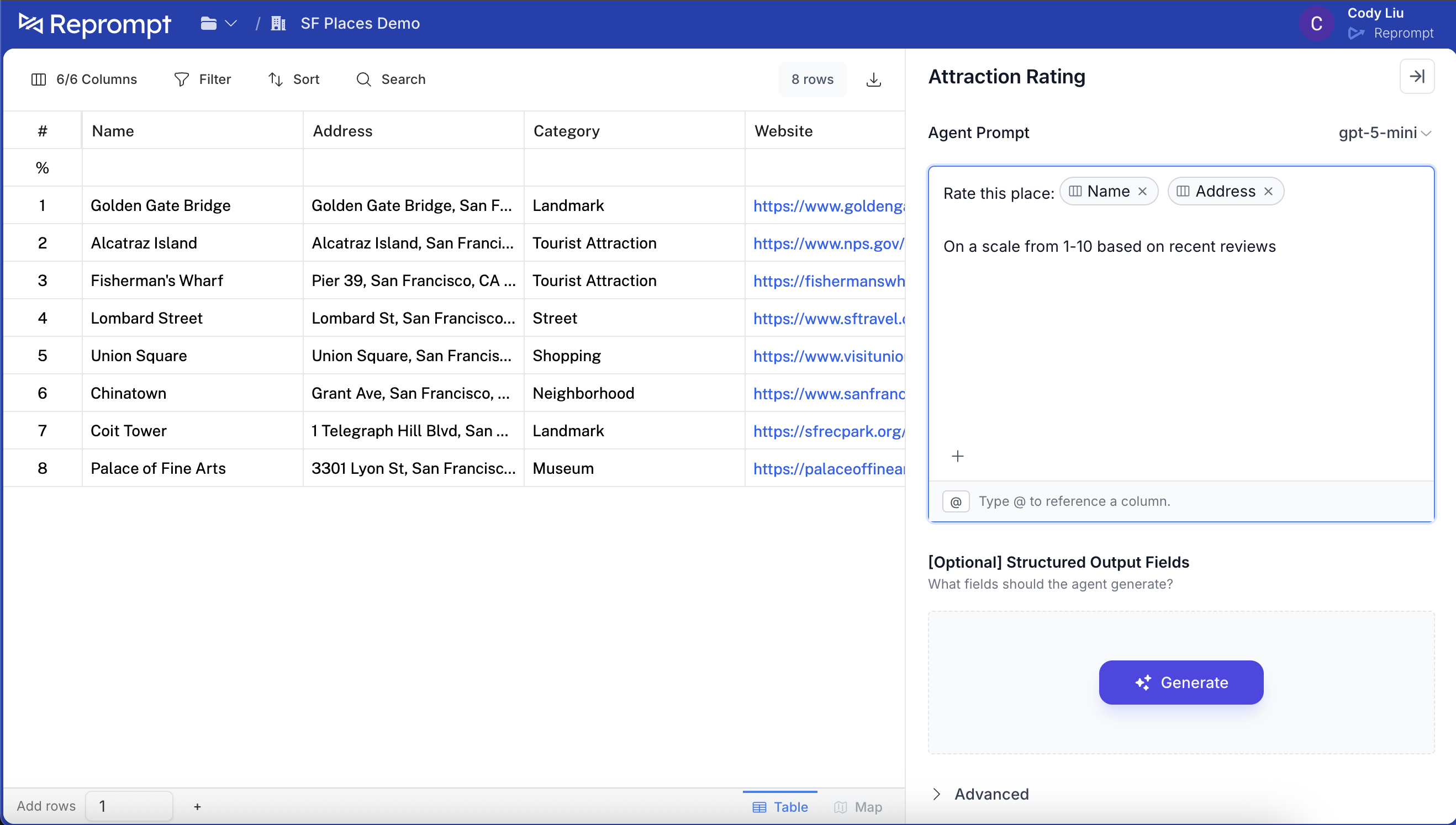 Add the prompt, then scroll down and click **Add column**.
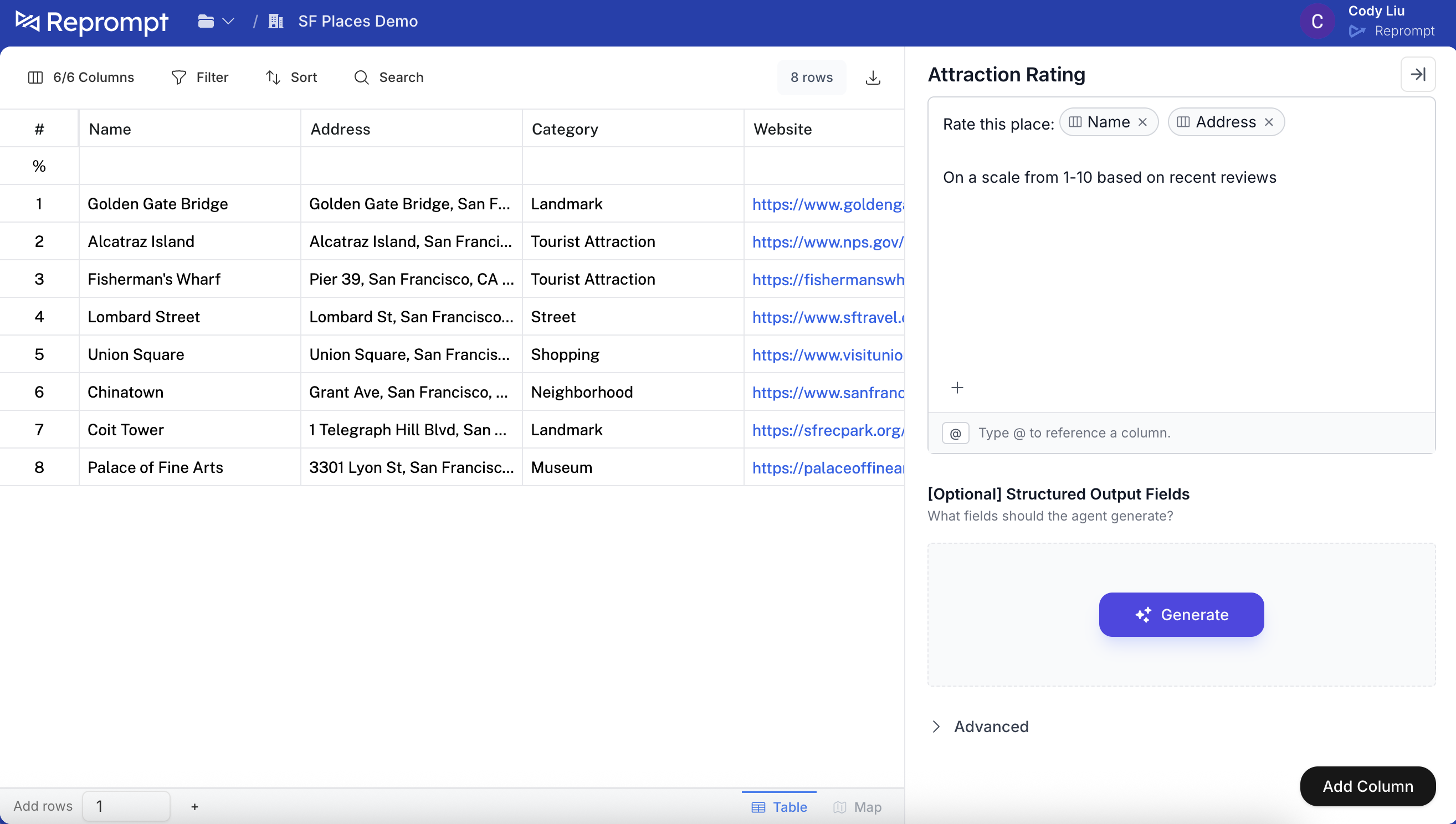 ## 2) Edit the agent settings
After the column is added to the table, click the column header and select **Edit agent**.
## 2) Edit the agent settings
After the column is added to the table, click the column header and select **Edit agent**.
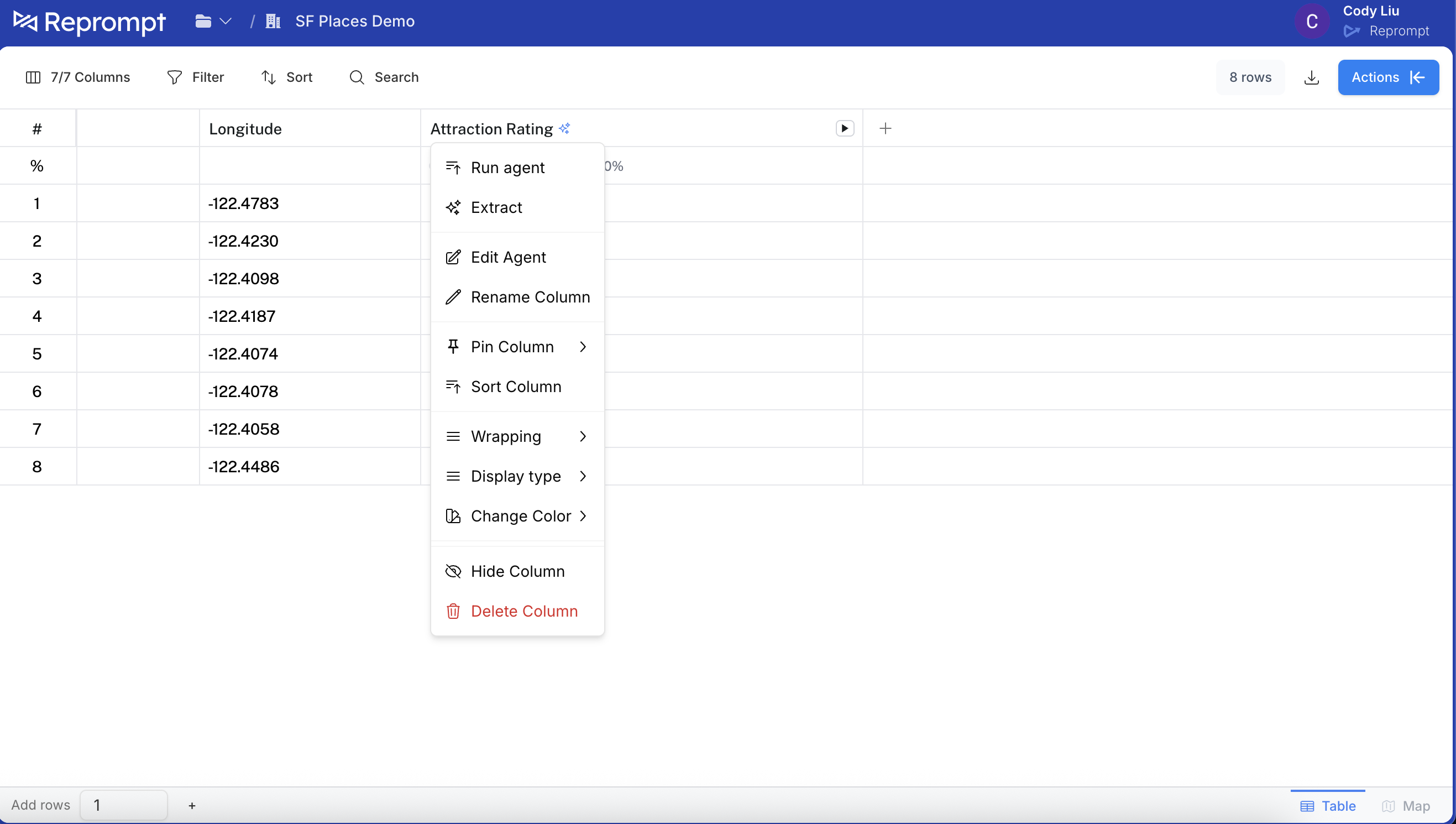 ## 3) Enable API usage
In the agent editor, click **Advanced** and then click **Use in API**.
## 3) Enable API usage
In the agent editor, click **Advanced** and then click **Use in API**.
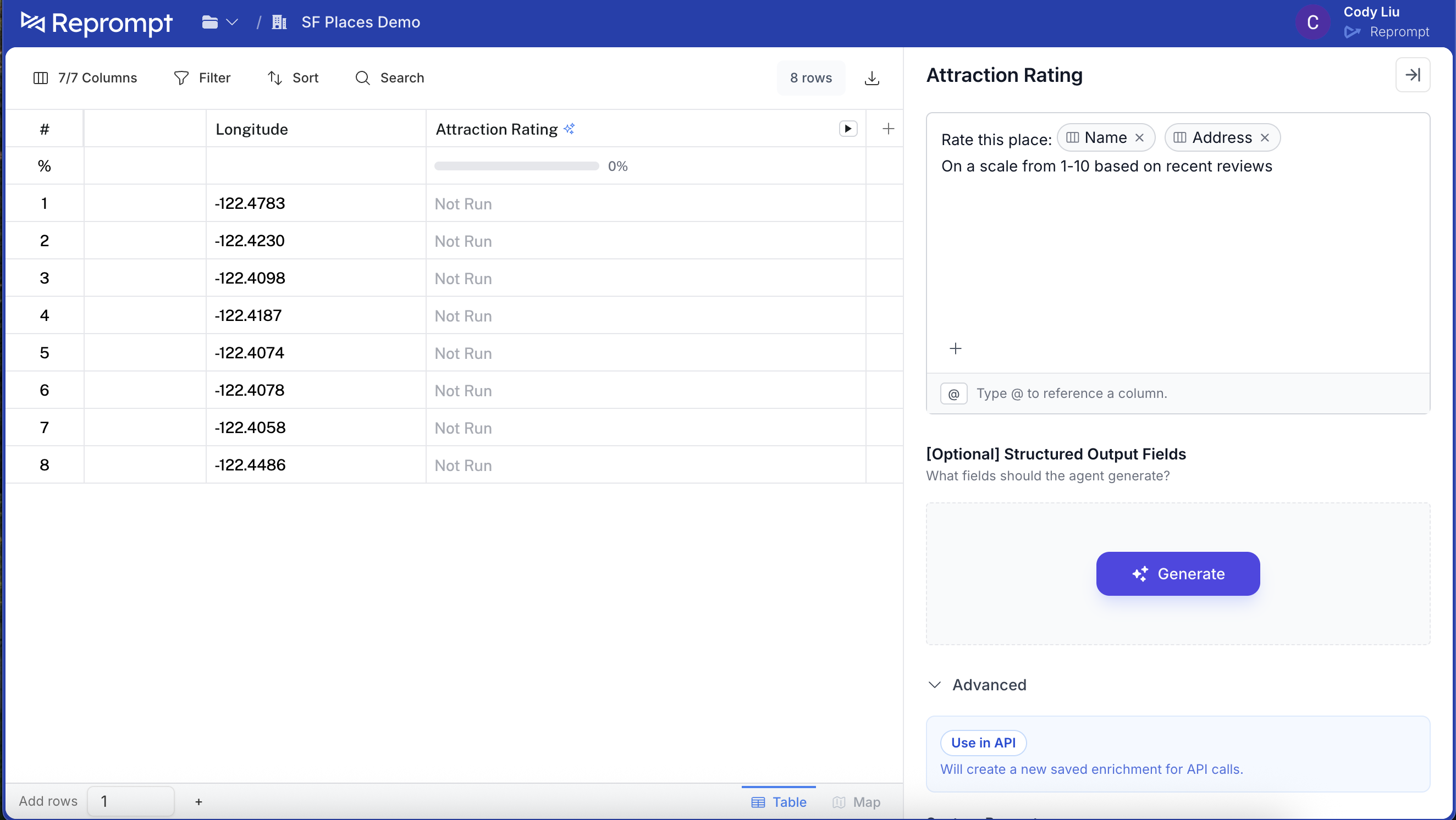 This opens the API enablement panel. You can add a description and optionally rename the API attribute. This is a preview of the agent you are adding.
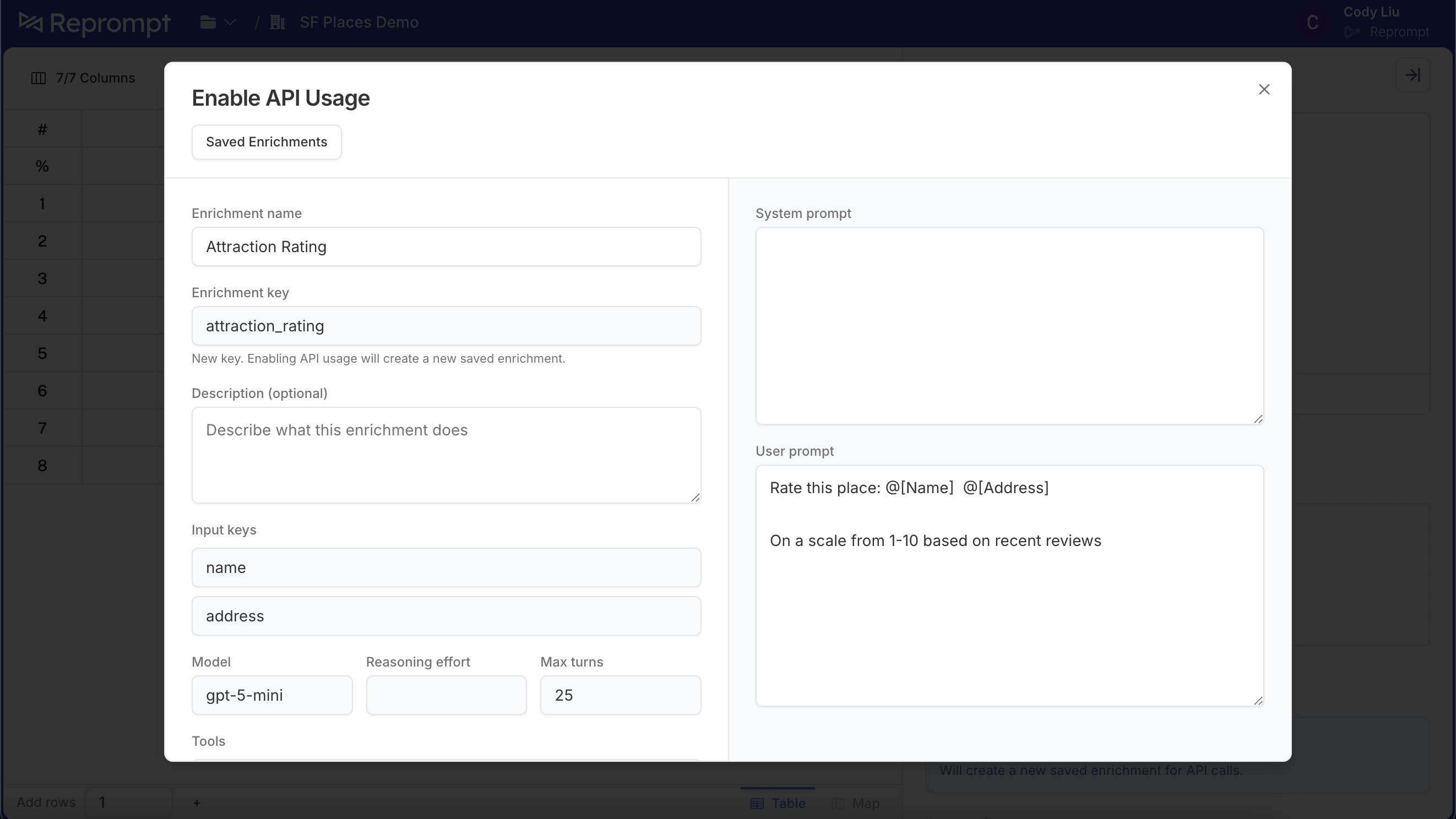 Scroll down and click **Enable API usage**.
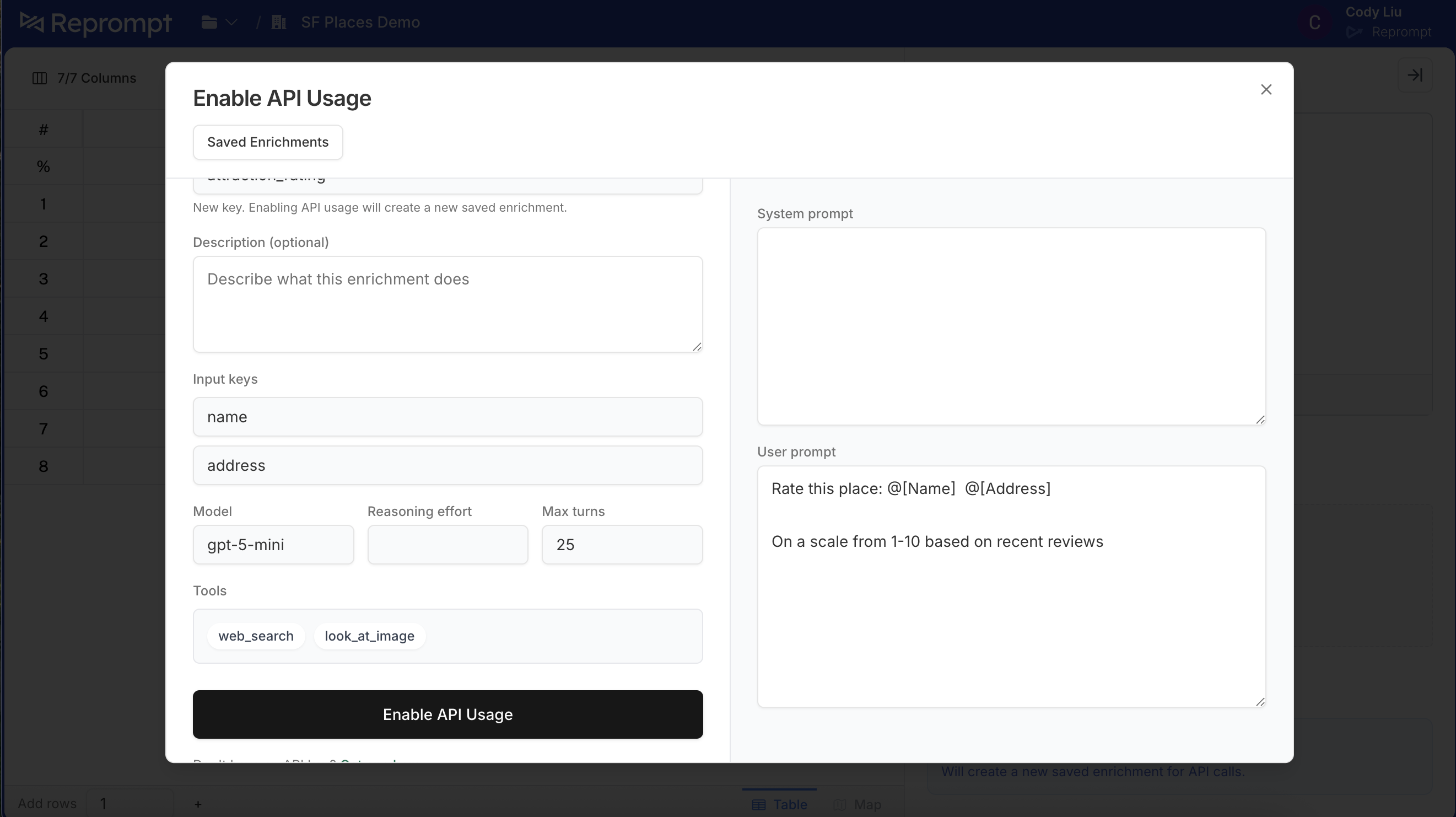 Once enabled, you will see a confirmation that it is ready to use.
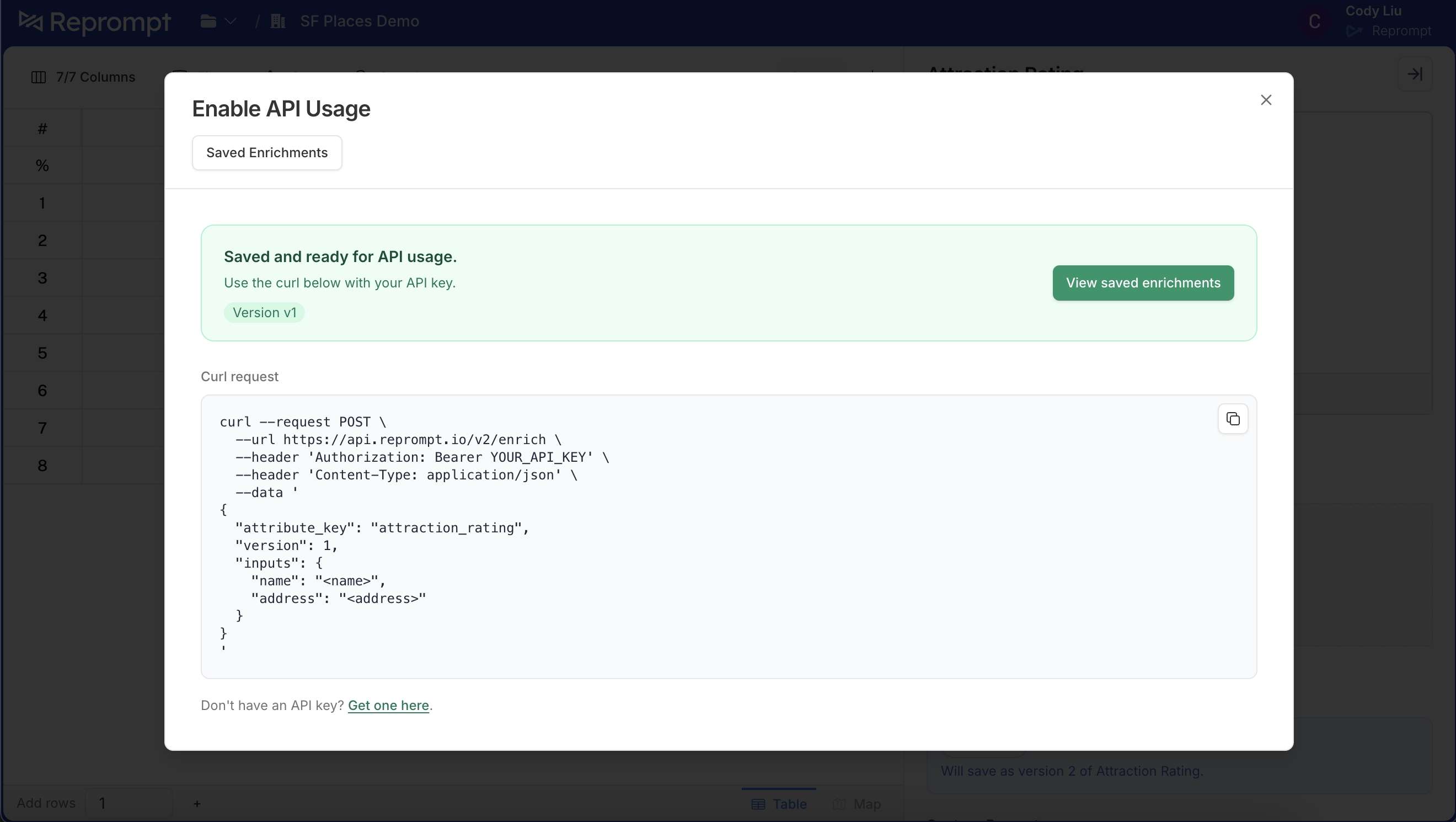 ## 4) Call the agent from the API
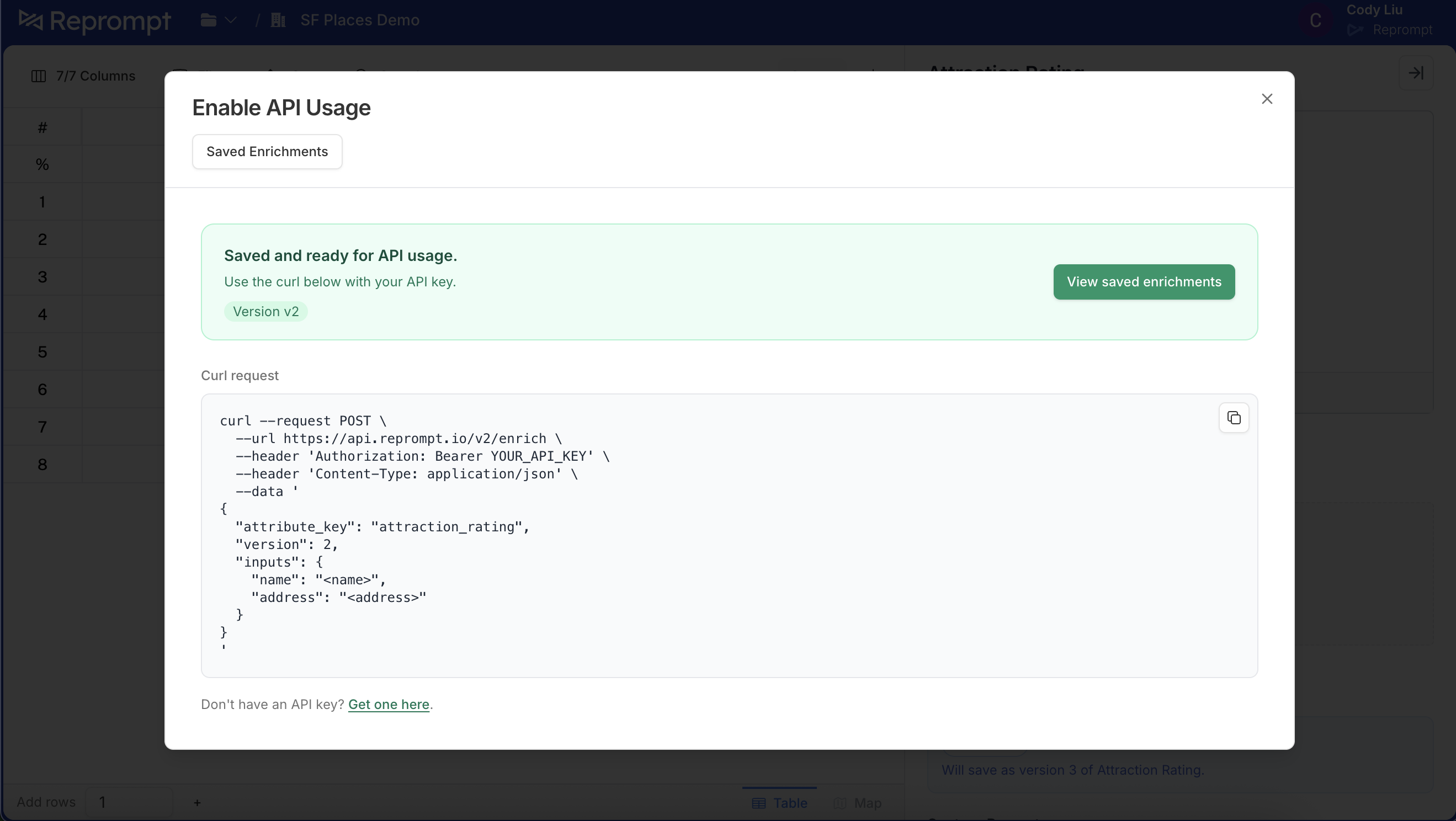
Use the `attribute_key` shown in the UI with the `/enrich` endpoint.
```bash cURL
# Use the default version (no version param)
curl --request POST \
--url https://api.reprompt.io/v2/enrich \
--header 'Authorization: Bearer {YOUR_API_KEY}' \
--header 'Content-Type: application/json' \
--data '{
"attribute_key": "attraction_rating",
"inputs": {
"name": "Golden Gate Bridge",
"full_address": "Golden Gate Bridge, San Francisco, CA"
}
}'
```
```bash cURL
# Call a specific version
curl --request POST \
--url 'https://api.reprompt.io/v2/enrich?version=1' \
--header 'Authorization: Bearer {YOUR_API_KEY}' \
--header 'Content-Type: application/json' \
--data '{
"attribute_key": "attraction_rating",
"inputs": {
"name": "Golden Gate Bridge",
"full_address": "Golden Gate Bridge, San Francisco, CA"
}
}'
```
## 5) Edit the agent and create a new version
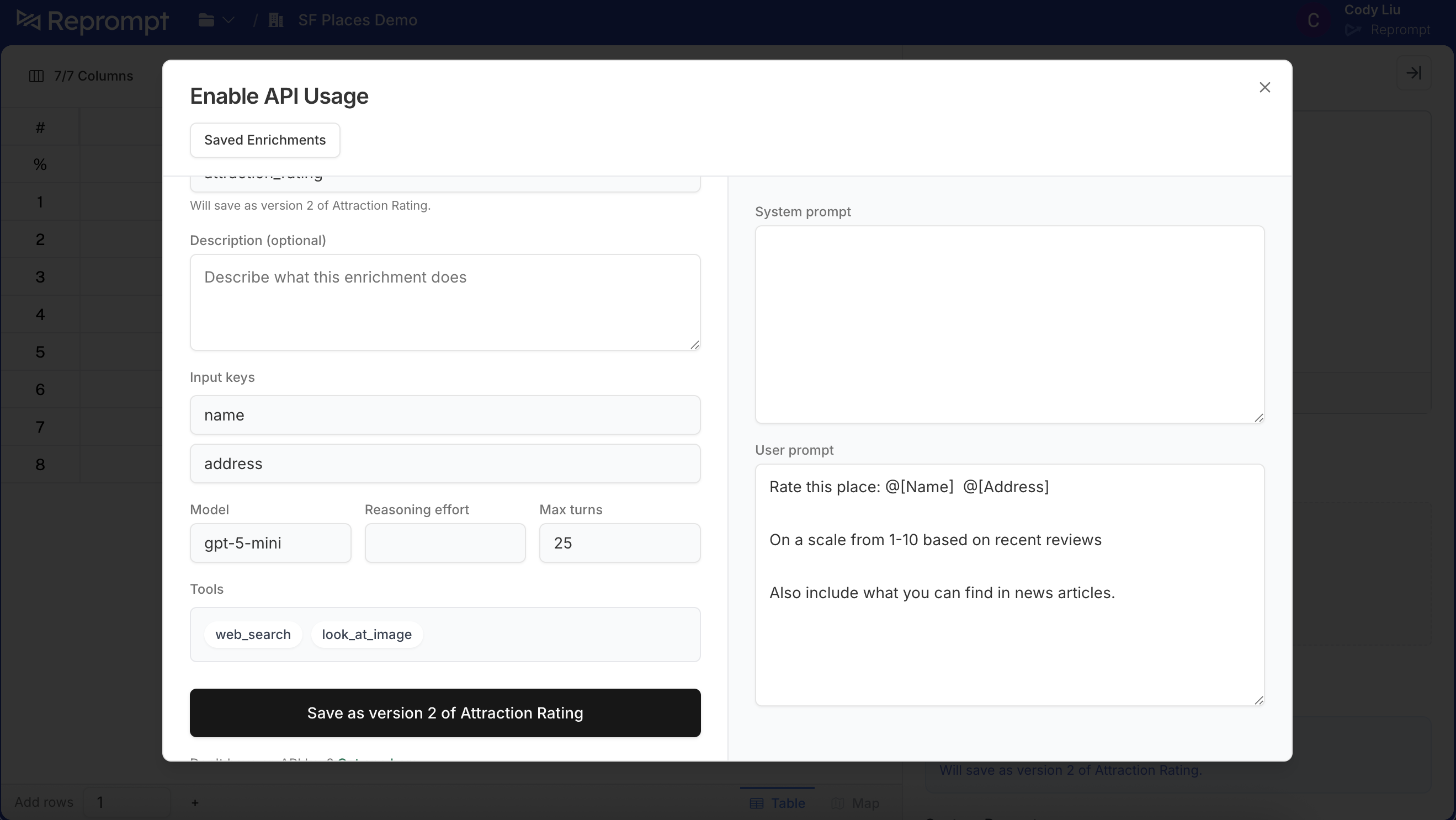
To make changes, return to the agent editor, update the prompt, and click **Use in API** again. The text below will show which version you are about to create (for example, “will save as version 2 of Attraction Rating”).
## 4) Call the agent from the API
Use the `attribute_key` shown in the UI with the `/enrich` endpoint.
```bash cURL
# Use the default version (no version param)
curl --request POST \
--url https://api.reprompt.io/v2/enrich \
--header 'Authorization: Bearer {YOUR_API_KEY}' \
--header 'Content-Type: application/json' \
--data '{
"attribute_key": "attraction_rating",
"inputs": {
"name": "Golden Gate Bridge",
"full_address": "Golden Gate Bridge, San Francisco, CA"
}
}'
```
```bash cURL
# Call a specific version
curl --request POST \
--url 'https://api.reprompt.io/v2/enrich?version=1' \
--header 'Authorization: Bearer {YOUR_API_KEY}' \
--header 'Content-Type: application/json' \
--data '{
"attribute_key": "attraction_rating",
"inputs": {
"name": "Golden Gate Bridge",
"full_address": "Golden Gate Bridge, San Francisco, CA"
}
}'
```
## 5) Edit the agent and create a new version
To make changes, return to the agent editor, update the prompt, and click **Use in API** again. The text below will show which version you are about to create (for example, “will save as version 2 of Attraction Rating”).
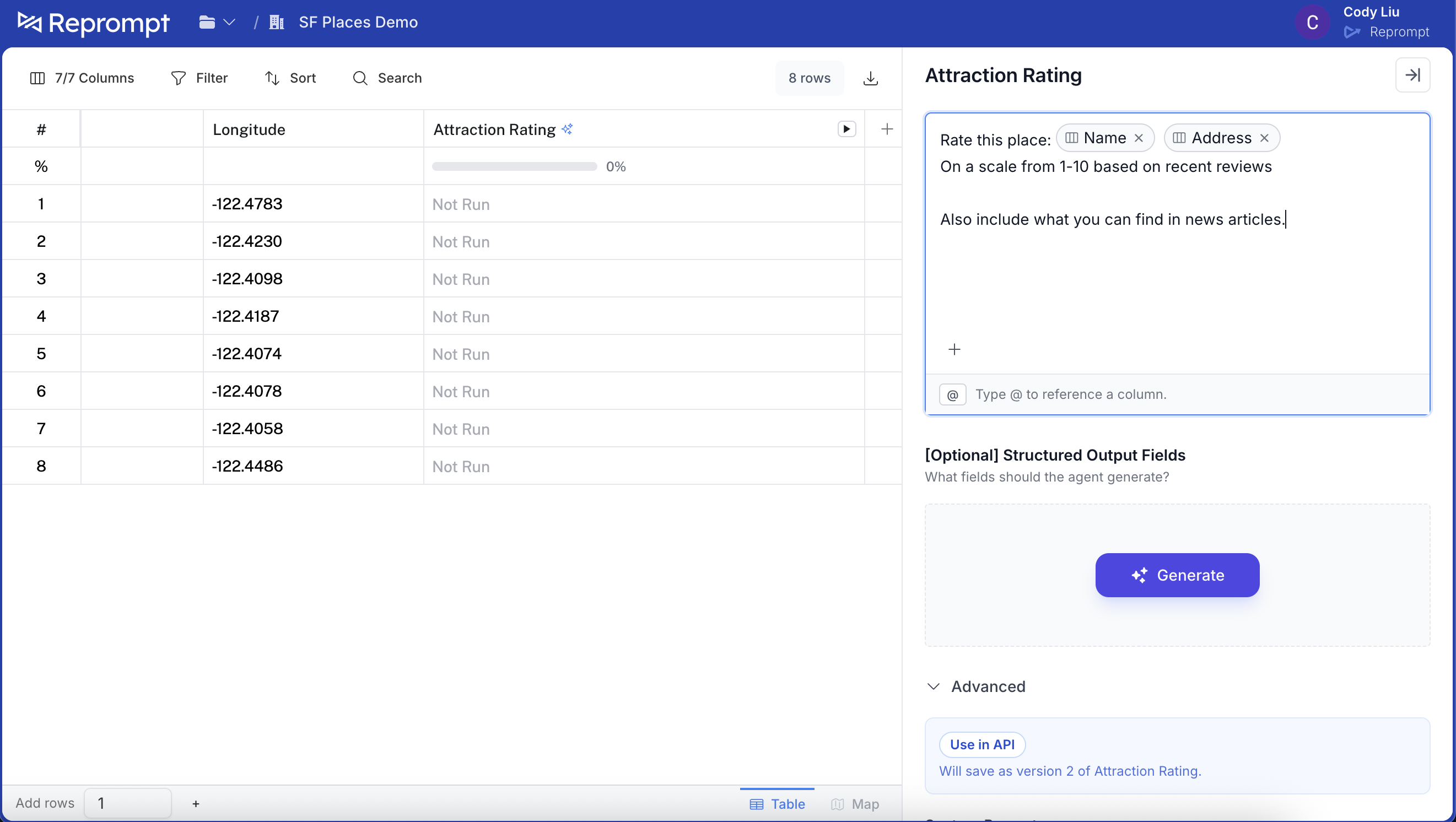 Click **Save**. The confirmation will show which version will be saved.
 After saving, the agent is ready to use. Any API callers **without** a version parameter will now use the **default** version.
 ## 6) Manage default versions
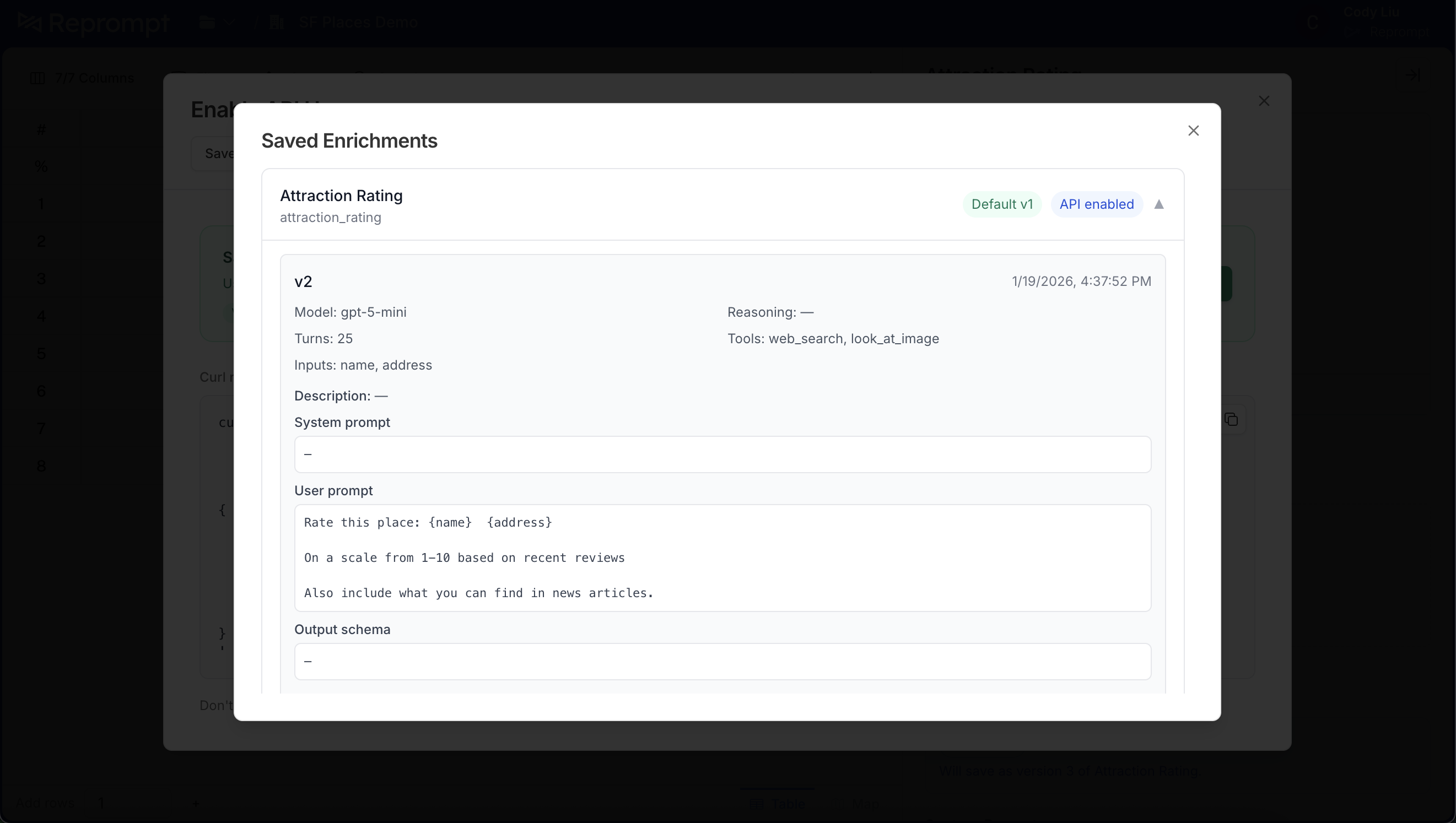
Click **Saved enrichments** to view all versions. The default version is labeled and shows **API enabled**.
## 6) Manage default versions
Click **Saved enrichments** to view all versions. The default version is labeled and shows **API enabled**.
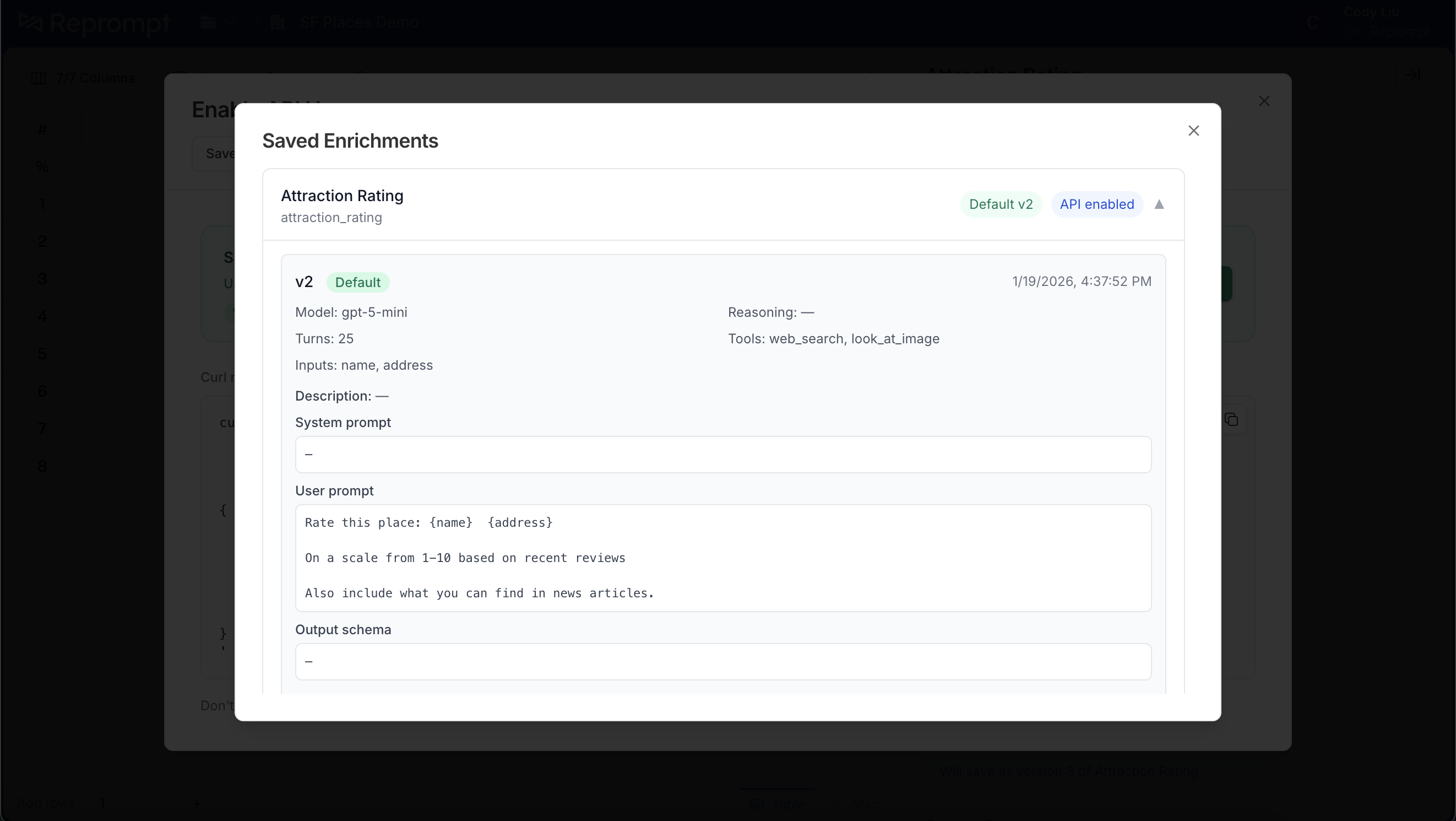 To change the default, find the version you want and click **Set as default**.
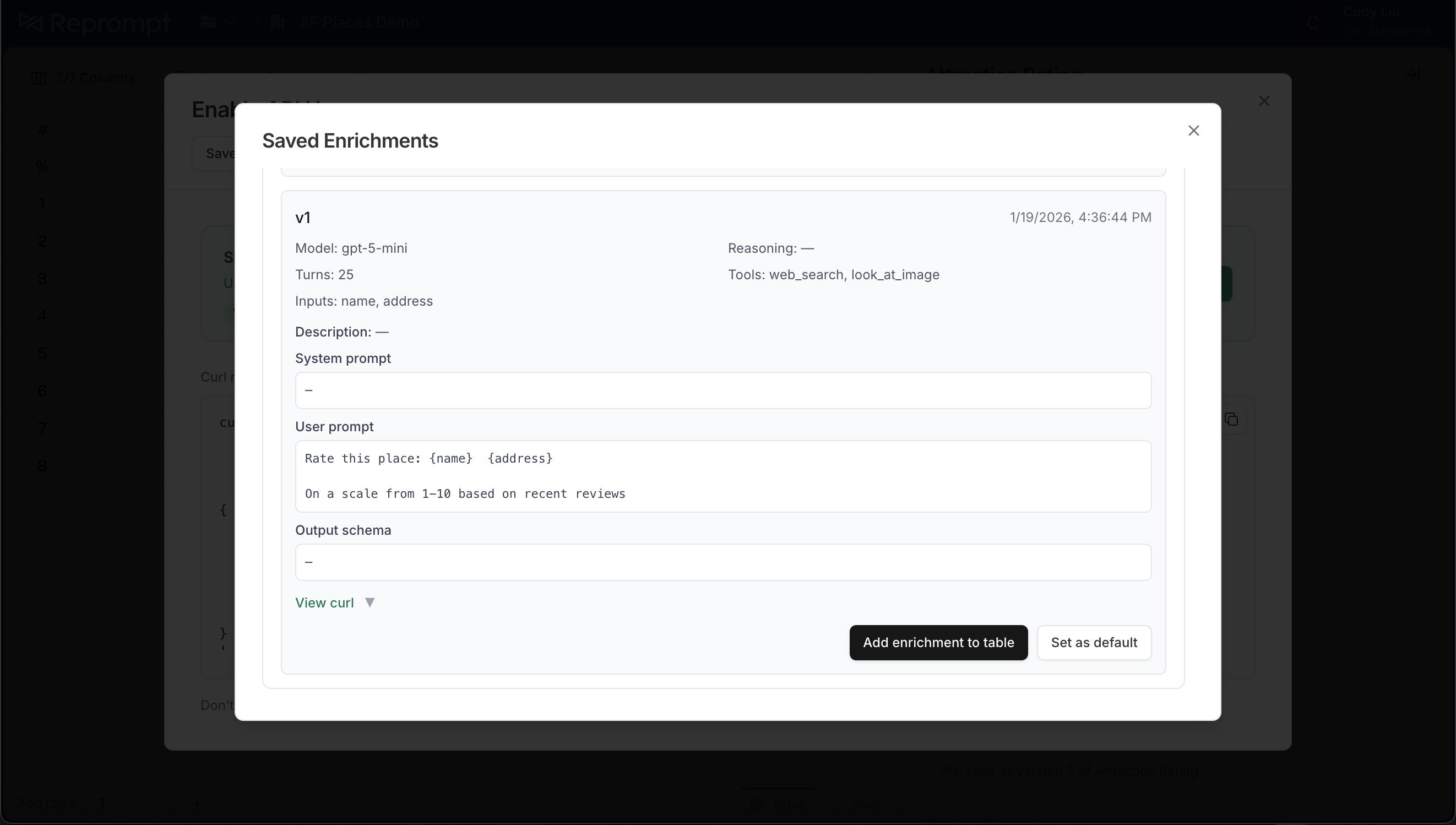 The header updates to show the new default. Calls without a version parameter will now use this version.
 ---
# Batch Processing
Submit places for enrichment asynchronously via batch endpoints.
### Endpoints
| Action | Method & Path |
|--------|---------------|
| Create batch | `POST /v1/{org_slug}/place_enrichment/batches` |
| Get batch status | `GET /v1/{org_slug}/place_enrichment/batches/{batch_id}` |
| Get batch results | `GET /v1/{org_slug}/place_enrichment/jobs?batchId={batch_id}&limit={n}&offset={n}` |
| Reprocess batch | `POST /v1/{org_slug}/place_enrichment/batches/{batch_id}/reprocess` |
| List batches | `GET /v1/{org_slug}/place_enrichment/batches?limit={n}&offset={n}` |
## Quick Start
Submit a minimal batch via the **Create batch** endpoint:
```json Request
{
"batch_name": "Q1 Store Locations",
"jobs": [
{
"place_id": "store_001",
"inputs": {
"name": "Downtown Store",
"full_address": "123 Main St, New York, NY 10001",
"latitude": 40.7128,
"longitude": -74.0060
}
}
],
"attributes": ["websites", "phoneNumbers", "categories"]
}
```
Include `full_address` in `jobs[].inputs` when available — it improves enrichment accuracy.
The same response shape is returned by **Create batch** and **Get batch status**. The `jobs` object lists place IDs grouped by their job status (see [Monitoring Progress](#monitoring-progress)).
```json Response
{
"id": "d98e206f-ff1d-4b5a-b0d8-18fff0757fef",
"batch_name": "Q1 Store Locations",
"status": "pending",
"jobs": {
"pending": ["store_001"],
"queued": [],
"in_progress": [],
"completed": [],
"failed": []
}
}
```
## Batch Limits
**Maximum places per request**: 50,000
Requests exceeding this limit return `400 Bad Request`. Split larger datasets into multiple batches (for example, up to 50,000 places per batch).
## Batch Status Lifecycle
Batches move through a small set of statuses driven by job state. The top-level `status` aggregates all jobs in the batch (e.g. `in_progress` if any job is still running). A batch is finished when `status` is `completed` or `failed`.
1. Not Started: Batch created; jobs are pending and not yet queued for processing.
2. Queued: Jobs are scheduled and waiting to be picked up by workers.
3. Processing: Jobs are actively being enriched by workers.
4. Completed: All jobs finished successfully.
5. Failed: Batch failed (e.g. too many job failures).
## Monitoring Progress
Call `GET /batches/{batch_id}` on an interval (e.g. every 5–10 seconds).
Stop polling when top-level `status` is `completed` or `failed`.
### Batch status response
The response exposes job-level status via the `jobs` object. Each key is a **job status**; each value is an array of place IDs whose enrichment job is in that status. Use the array lengths to derive progress (e.g. `jobs.completed.length + jobs.failed.length` over total).
| Field | Description |
|-------|-------------|
| `id` | Batch identifier |
| `batch_name` | Display name |
| `status` | Aggregated batch status (`pending`, `queued`, `in_progress`, `completed`, `failed`) |
| `jobs` | Place IDs grouped by **job status**: `pending`, `queued`, `in_progress`, `completed`, `failed` |
| `metadata` | Optional: `total_jobs`, `completed_jobs`, `status_counts`, `success_rate` |
| `created_at` | Batch creation timestamp |
`jobs` is keyed by job status, not counts. Each array contains the `place_id` values for jobs in that status. Total jobs = sum of lengths across all job arrays.
```json
{
"id": "d98e206f-ff1d-4b5a-b0d8-18fff0757fef",
"batch_name": "Q1 2024 Store Locations",
"status": "in_progress",
"jobs": {
"pending": ["store_001", "store_002"],
"queued": ["store_003", "store_004"],
"in_progress": ["store_005"],
"completed": ["store_006", "store_007"],
"failed": []
},
"created_at": "2024-01-15T10:00:00Z"
}
```
## Handling Results
### Fetch results
Use the **Get batch results** endpoint with `batchId`, `limit`, and `offset`. Returns `{ jobs, total, limit, offset }`.
Increment `offset` by `limit` until `offset + jobs.length >= total`.
### Success vs failed jobs
Each job in the `jobs` array has a `status` field. Filter by:
- `status === "completed"` — successful enrichments; use `outputs` for enriched data
- `status === "failed"` — failures; inspect for retry or manual review
Per-attribute run status (e.g. which enrichments ran or failed) lives under `job_metadata.attribute_status`. Use this for partial successes or to decide which attributes to reprocess.
| Value | Meaning |
|-------|---------|
| `RUN` | Enrichment ran successfully |
| `NOT_RUN` | Enrichment was not executed |
| `ERROR` | Enrichment failed |
| `RUN_CONDITION_FAILED` | Skipped (missing required inputs) |
## Reprocessing Failed Items
`POST /batches/{batch_id}/reprocess` re-queues jobs for enrichment. Key options:
| Param | Default | Description |
|-------|---------|-------------|
| `failed_only` | `true` | Only reprocess jobs with `failed` status |
| `incomplete_only` | `false` | Only reprocess pending/queued/in_progress |
| `refresh` | `false` | Force fresh enrichment, ignore cached data |
| `attributes` | — | Override attributes to enrich |
| `attribute_set` | — | Use predefined set: `core`, `all`, `open_closed` |
Set `failed_only: false` and `incomplete_only: false` to reprocess all jobs in the batch.
## Listing Batches
`GET /batches?limit={n}&offset={n}&query={search}` returns paginated batches. Each batch includes `id`, `batch_name`, `status`, `status_counts`, `created_at`, and optional `metadata`.
## Best Practices
- **Descriptive batch names** — Use names that identify the batch or run so you can find them in the list.
- **Chunk large datasets** — Stay under 50K jobs per request; split into multiple batches or append via repeated requests with the same `batch_id`.
- **Handle failures** — Check `jobs.failed` after completion; use the reprocess endpoint to retry with `failed_only: true`.
## Next Steps
- Learn about [Place Enrichment](/guides/quickstart) for single-item enrichment
- Check the [API Reference](/api-reference) for complete endpoint documentation
---
# CSV Export
Export enriched place data for one or more batches as a single CSV, delivered inline or as a background job.
### Endpoints
| Action | Method & Path |
|--------|---------------|
| Create export | `POST /v1/{org_slug}/place_enrichment/exports` |
| List exports | `GET /v1/{org_slug}/place_enrichment/exports?status=&cursor=&limit=` |
| Get export status | `GET /v1/{org_slug}/place_enrichment/exports/{export_id}` |
| Download export | `GET /v1/{org_slug}/place_enrichment/exports/{export_id}/download` |
Auth is the same as the batch endpoints: `Authorization: Bearer {YOUR_API_KEY}` or the `apiKey` header.
**Sync vs. Async export:**
| Selection | Response |
|-----------|----------|
| ≤ ~50,000 rows (~120 MB) — a single batch always qualifies | `200` — CSV inline |
| Bigger, spanning multiple batches | `202` — poll, then download |
## Quick Start
Call `POST /exports` with the `batch_ids` you want combined into one CSV; delivery mode is decided for you by size.
Prefer clicking through instead? See [Using the Dashboard](#using-the-dashboard) for the same flow with checkboxes and an **Export N Batches** button.
```bash Request
curl -X POST \
'https://api.repromptai.com/v1/{org_slug}/place_enrichment/exports' \
-H 'Authorization: Bearer {YOUR_API_KEY}' \
-H 'Content-Type: application/json' \
-H 'Idempotency-Key: 4a7c1e02-3f3d-4b1a-9c2e-8f6d2b1a9e40' \
-d '{
"batch_ids": ["batch_2024_03_15_123456", "batch_2024_03_16_654321"]
}'
```
```json 202 Response
{
"id": "e59f3b9a-6b7d-4e21-9d34-9d1b6c9b6a41",
"status": "queued",
"batch_ids": ["batch_2024_03_15_123456", "batch_2024_03_16_654321"],
"batch_names": {
"batch_2024_03_15_123456": "NYC Restaurants March 2024",
"batch_2024_03_16_654321": "Chicago Retail March 2024"
},
"created_at": "2024-03-15T10:00:00Z",
"updated_at": "2024-03-15T10:00:00Z",
"status_url": "/v1/{org_slug}/place_enrichment/exports/e59f3b9a-6b7d-4e21-9d34-9d1b6c9b6a41",
"download_url": null,
"error": null,
"metadata": null,
"expired": false
}
```
`Idempotency-Key` is optional but recommended for async requests — see [Async Exports](#async-exports) for how it works.
## Sync Exports
Small exports skip the export job entirely. A single batch (max 50,000 places) always qualifies; so does any combination of batches that stays roughly under 50,000 rows and 120 MB. You get `200` back with the CSV already in the body:
```bash
curl -X POST \
'https://api.repromptai.com/v1/{org_slug}/place_enrichment/exports' \
-H 'Authorization: Bearer {YOUR_API_KEY}' \
-H 'Content-Type: application/json' \
-d '{"batch_ids": ["batch_2024_03_15_123456"]}' \
-o place-enrichment.csv
```
## Async Exports
Larger selections return `202` immediately: `status: queued`, a `status_url` to poll, and `download_url: null` until the job finishes.
There is no set limit to number of batches or total jobs to export, async export comfortably handles exports >1M jobs across many batches.
### Idempotency-Key
Sending an `Idempotency-Key` is optional, not required. Its only job is to make retries safe:
- **With a key**: retry the same request (same key, same `batch_ids`) as many times as you want, like after a timeout, and you'll get back the original export job instead of a new one. Reuse the key with a *different* `batch_ids` set and you'll get `409`, since that's not a retry.
- **Without a key**: every request creates a new export job, including retries. Fine for one-off calls; risky if your client retries automatically.
We recommend a UUID v4, generated once per export attempt and reused across that attempt's retries — not a new one per HTTP call.
If your HTTP client already retries on timeout, generate the key before the first attempt and pass the same value through every retry it makes.
## Export Lifecycle
1. Queued: Export Job accepted; waiting for a worker to pick it up.
2. Running: A worker is generating the CSV.
3. Completed: `download_url` is set. Download it before the retention window closes.
4. Failed: Something went wrong — check `error`. Worker dispatch failures return `502` on create and mark the export job `failed` immediately; it's safe to retry.
5. Expired: The artifact aged past its 7-day retention window. `download_url` is `null` and `expired` is `true`.
| Status | `download_url` | `error` | `metadata` |
|--------|-----------------|---------|------------|
| `queued` | `null` | `null` | `null` |
| `running` | `null` | `null` | `null` or partial |
| `completed` | signed URL (1h validity) | `null` | `rows_exported` + stage timings |
| `failed` | `null` | reason string | may include partial stats |
| `expired` | `null` | `null` | retained from `completed` |
## Polling & Downloading [#polling-&-downloading]
Call `GET /exports/{export_id}` (or follow `status_url` from the create response) every few seconds. Don't poll faster than that.
Stop once `status` is `completed`, `failed`, or `expired`.
Call `GET /exports/{export_id}/download`. It returns `307` with a `Location` pointing at a short-lived signed S3 URL. Most HTTP clients (curl, `requests`, `fetch`) follow the redirect automatically, and the body that arrives is `text/csv`.
The signed URL from `/download` is valid for 1 hour. The underlying artifact is retained for 7 days; call `/download` again to get a fresh URL as long as the export hasn't expired.
Calling `/download` before `status` is `completed` returns `409`. Calling it after the 7-day retention window returns `410`.
## Status Response Fields
| Field | Description |
|-------|-------------|
| `id` | Export identifier (UUID) |
| `status` | `queued`, `running`, `completed`, `failed`, or `expired` |
| `batch_ids` | Batch IDs included in this export |
| `batch_names` | Best-effort `{batch_id → name}` map; a batch is omitted if its name can't be resolved |
| `created_at` / `updated_at` | ISO-8601 timestamps |
| `status_url` | URL to poll this export's status |
| `download_url` | Download URL; present only while `status` is `completed` and unexpired |
| `error` | Failure reason, set when `status` is `failed` |
| `metadata` | Worker-reported stats: `rows_exported` plus per-stage timings |
| `expired` | `true` once the artifact has aged past its 7-day retention window |
This is the shape returned by the `202` on create, by **Get export status**, and by each element of **List exports**.
## Listing Exports
`GET /exports?status=&cursor=&limit=` returns `{ exports: [...], next_cursor }`, newest first.
| Param | Default | Description |
|-------|---------|-------------|
| `status` | — | Filter by status: `queued`, `running`, `completed`, `failed`, `expired` |
| `cursor` | — | Opaque cursor from a previous page's `next_cursor` |
| `limit` | `50` | Max results per page (max `200`) |
`next_cursor` is `null` on the last page. Keep passing it back as `cursor` until then.
## CSV Columns
Every export has the same shape: `batch_id`, `batch_name`, `place_id`, `status`, then per-attribute columns — `{field}_original` (your inputs), `{field}_enriched` (the enriched value), `{field}_status`, plus confidence and reasoning columns. Columns that are blank across every row are dropped.
For what each attribute returns, see [Place Job Results](/guides/place-job-results).
## Errors
| Code | Meaning |
|------|---------|
| `404` | A `batch_id` isn't owned by the org, or the export doesn't exist |
| `409` | `Idempotency-Key` reused with a different `batch_ids` set, or `/download` called before `completed` |
| `410` | Export artifact has expired |
| `502` | Worker dispatch failed; the export job is marked `failed` — safe to retry |
## Using the Dashboard
Exports work the same way without writing any code.
On **Place Enrichment → Run Batches**, check one or more batches and click **Export N Batches**. A confirm dialog — "Export N batches (~X jobs) as a single CSV. Large selections generate in the background…" — kicks off the same `POST /exports` under the hood.
- **Small exports** download instantly in the browser.
- **Large exports** show a "queued" toast with a **View** link to the **Exports** screen (sidebar → Exports, `/place-enrichment/exports`).
- The Exports screen lists background exports with status pills — Queued / Generating / Ready / Failed / Expired — and auto-polls until each one finishes. Ready rows get a **Download** button (a plain link that follows the `307` to S3); failed rows get **Retry**.
- Its subtitle states the rule plainly: "Background CSV exports, kept 7 days. Small exports download instantly and aren't listed here."
Idempotency is handled for you — the dashboard sends one key per export attempt.
## Best Practices
- **Send an Idempotency-Key for anything you might retry** — a UUID v4 per export attempt, reused across that attempt's retries, not generated per HTTP call.
- **Poll politely** — every few seconds is enough; the export runs as a background export job either way.
- **Download promptly** — the signed URL expires in 1 hour. Call `/download` again for a fresh one if you miss the window.
- **Check `metadata.rows_exported`** — confirms the export covered the rows you expected before you rely on the file.
## Next Steps
- [Batch Processing](/guides/batch-processing) - create the batches you're exporting
- [Place Job Results](/guides/place-job-results) - full schema of the enriched attributes behind each CSV column
---
# Upload Large Files
Upload and enrich large CSV files through the Reprompt dashboard.
Upload a CSV of places and enrich them in bulk — no code required. Files must be under **200 MB** and include a header row.
Go to **[Place Enrichment → Upload](https://app.repromptai.com/place-enrichment/upload-csv)** to get started.
## Map Your Columns
After uploading, map your CSV columns to Reprompt fields. The dashboard auto-detects columns where possible.
---
# Batch Processing
Submit places for enrichment asynchronously via batch endpoints.
### Endpoints
| Action | Method & Path |
|--------|---------------|
| Create batch | `POST /v1/{org_slug}/place_enrichment/batches` |
| Get batch status | `GET /v1/{org_slug}/place_enrichment/batches/{batch_id}` |
| Get batch results | `GET /v1/{org_slug}/place_enrichment/jobs?batchId={batch_id}&limit={n}&offset={n}` |
| Reprocess batch | `POST /v1/{org_slug}/place_enrichment/batches/{batch_id}/reprocess` |
| List batches | `GET /v1/{org_slug}/place_enrichment/batches?limit={n}&offset={n}` |
## Quick Start
Submit a minimal batch via the **Create batch** endpoint:
```json Request
{
"batch_name": "Q1 Store Locations",
"jobs": [
{
"place_id": "store_001",
"inputs": {
"name": "Downtown Store",
"full_address": "123 Main St, New York, NY 10001",
"latitude": 40.7128,
"longitude": -74.0060
}
}
],
"attributes": ["websites", "phoneNumbers", "categories"]
}
```
Include `full_address` in `jobs[].inputs` when available — it improves enrichment accuracy.
The same response shape is returned by **Create batch** and **Get batch status**. The `jobs` object lists place IDs grouped by their job status (see [Monitoring Progress](#monitoring-progress)).
```json Response
{
"id": "d98e206f-ff1d-4b5a-b0d8-18fff0757fef",
"batch_name": "Q1 Store Locations",
"status": "pending",
"jobs": {
"pending": ["store_001"],
"queued": [],
"in_progress": [],
"completed": [],
"failed": []
}
}
```
## Batch Limits
**Maximum places per request**: 50,000
Requests exceeding this limit return `400 Bad Request`. Split larger datasets into multiple batches (for example, up to 50,000 places per batch).
## Batch Status Lifecycle
Batches move through a small set of statuses driven by job state. The top-level `status` aggregates all jobs in the batch (e.g. `in_progress` if any job is still running). A batch is finished when `status` is `completed` or `failed`.
1. Not Started: Batch created; jobs are pending and not yet queued for processing.
2. Queued: Jobs are scheduled and waiting to be picked up by workers.
3. Processing: Jobs are actively being enriched by workers.
4. Completed: All jobs finished successfully.
5. Failed: Batch failed (e.g. too many job failures).
## Monitoring Progress
Call `GET /batches/{batch_id}` on an interval (e.g. every 5–10 seconds).
Stop polling when top-level `status` is `completed` or `failed`.
### Batch status response
The response exposes job-level status via the `jobs` object. Each key is a **job status**; each value is an array of place IDs whose enrichment job is in that status. Use the array lengths to derive progress (e.g. `jobs.completed.length + jobs.failed.length` over total).
| Field | Description |
|-------|-------------|
| `id` | Batch identifier |
| `batch_name` | Display name |
| `status` | Aggregated batch status (`pending`, `queued`, `in_progress`, `completed`, `failed`) |
| `jobs` | Place IDs grouped by **job status**: `pending`, `queued`, `in_progress`, `completed`, `failed` |
| `metadata` | Optional: `total_jobs`, `completed_jobs`, `status_counts`, `success_rate` |
| `created_at` | Batch creation timestamp |
`jobs` is keyed by job status, not counts. Each array contains the `place_id` values for jobs in that status. Total jobs = sum of lengths across all job arrays.
```json
{
"id": "d98e206f-ff1d-4b5a-b0d8-18fff0757fef",
"batch_name": "Q1 2024 Store Locations",
"status": "in_progress",
"jobs": {
"pending": ["store_001", "store_002"],
"queued": ["store_003", "store_004"],
"in_progress": ["store_005"],
"completed": ["store_006", "store_007"],
"failed": []
},
"created_at": "2024-01-15T10:00:00Z"
}
```
## Handling Results
### Fetch results
Use the **Get batch results** endpoint with `batchId`, `limit`, and `offset`. Returns `{ jobs, total, limit, offset }`.
Increment `offset` by `limit` until `offset + jobs.length >= total`.
### Success vs failed jobs
Each job in the `jobs` array has a `status` field. Filter by:
- `status === "completed"` — successful enrichments; use `outputs` for enriched data
- `status === "failed"` — failures; inspect for retry or manual review
Per-attribute run status (e.g. which enrichments ran or failed) lives under `job_metadata.attribute_status`. Use this for partial successes or to decide which attributes to reprocess.
| Value | Meaning |
|-------|---------|
| `RUN` | Enrichment ran successfully |
| `NOT_RUN` | Enrichment was not executed |
| `ERROR` | Enrichment failed |
| `RUN_CONDITION_FAILED` | Skipped (missing required inputs) |
## Reprocessing Failed Items
`POST /batches/{batch_id}/reprocess` re-queues jobs for enrichment. Key options:
| Param | Default | Description |
|-------|---------|-------------|
| `failed_only` | `true` | Only reprocess jobs with `failed` status |
| `incomplete_only` | `false` | Only reprocess pending/queued/in_progress |
| `refresh` | `false` | Force fresh enrichment, ignore cached data |
| `attributes` | — | Override attributes to enrich |
| `attribute_set` | — | Use predefined set: `core`, `all`, `open_closed` |
Set `failed_only: false` and `incomplete_only: false` to reprocess all jobs in the batch.
## Listing Batches
`GET /batches?limit={n}&offset={n}&query={search}` returns paginated batches. Each batch includes `id`, `batch_name`, `status`, `status_counts`, `created_at`, and optional `metadata`.
## Best Practices
- **Descriptive batch names** — Use names that identify the batch or run so you can find them in the list.
- **Chunk large datasets** — Stay under 50K jobs per request; split into multiple batches or append via repeated requests with the same `batch_id`.
- **Handle failures** — Check `jobs.failed` after completion; use the reprocess endpoint to retry with `failed_only: true`.
## Next Steps
- Learn about [Place Enrichment](/guides/quickstart) for single-item enrichment
- Check the [API Reference](/api-reference) for complete endpoint documentation
---
# CSV Export
Export enriched place data for one or more batches as a single CSV, delivered inline or as a background job.
### Endpoints
| Action | Method & Path |
|--------|---------------|
| Create export | `POST /v1/{org_slug}/place_enrichment/exports` |
| List exports | `GET /v1/{org_slug}/place_enrichment/exports?status=&cursor=&limit=` |
| Get export status | `GET /v1/{org_slug}/place_enrichment/exports/{export_id}` |
| Download export | `GET /v1/{org_slug}/place_enrichment/exports/{export_id}/download` |
Auth is the same as the batch endpoints: `Authorization: Bearer {YOUR_API_KEY}` or the `apiKey` header.
**Sync vs. Async export:**
| Selection | Response |
|-----------|----------|
| ≤ ~50,000 rows (~120 MB) — a single batch always qualifies | `200` — CSV inline |
| Bigger, spanning multiple batches | `202` — poll, then download |
## Quick Start
Call `POST /exports` with the `batch_ids` you want combined into one CSV; delivery mode is decided for you by size.
Prefer clicking through instead? See [Using the Dashboard](#using-the-dashboard) for the same flow with checkboxes and an **Export N Batches** button.
```bash Request
curl -X POST \
'https://api.repromptai.com/v1/{org_slug}/place_enrichment/exports' \
-H 'Authorization: Bearer {YOUR_API_KEY}' \
-H 'Content-Type: application/json' \
-H 'Idempotency-Key: 4a7c1e02-3f3d-4b1a-9c2e-8f6d2b1a9e40' \
-d '{
"batch_ids": ["batch_2024_03_15_123456", "batch_2024_03_16_654321"]
}'
```
```json 202 Response
{
"id": "e59f3b9a-6b7d-4e21-9d34-9d1b6c9b6a41",
"status": "queued",
"batch_ids": ["batch_2024_03_15_123456", "batch_2024_03_16_654321"],
"batch_names": {
"batch_2024_03_15_123456": "NYC Restaurants March 2024",
"batch_2024_03_16_654321": "Chicago Retail March 2024"
},
"created_at": "2024-03-15T10:00:00Z",
"updated_at": "2024-03-15T10:00:00Z",
"status_url": "/v1/{org_slug}/place_enrichment/exports/e59f3b9a-6b7d-4e21-9d34-9d1b6c9b6a41",
"download_url": null,
"error": null,
"metadata": null,
"expired": false
}
```
`Idempotency-Key` is optional but recommended for async requests — see [Async Exports](#async-exports) for how it works.
## Sync Exports
Small exports skip the export job entirely. A single batch (max 50,000 places) always qualifies; so does any combination of batches that stays roughly under 50,000 rows and 120 MB. You get `200` back with the CSV already in the body:
```bash
curl -X POST \
'https://api.repromptai.com/v1/{org_slug}/place_enrichment/exports' \
-H 'Authorization: Bearer {YOUR_API_KEY}' \
-H 'Content-Type: application/json' \
-d '{"batch_ids": ["batch_2024_03_15_123456"]}' \
-o place-enrichment.csv
```
## Async Exports
Larger selections return `202` immediately: `status: queued`, a `status_url` to poll, and `download_url: null` until the job finishes.
There is no set limit to number of batches or total jobs to export, async export comfortably handles exports >1M jobs across many batches.
### Idempotency-Key
Sending an `Idempotency-Key` is optional, not required. Its only job is to make retries safe:
- **With a key**: retry the same request (same key, same `batch_ids`) as many times as you want, like after a timeout, and you'll get back the original export job instead of a new one. Reuse the key with a *different* `batch_ids` set and you'll get `409`, since that's not a retry.
- **Without a key**: every request creates a new export job, including retries. Fine for one-off calls; risky if your client retries automatically.
We recommend a UUID v4, generated once per export attempt and reused across that attempt's retries — not a new one per HTTP call.
If your HTTP client already retries on timeout, generate the key before the first attempt and pass the same value through every retry it makes.
## Export Lifecycle
1. Queued: Export Job accepted; waiting for a worker to pick it up.
2. Running: A worker is generating the CSV.
3. Completed: `download_url` is set. Download it before the retention window closes.
4. Failed: Something went wrong — check `error`. Worker dispatch failures return `502` on create and mark the export job `failed` immediately; it's safe to retry.
5. Expired: The artifact aged past its 7-day retention window. `download_url` is `null` and `expired` is `true`.
| Status | `download_url` | `error` | `metadata` |
|--------|-----------------|---------|------------|
| `queued` | `null` | `null` | `null` |
| `running` | `null` | `null` | `null` or partial |
| `completed` | signed URL (1h validity) | `null` | `rows_exported` + stage timings |
| `failed` | `null` | reason string | may include partial stats |
| `expired` | `null` | `null` | retained from `completed` |
## Polling & Downloading [#polling-&-downloading]
Call `GET /exports/{export_id}` (or follow `status_url` from the create response) every few seconds. Don't poll faster than that.
Stop once `status` is `completed`, `failed`, or `expired`.
Call `GET /exports/{export_id}/download`. It returns `307` with a `Location` pointing at a short-lived signed S3 URL. Most HTTP clients (curl, `requests`, `fetch`) follow the redirect automatically, and the body that arrives is `text/csv`.
The signed URL from `/download` is valid for 1 hour. The underlying artifact is retained for 7 days; call `/download` again to get a fresh URL as long as the export hasn't expired.
Calling `/download` before `status` is `completed` returns `409`. Calling it after the 7-day retention window returns `410`.
## Status Response Fields
| Field | Description |
|-------|-------------|
| `id` | Export identifier (UUID) |
| `status` | `queued`, `running`, `completed`, `failed`, or `expired` |
| `batch_ids` | Batch IDs included in this export |
| `batch_names` | Best-effort `{batch_id → name}` map; a batch is omitted if its name can't be resolved |
| `created_at` / `updated_at` | ISO-8601 timestamps |
| `status_url` | URL to poll this export's status |
| `download_url` | Download URL; present only while `status` is `completed` and unexpired |
| `error` | Failure reason, set when `status` is `failed` |
| `metadata` | Worker-reported stats: `rows_exported` plus per-stage timings |
| `expired` | `true` once the artifact has aged past its 7-day retention window |
This is the shape returned by the `202` on create, by **Get export status**, and by each element of **List exports**.
## Listing Exports
`GET /exports?status=&cursor=&limit=` returns `{ exports: [...], next_cursor }`, newest first.
| Param | Default | Description |
|-------|---------|-------------|
| `status` | — | Filter by status: `queued`, `running`, `completed`, `failed`, `expired` |
| `cursor` | — | Opaque cursor from a previous page's `next_cursor` |
| `limit` | `50` | Max results per page (max `200`) |
`next_cursor` is `null` on the last page. Keep passing it back as `cursor` until then.
## CSV Columns
Every export has the same shape: `batch_id`, `batch_name`, `place_id`, `status`, then per-attribute columns — `{field}_original` (your inputs), `{field}_enriched` (the enriched value), `{field}_status`, plus confidence and reasoning columns. Columns that are blank across every row are dropped.
For what each attribute returns, see [Place Job Results](/guides/place-job-results).
## Errors
| Code | Meaning |
|------|---------|
| `404` | A `batch_id` isn't owned by the org, or the export doesn't exist |
| `409` | `Idempotency-Key` reused with a different `batch_ids` set, or `/download` called before `completed` |
| `410` | Export artifact has expired |
| `502` | Worker dispatch failed; the export job is marked `failed` — safe to retry |
## Using the Dashboard
Exports work the same way without writing any code.
On **Place Enrichment → Run Batches**, check one or more batches and click **Export N Batches**. A confirm dialog — "Export N batches (~X jobs) as a single CSV. Large selections generate in the background…" — kicks off the same `POST /exports` under the hood.
- **Small exports** download instantly in the browser.
- **Large exports** show a "queued" toast with a **View** link to the **Exports** screen (sidebar → Exports, `/place-enrichment/exports`).
- The Exports screen lists background exports with status pills — Queued / Generating / Ready / Failed / Expired — and auto-polls until each one finishes. Ready rows get a **Download** button (a plain link that follows the `307` to S3); failed rows get **Retry**.
- Its subtitle states the rule plainly: "Background CSV exports, kept 7 days. Small exports download instantly and aren't listed here."
Idempotency is handled for you — the dashboard sends one key per export attempt.
## Best Practices
- **Send an Idempotency-Key for anything you might retry** — a UUID v4 per export attempt, reused across that attempt's retries, not generated per HTTP call.
- **Poll politely** — every few seconds is enough; the export runs as a background export job either way.
- **Download promptly** — the signed URL expires in 1 hour. Call `/download` again for a fresh one if you miss the window.
- **Check `metadata.rows_exported`** — confirms the export covered the rows you expected before you rely on the file.
## Next Steps
- [Batch Processing](/guides/batch-processing) - create the batches you're exporting
- [Place Job Results](/guides/place-job-results) - full schema of the enriched attributes behind each CSV column
---
# Upload Large Files
Upload and enrich large CSV files through the Reprompt dashboard.
Upload a CSV of places and enrich them in bulk — no code required. Files must be under **200 MB** and include a header row.
Go to **[Place Enrichment → Upload](https://app.repromptai.com/place-enrichment/upload-csv)** to get started.
## Map Your Columns
After uploading, map your CSV columns to Reprompt fields. The dashboard auto-detects columns where possible.
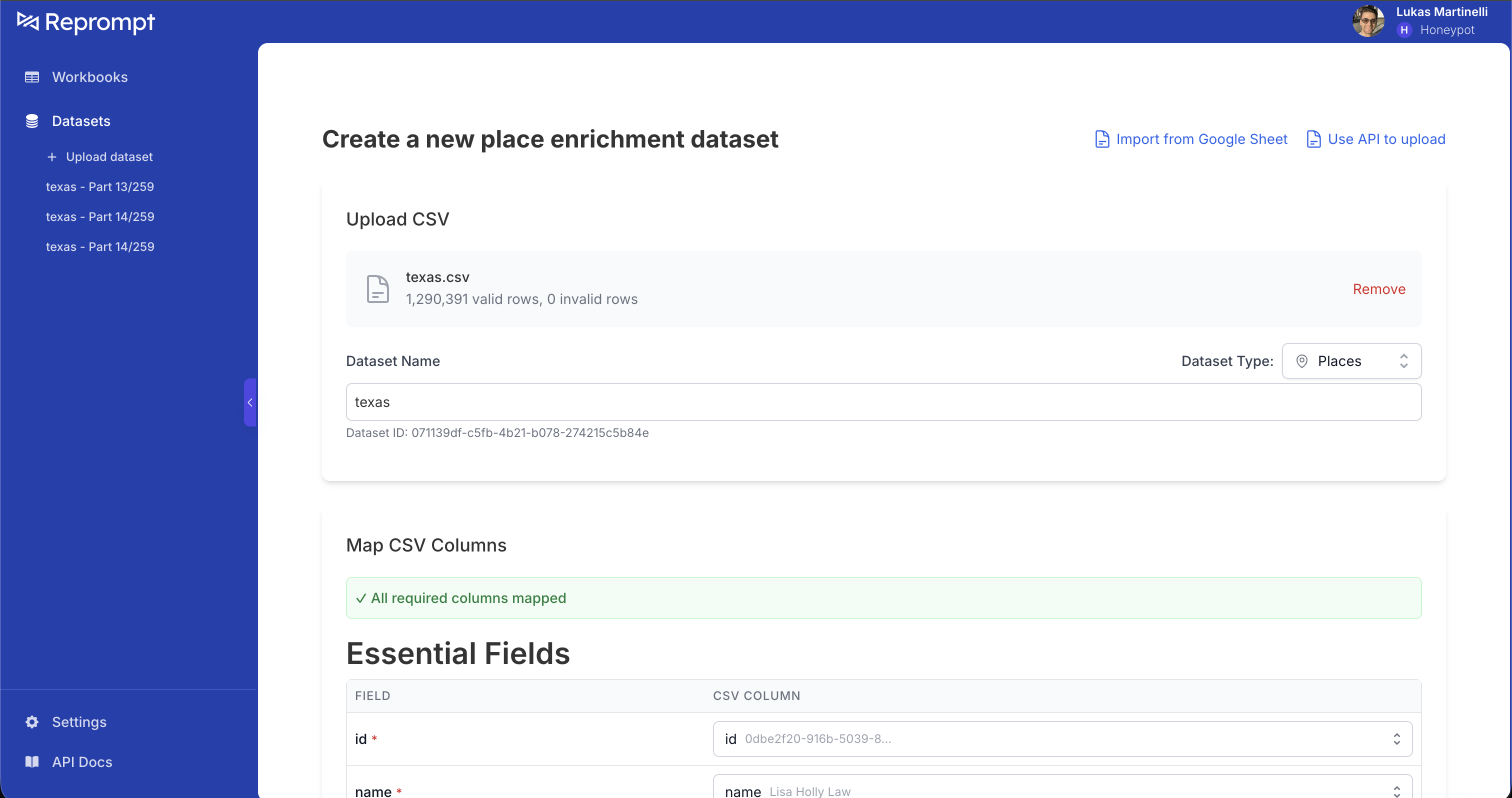 ### Essential Fields
All five fields below are required for best results. You can technically omit either coordinates or address, but enrichment accuracy drops significantly — always provide both when possible.
| Field | Description |
|-------|-------------|
| `id` | Unique identifier for each place |
| `name` | Business or place name |
| `full_address` | Full street address as a single string (or map individual components instead) |
| `latitude` | Latitude coordinate |
| `longitude` | Longitude coordinate |
### Additional Options
Expand **Additional Options** to map extra columns. The more fields you map, the better your results.
### Essential Fields
All five fields below are required for best results. You can technically omit either coordinates or address, but enrichment accuracy drops significantly — always provide both when possible.
| Field | Description |
|-------|-------------|
| `id` | Unique identifier for each place |
| `name` | Business or place name |
| `full_address` | Full street address as a single string (or map individual components instead) |
| `latitude` | Latitude coordinate |
| `longitude` | Longitude coordinate |
### Additional Options
Expand **Additional Options** to map extra columns. The more fields you map, the better your results.
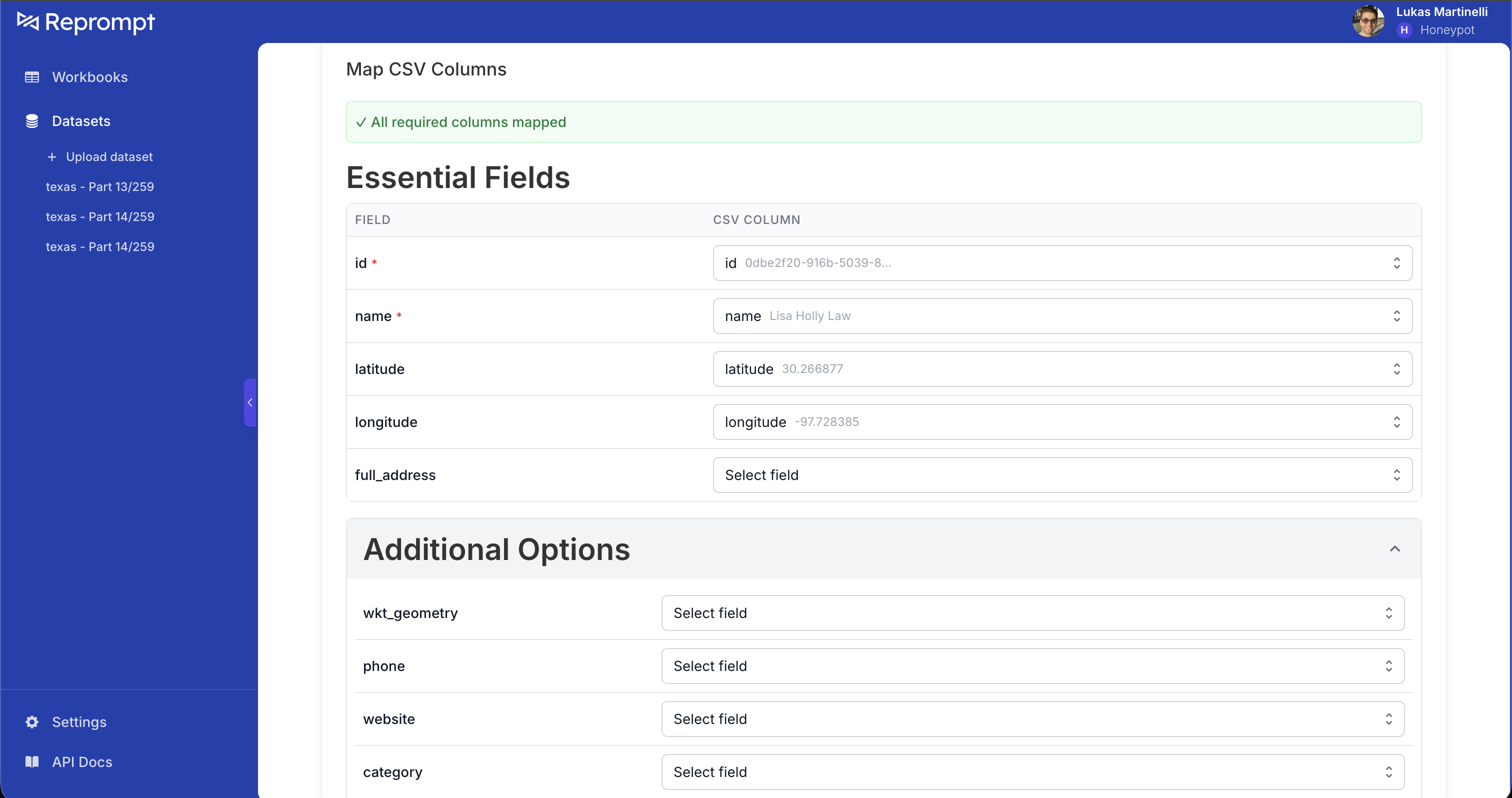 | Field | Description |
|-------|-------------|
| `phone` | Phone number |
| `website` | Official website URL |
| `category` | Place category |
| `house` | House/building number |
| `street` | Street name |
| `city` | City |
| `postalCode` | Postal / zip code |
| `state` | State or province |
| `country_code` | ISO country code |
| `country` | Country name |
Map **every field you have**. Unmapped columns are ignored during enrichment, which reduces match quality.
## Preview and Import
After mapping, review the **Preview**, click **Select All**, and confirm the import. The platform automatically splits large files into batches of ~5,000 rows each.
| Field | Description |
|-------|-------------|
| `phone` | Phone number |
| `website` | Official website URL |
| `category` | Place category |
| `house` | House/building number |
| `street` | Street name |
| `city` | City |
| `postalCode` | Postal / zip code |
| `state` | State or province |
| `country_code` | ISO country code |
| `country` | Country name |
Map **every field you have**. Unmapped columns are ignored during enrichment, which reduces match quality.
## Preview and Import
After mapping, review the **Preview**, click **Select All**, and confirm the import. The platform automatically splits large files into batches of ~5,000 rows each.
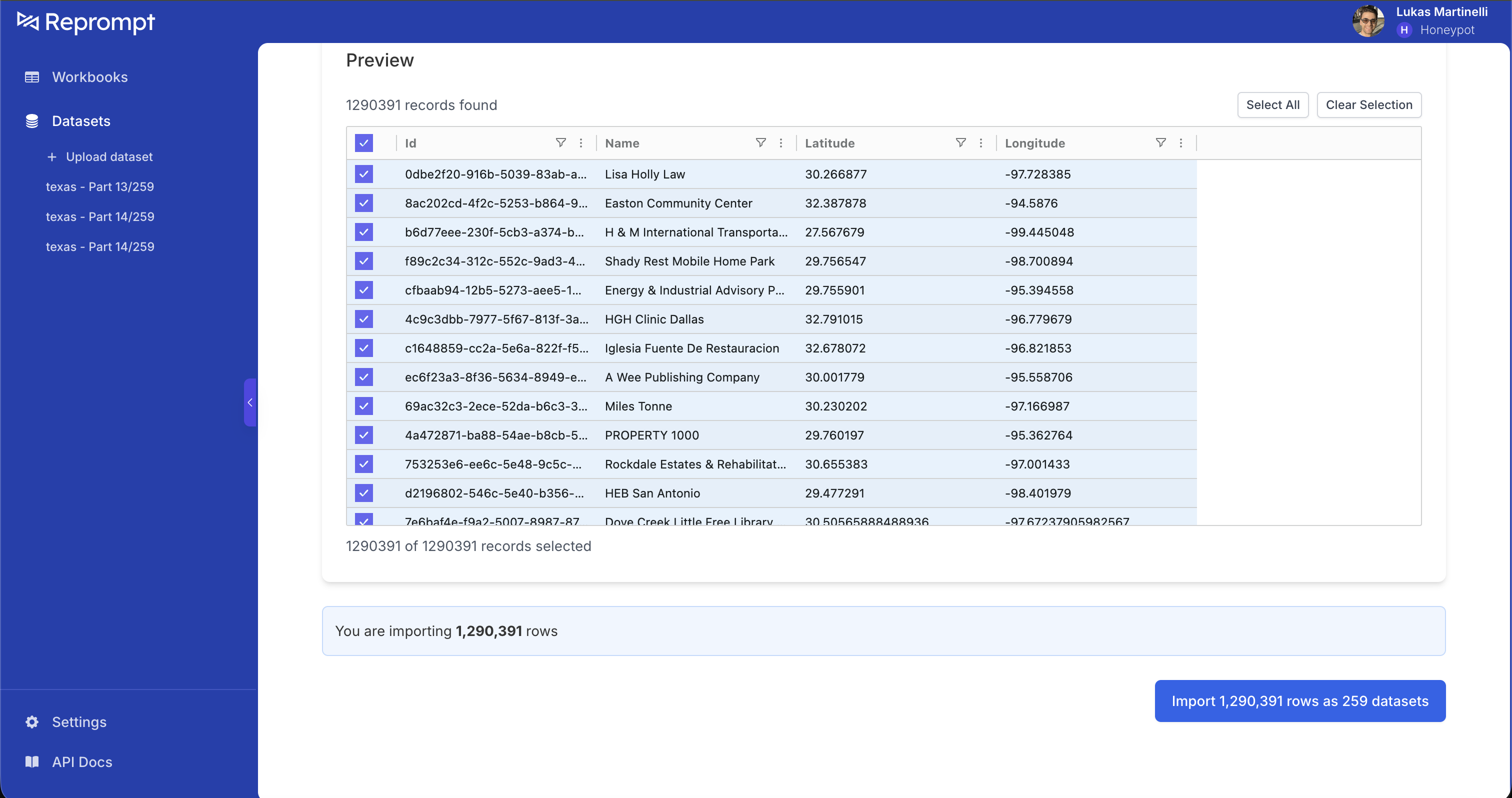 ## Run Enrichment
Select batches from the list, click **Enrich N batches of places...**, choose **Enrich Place**, and start processing.
## Run Enrichment
Select batches from the list, click **Enrich N batches of places...**, choose **Enrich Place**, and start processing.
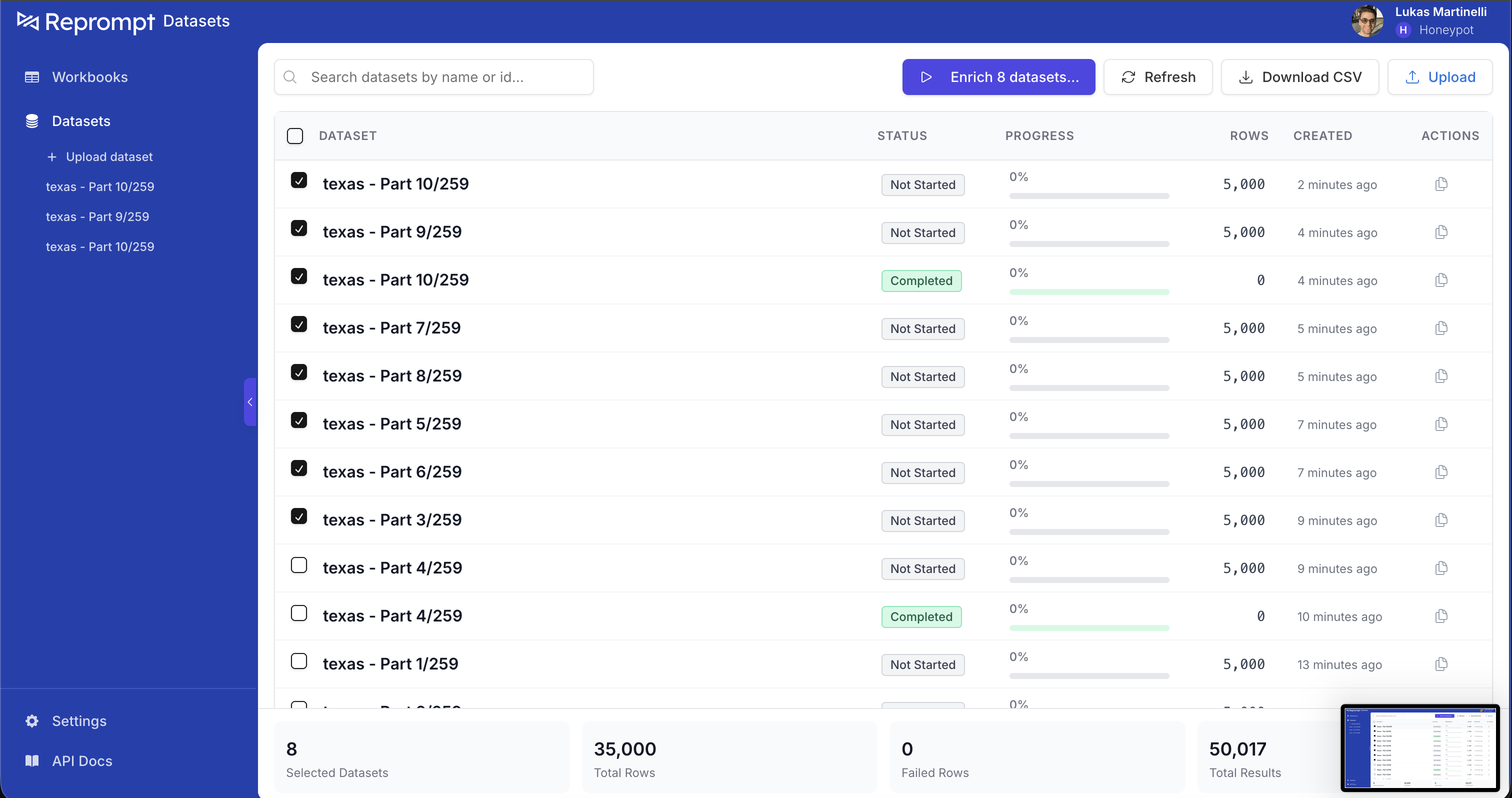
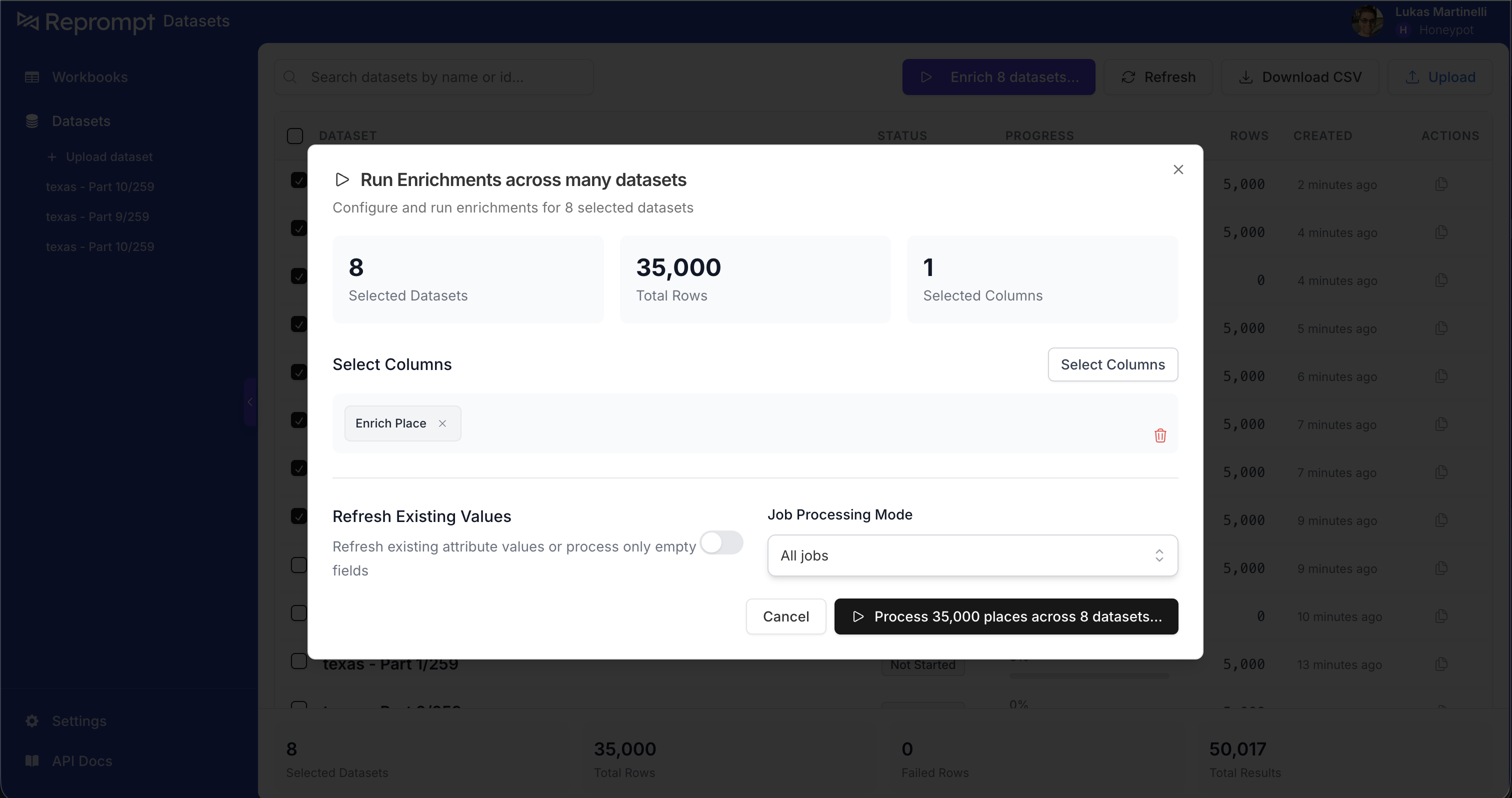 ## Files Over 200 MB
Split files exceeding 200 MB before uploading. You can use a tool like [`csv-split`](https://www.npmjs.com/package/csv-split) from npm, then upload each part separately.
## Best Practices
- **Map every column** — unmapped columns are ignored, reducing match quality.
- **Provide both address and coordinates** — this gives the best enrichment accuracy.
- **Use descriptive batch names** — name by geography, date, or purpose (e.g. "texas" or "Q1 2025 Store Locations").
- **Start with a sample** — upload 100–1,000 rows first to verify column mapping.
## Next Steps
- [Batch Processing](/guides/batch-processing) - Monitor batches, paginate results, and reprocess failures via the API
- [Place Job Results](/guides/place-job-results) - Understand the enrichment output schema
- [Troubleshooting 40x Errors](/guides/troubleshooting-40x) - Debug common API and upload errors
---
# Entrances API
Get entrances, access points, and building data for any address
## Overview
Given an address, the Entrances API returns the exact location of every entrance, what access points you need to pass through, and the building and compound context.
```
Response
├── place_name, address, lat/lng
├── entrances[] shared and unit entrances to the place
├── access_points[] gates / checkpoints to reach it
├── building {} type, geofence, floor count
└── compound {} | null compound context, if inside one
```
Most responses have `compound: null` — the address maps to a standalone building. When the building sits inside a compound (mall, campus, gated community), the `compound` field provides the boundary, type, and ID you can use to fetch the full compound view.
---
## Request
```
POST /v1/entrances
```
```bash cURL
curl -X POST \
'https://api.repromptai.com/v1/entrances' \
-H 'Authorization: Bearer {YOUR_API_KEY}' \
-H 'Content-Type: application/json' \
-d '{
"address": "7 Carmine St, New York, NY 10014",
"name": "Joes Pizza",
"latitude": 40.7359,
"longitude": -73.9911
}'
```
```python Python
import requests
response = requests.post(
"https://api.repromptai.com/v1/entrances",
headers={
"Authorization": "Bearer {YOUR_API_KEY}",
"Content-Type": "application/json",
},
json={
"address": "7 Carmine St, New York, NY 10014",
"name": "Joes Pizza",
"latitude": 40.7359,
"longitude": -73.9911,
},
)
print(response.json())
```
```javascript JavaScript
const response = await fetch("https://api.repromptai.com/v1/entrances", {
method: "POST",
headers: {
Authorization: "Bearer {YOUR_API_KEY}",
"Content-Type": "application/json",
},
body: JSON.stringify({
address: "7 Carmine St, New York, NY 10014",
name: "Joes Pizza",
latitude: 40.7359,
longitude: -73.9911,
}),
});
console.log(await response.json());
```
### Request Fields
| Field | Type | Required | Description |
|-------|------|----------|-------------|
| `address` | string | **Yes** | Full street address |
| `name` | string | No | Place or business name — helps locate the right building within a compound |
| `latitude` | number | No | Latitude (-90 to 90) — improves geocoding accuracy |
| `longitude` | number | No | Longitude (-180 to 180) — improves geocoding accuracy |
---
## Response Example
```json
{
"place_name": "Joes Pizza",
"address": "7 Carmine St, New York, NY 10014",
"latitude": 40.7359,
"longitude": -73.9911,
"entrances": [
{
"entrance_id": "ent_main_01",
"entrance_type": "MAIN",
"entrance_scope": "SHARED",
"latitude": 40.7359,
"longitude": -73.9911,
"name": "Front entrance",
"floor": 0,
"tags": ["wheelchair_accessible"],
"preferred_parking": [],
"unit": null
},
{
"entrance_id": "ent_svc_01",
"entrance_type": "SERVICE",
"entrance_scope": "UNIT",
"latitude": 40.7358,
"longitude": -73.9913,
"name": "Service entrance",
"floor": 0,
"tags": [],
"preferred_parking": [],
"unit": "Suite 1A"
}
],
"access_points": [
{
"access_point_id": "ap_001",
"access_type": "VEHICLE_ENTRY",
"access_control": "OPEN",
"latitude": 40.7358,
"longitude": -73.9912,
"name": "Main parking entrance",
"operating_hours": { "open": "06:00", "close": "23:00" },
"tags": ["parking"]
},
{
"access_point_id": "ap_002",
"access_type": "PEDESTRIAN_ENTRY",
"access_control": "OPEN",
"latitude": 40.7360,
"longitude": -73.9910,
"name": "Carmine St pedestrian entrance",
"operating_hours": null,
"tags": []
}
],
"building": {
"building_type": "COMMERCIAL",
"building_geofence": {
"type": "Polygon",
"coordinates": [[[-73.9913, 40.7358], [-73.9909, 40.7358], [-73.9909, 40.7361], [-73.9913, 40.7361], [-73.9913, 40.7358]]]
},
"floor_count": 2
},
"compound": {
"compound_id": "cmp_abc123",
"compound_name": "Carmine Street Plaza",
"compound_type": "MIXED_USE_COMPLEX",
"compound_geofence": {
"type": "Polygon",
"coordinates": [[[-73.9915, 40.7356], [-73.9907, 40.7356], [-73.9907, 40.7362], [-73.9915, 40.7362], [-73.9915, 40.7356]]]
}
}
}
```
---
## Compound View
Retrieve all buildings, entrances, and access points within a compound.
```
GET /v1/compounds/{compound_id}
```
Returns the full compound hierarchy: every building, entrance, and access point within the compound boundary. The `compound_id` is returned in the entrances response above.
---
## Schema Reference
### Top-Level Response
| Field | Type | Description |
|-------|------|-------------|
| `place_name` | string | Resolved place or address name |
| `address` | string | Full street address |
| `latitude` | number | Latitude of the place |
| `longitude` | number | Longitude of the place |
| `entrances` | Entrance[] | Entrances to this place |
| `access_points` | AccessPoint[] | Gates and checkpoints to reach this place |
| `building` | Building | Building metadata |
| `compound` | Compound \| null | Compound context, if the building is inside one |
### Entrance
| Field | Type | Description |
|-------|------|-------------|
| `entrance_id` | string | Unique identifier |
| `entrance_type` | enum | `MAIN`, `SECONDARY`, `SERVICE`, `EMERGENCY`, `GATE` |
| `entrance_scope` | enum | `UNIT` (specific unit) or `SHARED` (common entrance) |
| `latitude` | number | Entrance latitude |
| `longitude` | number | Entrance longitude |
| `name` | string \| null | Human-readable label |
| `floor` | number \| null | Floor level (0 = ground) |
| `tags` | string[] | Descriptive tags (e.g. `wheelchair_accessible`) |
| `preferred_parking` | ParkingZone[] | Nearby parking areas |
| `unit` | string \| null | Unit number (when scope is `UNIT`) |
### Access Point
| Field | Type | Description |
|-------|------|-------------|
| `access_point_id` | string | Unique identifier |
| `access_type` | enum | How you physically enter (see below) |
| `access_control` | enum | What controls entry (see below) |
| `latitude` | number | Access point latitude |
| `longitude` | number | Access point longitude |
| `name` | string \| null | Human-readable label |
| `operating_hours` | object \| null | `{ "open": "HH:MM", "close": "HH:MM" }` |
| `tags` | string[] | Descriptive tags |
#### Access Types
| Value | Description |
|-------|-------------|
| `GATE` | Physical gate |
| `VEHICLE_ENTRY` | Vehicle-only entrance |
| `PEDESTRIAN_ENTRY` | Pedestrian-only entrance |
| `SECURITY_CHECKPOINT` | Staffed security checkpoint |
| `LOADING_DOCK_ENTRY` | Loading dock or service entrance |
#### Access Control
| Value | Description |
|-------|-------------|
| `OPEN` | No restriction |
| `BUZZER` | Buzzer/doorbell system |
| `KEY_CODE` | Keypad code required |
| `GUARD` | Security guard |
| `RFID` | RFID badge or fob |
| `CALL_BOX` | Call box to contact tenant |
| `INTERCOM` | Intercom system |
| `NONE` | No access control present |
### Building
| Field | Type | Description |
|-------|------|-------------|
| `building_type` | enum | Category of building (see below) |
| `building_geofence` | GeoJSON Polygon \| null | Building footprint |
| `floor_count` | number \| null | Number of floors |
#### Building Types
`RESIDENTIAL` · `COMMERCIAL` · `INDUSTRIAL` · `CIVIC` · `EDUCATION` · `MEDICAL` · `ENTERTAINMENT` · `RELIGIOUS` · `TRANSPORTATION` · `HOSPITALITY` · `MIXED_USE` · `AGRICULTURAL` · `MILITARY` · `UTILITY`
### Compound
| Field | Type | Description |
|-------|------|-------------|
| `compound_id` | string | Unique identifier (use with `/v1/compounds/{compound_id}`) |
| `compound_name` | string | Display name |
| `compound_type` | enum | Category of compound (see below) |
| `compound_geofence` | GeoJSON Polygon | Boundary of the compound |
#### Compound Types
| Value | Description |
|-------|-------------|
| `APARTMENT_COMPLEX` | Residential apartment complex |
| `SHOPPING_MALL` | Enclosed shopping mall |
| `STRIP_MALL` | Open-air strip mall |
| `OFFICE_PARK` | Office park or business campus |
| `HOSPITAL_CAMPUS` | Hospital or medical campus |
| `UNIVERSITY_CAMPUS` | University or college campus |
| `GATED_COMMUNITY` | Gated residential community |
| `MIXED_USE_COMPLEX` | Mixed residential/commercial complex |
| `INDUSTRIAL_PARK` | Industrial or warehouse park |
### Parking Zone
| Field | Type | Description |
|-------|------|-------------|
| `parking_id` | string | Unique identifier |
| `geometry` | GeoJSON Polygon \| LineString | Parking area boundary or curb line |
| `notes` | string \| null | Additional info (e.g. "2-hour limit") |
---
# Monthly Refresh
How place enrichment refreshes run and how to review what changed
## Overview
Monthly refreshes re-run enrichment for places you’ve marked, so you can detect changes over time. Refresh runs execute on the **9th of every month**.
Refresh behavior:
- By default, we refresh **only the attributes that were already enriched** for that place.
- If you have a custom agreement with Reprompt, we can scope refreshes to specific attributes (for example, only `open_closed_status`).
## 1) Mark places for refresh
To include places in the monthly refresh, use the batch actions menu in the UI:
Click the **Actions** button.
## Files Over 200 MB
Split files exceeding 200 MB before uploading. You can use a tool like [`csv-split`](https://www.npmjs.com/package/csv-split) from npm, then upload each part separately.
## Best Practices
- **Map every column** — unmapped columns are ignored, reducing match quality.
- **Provide both address and coordinates** — this gives the best enrichment accuracy.
- **Use descriptive batch names** — name by geography, date, or purpose (e.g. "texas" or "Q1 2025 Store Locations").
- **Start with a sample** — upload 100–1,000 rows first to verify column mapping.
## Next Steps
- [Batch Processing](/guides/batch-processing) - Monitor batches, paginate results, and reprocess failures via the API
- [Place Job Results](/guides/place-job-results) - Understand the enrichment output schema
- [Troubleshooting 40x Errors](/guides/troubleshooting-40x) - Debug common API and upload errors
---
# Entrances API
Get entrances, access points, and building data for any address
## Overview
Given an address, the Entrances API returns the exact location of every entrance, what access points you need to pass through, and the building and compound context.
```
Response
├── place_name, address, lat/lng
├── entrances[] shared and unit entrances to the place
├── access_points[] gates / checkpoints to reach it
├── building {} type, geofence, floor count
└── compound {} | null compound context, if inside one
```
Most responses have `compound: null` — the address maps to a standalone building. When the building sits inside a compound (mall, campus, gated community), the `compound` field provides the boundary, type, and ID you can use to fetch the full compound view.
---
## Request
```
POST /v1/entrances
```
```bash cURL
curl -X POST \
'https://api.repromptai.com/v1/entrances' \
-H 'Authorization: Bearer {YOUR_API_KEY}' \
-H 'Content-Type: application/json' \
-d '{
"address": "7 Carmine St, New York, NY 10014",
"name": "Joes Pizza",
"latitude": 40.7359,
"longitude": -73.9911
}'
```
```python Python
import requests
response = requests.post(
"https://api.repromptai.com/v1/entrances",
headers={
"Authorization": "Bearer {YOUR_API_KEY}",
"Content-Type": "application/json",
},
json={
"address": "7 Carmine St, New York, NY 10014",
"name": "Joes Pizza",
"latitude": 40.7359,
"longitude": -73.9911,
},
)
print(response.json())
```
```javascript JavaScript
const response = await fetch("https://api.repromptai.com/v1/entrances", {
method: "POST",
headers: {
Authorization: "Bearer {YOUR_API_KEY}",
"Content-Type": "application/json",
},
body: JSON.stringify({
address: "7 Carmine St, New York, NY 10014",
name: "Joes Pizza",
latitude: 40.7359,
longitude: -73.9911,
}),
});
console.log(await response.json());
```
### Request Fields
| Field | Type | Required | Description |
|-------|------|----------|-------------|
| `address` | string | **Yes** | Full street address |
| `name` | string | No | Place or business name — helps locate the right building within a compound |
| `latitude` | number | No | Latitude (-90 to 90) — improves geocoding accuracy |
| `longitude` | number | No | Longitude (-180 to 180) — improves geocoding accuracy |
---
## Response Example
```json
{
"place_name": "Joes Pizza",
"address": "7 Carmine St, New York, NY 10014",
"latitude": 40.7359,
"longitude": -73.9911,
"entrances": [
{
"entrance_id": "ent_main_01",
"entrance_type": "MAIN",
"entrance_scope": "SHARED",
"latitude": 40.7359,
"longitude": -73.9911,
"name": "Front entrance",
"floor": 0,
"tags": ["wheelchair_accessible"],
"preferred_parking": [],
"unit": null
},
{
"entrance_id": "ent_svc_01",
"entrance_type": "SERVICE",
"entrance_scope": "UNIT",
"latitude": 40.7358,
"longitude": -73.9913,
"name": "Service entrance",
"floor": 0,
"tags": [],
"preferred_parking": [],
"unit": "Suite 1A"
}
],
"access_points": [
{
"access_point_id": "ap_001",
"access_type": "VEHICLE_ENTRY",
"access_control": "OPEN",
"latitude": 40.7358,
"longitude": -73.9912,
"name": "Main parking entrance",
"operating_hours": { "open": "06:00", "close": "23:00" },
"tags": ["parking"]
},
{
"access_point_id": "ap_002",
"access_type": "PEDESTRIAN_ENTRY",
"access_control": "OPEN",
"latitude": 40.7360,
"longitude": -73.9910,
"name": "Carmine St pedestrian entrance",
"operating_hours": null,
"tags": []
}
],
"building": {
"building_type": "COMMERCIAL",
"building_geofence": {
"type": "Polygon",
"coordinates": [[[-73.9913, 40.7358], [-73.9909, 40.7358], [-73.9909, 40.7361], [-73.9913, 40.7361], [-73.9913, 40.7358]]]
},
"floor_count": 2
},
"compound": {
"compound_id": "cmp_abc123",
"compound_name": "Carmine Street Plaza",
"compound_type": "MIXED_USE_COMPLEX",
"compound_geofence": {
"type": "Polygon",
"coordinates": [[[-73.9915, 40.7356], [-73.9907, 40.7356], [-73.9907, 40.7362], [-73.9915, 40.7362], [-73.9915, 40.7356]]]
}
}
}
```
---
## Compound View
Retrieve all buildings, entrances, and access points within a compound.
```
GET /v1/compounds/{compound_id}
```
Returns the full compound hierarchy: every building, entrance, and access point within the compound boundary. The `compound_id` is returned in the entrances response above.
---
## Schema Reference
### Top-Level Response
| Field | Type | Description |
|-------|------|-------------|
| `place_name` | string | Resolved place or address name |
| `address` | string | Full street address |
| `latitude` | number | Latitude of the place |
| `longitude` | number | Longitude of the place |
| `entrances` | Entrance[] | Entrances to this place |
| `access_points` | AccessPoint[] | Gates and checkpoints to reach this place |
| `building` | Building | Building metadata |
| `compound` | Compound \| null | Compound context, if the building is inside one |
### Entrance
| Field | Type | Description |
|-------|------|-------------|
| `entrance_id` | string | Unique identifier |
| `entrance_type` | enum | `MAIN`, `SECONDARY`, `SERVICE`, `EMERGENCY`, `GATE` |
| `entrance_scope` | enum | `UNIT` (specific unit) or `SHARED` (common entrance) |
| `latitude` | number | Entrance latitude |
| `longitude` | number | Entrance longitude |
| `name` | string \| null | Human-readable label |
| `floor` | number \| null | Floor level (0 = ground) |
| `tags` | string[] | Descriptive tags (e.g. `wheelchair_accessible`) |
| `preferred_parking` | ParkingZone[] | Nearby parking areas |
| `unit` | string \| null | Unit number (when scope is `UNIT`) |
### Access Point
| Field | Type | Description |
|-------|------|-------------|
| `access_point_id` | string | Unique identifier |
| `access_type` | enum | How you physically enter (see below) |
| `access_control` | enum | What controls entry (see below) |
| `latitude` | number | Access point latitude |
| `longitude` | number | Access point longitude |
| `name` | string \| null | Human-readable label |
| `operating_hours` | object \| null | `{ "open": "HH:MM", "close": "HH:MM" }` |
| `tags` | string[] | Descriptive tags |
#### Access Types
| Value | Description |
|-------|-------------|
| `GATE` | Physical gate |
| `VEHICLE_ENTRY` | Vehicle-only entrance |
| `PEDESTRIAN_ENTRY` | Pedestrian-only entrance |
| `SECURITY_CHECKPOINT` | Staffed security checkpoint |
| `LOADING_DOCK_ENTRY` | Loading dock or service entrance |
#### Access Control
| Value | Description |
|-------|-------------|
| `OPEN` | No restriction |
| `BUZZER` | Buzzer/doorbell system |
| `KEY_CODE` | Keypad code required |
| `GUARD` | Security guard |
| `RFID` | RFID badge or fob |
| `CALL_BOX` | Call box to contact tenant |
| `INTERCOM` | Intercom system |
| `NONE` | No access control present |
### Building
| Field | Type | Description |
|-------|------|-------------|
| `building_type` | enum | Category of building (see below) |
| `building_geofence` | GeoJSON Polygon \| null | Building footprint |
| `floor_count` | number \| null | Number of floors |
#### Building Types
`RESIDENTIAL` · `COMMERCIAL` · `INDUSTRIAL` · `CIVIC` · `EDUCATION` · `MEDICAL` · `ENTERTAINMENT` · `RELIGIOUS` · `TRANSPORTATION` · `HOSPITALITY` · `MIXED_USE` · `AGRICULTURAL` · `MILITARY` · `UTILITY`
### Compound
| Field | Type | Description |
|-------|------|-------------|
| `compound_id` | string | Unique identifier (use with `/v1/compounds/{compound_id}`) |
| `compound_name` | string | Display name |
| `compound_type` | enum | Category of compound (see below) |
| `compound_geofence` | GeoJSON Polygon | Boundary of the compound |
#### Compound Types
| Value | Description |
|-------|-------------|
| `APARTMENT_COMPLEX` | Residential apartment complex |
| `SHOPPING_MALL` | Enclosed shopping mall |
| `STRIP_MALL` | Open-air strip mall |
| `OFFICE_PARK` | Office park or business campus |
| `HOSPITAL_CAMPUS` | Hospital or medical campus |
| `UNIVERSITY_CAMPUS` | University or college campus |
| `GATED_COMMUNITY` | Gated residential community |
| `MIXED_USE_COMPLEX` | Mixed residential/commercial complex |
| `INDUSTRIAL_PARK` | Industrial or warehouse park |
### Parking Zone
| Field | Type | Description |
|-------|------|-------------|
| `parking_id` | string | Unique identifier |
| `geometry` | GeoJSON Polygon \| LineString | Parking area boundary or curb line |
| `notes` | string \| null | Additional info (e.g. "2-hour limit") |
---
# Monthly Refresh
How place enrichment refreshes run and how to review what changed
## Overview
Monthly refreshes re-run enrichment for places you’ve marked, so you can detect changes over time. Refresh runs execute on the **9th of every month**.
Refresh behavior:
- By default, we refresh **only the attributes that were already enriched** for that place.
- If you have a custom agreement with Reprompt, we can scope refreshes to specific attributes (for example, only `open_closed_status`).
## 1) Mark places for refresh
To include places in the monthly refresh, use the batch actions menu in the UI:
Click the **Actions** button.
 Then select **Mark for refresh** in the dropdown.
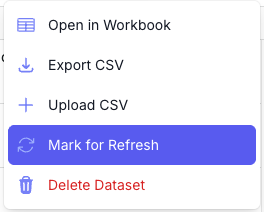 ## 2) Check what changed
To see updates, list your refresh batches, then inspect the jobs inside each batch. For each place, compare the `job_metadata.last_enriched` timestamp (and, if needed, the output values) against your prior snapshot.
### List recent batches
Use this to find the batch IDs you want to review (especially the batches you marked for refresh).
Expect `batches[]` with `id`, `status`, `status_counts`, and `refresh` so you can pick the batch IDs to inspect.
[List batches API reference](https://docs.repromptai.com/api-reference/batches/list-batches)
```bash
curl --request GET \
--url 'https://api.repromptai.com/v1/reprompt/place_enrichment/batches?limit=10' \
--header 'Authorization: Bearer YOUR_API_KEY'
```
### Fetch a batch to get its place IDs
Use this to see which place IDs are included in a specific batch.
Expect a `jobs` object with arrays by status; `jobs.completed` can be large, so you’ll typically sample or page through.
[Get batch status API reference](https://docs.repromptai.com/api-reference/batches/get-batch-status)
```bash
curl --request GET \
--url 'https://api.repromptai.com/v1/reprompt/place_enrichment/batches/{batch_id}' \
--header 'Authorization: Bearer YOUR_API_KEY'
```
### Fetch a job by place ID
Use this to inspect the updated enrichment results for each place so you can scan for changes.
Expect `job_metadata.last_enriched` (timestamp with microseconds) plus `attribute_status` and `outputs` for validation.
[Get a single enrichment job API reference](https://docs.repromptai.com/api-reference/jobs/get-a-single-enrichment-job)
```bash
curl --request GET \
--url 'https://api.repromptai.com/v1/reprompt/place_enrichment/jobs/{place_id}' \
--header 'Authorization: Bearer YOUR_API_KEY'
```
### Inspect `last_enriched`
Example response (trimmed). Focus on `job_metadata.last_enriched`:
```jsonc
{
"place_id": "place_123",
"status": "completed",
"job_metadata": {
"attribute_status": {},
"last_enriched": "2023-11-07T05:31:56Z", // last refresh time
"enrichment_metadata": {},
"country_code": "US"
},
"inputs": {
"type": ""
},
"outputs": {},
"reasoning": {},
"confidence_scores": {
"open_closed_status": "VERY_HIGH",
"phone": "VERY_HIGH",
"website": "VERY_HIGH",
"address": "VERY_HIGH",
"categories": "VERY_HIGH",
"opening_hours": "VERY_HIGH",
"entity_type": "VERY_HIGH",
"name": "VERY_HIGH",
"parking_spaces": "VERY_HIGH",
"parking_spaces_total": "VERY_HIGH",
"parking_spaces_street": "VERY_HIGH",
"parking_spaces_shared": "VERY_HIGH",
"parking_spaces_dedicated": "VERY_HIGH",
"chain": "VERY_HIGH",
"tiktok": "VERY_HIGH",
"price_tier": "VERY_HIGH",
"approximate_user_reviews": "VERY_HIGH",
"menu": "VERY_HIGH",
"school_geofence": "VERY_HIGH"
}
}
```
Notes:
- **Key field**: `job_metadata.last_enriched` indicates the most recent enrichment timestamp for that place.
- A refresh can complete **without** changing `last_enriched`. That means the data matched the prior enrichment and **you are not charged** for that refresh.
- Use `job_metadata.last_enriched` to confirm a refresh ran (e.g., a timestamp on or after the 9th of the month).
- If you need a deeper diff, compare the `outputs` object to your stored snapshot.
---
# Place Status - Open/Closed
Enrich whether a place is open, permanently closed, or has no discernible internet presence.
## Overview
Reprompt determines business status and returns a structured `open_closed_status` with:
- `status` (enum): One of `"Open"`, `"Closed"`, `"Temporarily Closed"`, or `"No Internet Presence"`
- `reasoning` (string): Explanation with referenced sources
- `confidence` (enum): `VERY_HIGH`, `HIGH`, `MEDIUM`, `LOW`, or `NONE`
## Status Values
```python
class OpenClosedStatus(str, Enum):
NO_INTERNET_PRESENCE = "No Internet Presence"
OPEN = "Open"
CLOSED = "Closed"
TEMPORARILY_CLOSED = "Temporarily Closed"
```
## Usage Example
To enrich a place with open/closed status information:
```bash cURL
curl -X POST \
'https://api.repromptai.com/v1/{org_slug}/place_enrichment/enrich' \
-H 'Authorization: Bearer {YOUR_API_KEY}' \
-H 'Content-Type: application/json' \
-d '{
"inputs": {
"place_id": "my_place_123",
"name": "Joe'\''s Pizza",
"latitude": 40.7359,
"longitude": -73.9911,
"full_address": "7 Carmine St, New York, NY 10014"
},
"attributes": ["closed_permanently"]
}'
```
**Response:**
```json
{
"place_id": "my_place_123",
"outputs": {
"closed_permanently": {
"status": "Open",
"confidence": "HIGH",
"reasoning": "Recent activity confirmed from multiple credible sources; business appears to be operating normally."
}
}
}
```
### Determining Status
#### No Internet Presence
- **Places are defined as having no internet presence if**:
- Web sources have no exact or near exact business name match and
- Web sources have no near partial address match tied to the business name
#### Permanently Closed vs Temporarily Closed vs Open
- **Permanently closed**: Reprompt will return Closed if there is evidence of:
- Explicit closure signals from official first-party web or social sources (Business website, business official social media page, etc.)
- Explicit closure signals from multiple corroborated unofficial web sources (public news articles, goverment web portals, public aggregator websites, etc.)
- Specifically for businesses with a customer-facing storefront: Lack of official web or social presence and lack of corroborated 3rd party sources will mark the business as permanently closed. For instance, a Joe's Pizza in New York City that has no official first-party presence and is only listed on MapQuest and Better Business Bureau from 2009 will be marked as permanently closed without an explicit signal, based on absense of information from up to date sources.
- **Temporarily Closed**: Requires official temporary closure signals from official web or social sources
- **Bias**: There is a high bar for marking a business as permanently closed. The agent will bias towards Open if there is sufficient evidence of existence and operation from up to date web sources.
Specific cases:
- **Minor name variations**: Slight variations in the name will be treated as the same place. For example, "Joe's Pizza" and "Joseph Hot Wings and Pizza" at the same address will be treated as the same place. A closure announcement of "Joe's Pizza" will impact "Joseph Hot Wings and Pizza"
- **Significant name variations**: If the name is significantly different, the agent will treat the business as a different place. For example, "Joe's Pizza" and "Mystic Pizza" at the same address will be treated as different places. A closure announcement of "Joe's Pizza" will not impact "Mystic Pizza"
#### Example cases
| Place | Status | Reasoning |
| ----------------------------------------- | ------- | ---------------------------------------------------------------------------------------------------------------------------------------------------------------------------------------------------------------------------------------------------------------------------------------------------------------------------------------- |
| Joe's Pizza, 7 carmine st, new york, ny | Open | Joe's Pizza has a significant digital presence with an official first-party website (joespizzanyc.com) and official social media with posts in the last 6 months. They are mentioned by multiple news articles and listed on multiple review aggregator websites. The agent finds no evidence of closure or temporary closure. |
| Iza Ramen, 237 Fillmore St, San Francisco, CA | Closed | Iza Ramen has news articles mentioning closure of the business during COVID. The business has official social media with no mention of the closure. There is no evidence of reopening or that the closure is temporary. The agent marks the business as permanently closed. |
| Terry's Donuts, 712 steiner st, Seattle, WA | Closed | Terry's Donuts has no official web or social presence. It is not listed on review aggregator websites. It's only listed on Better Business Bureau from 2009. The agent marks the business as permanently closed without an explicit signal, based on absence of information from up to date sources. Special case: no recent digital presence. |
| Robertson Commercial Construction, 701 Power Line Rd, Winter Haven, FL | Open | Robertson Commercial Construction has an official website which lists its office address as 701 Power Line Rd, Winter Haven, FL, and a county filing from 2021. It has very little internet presence otherwise. The agent marks the business as open with medium confidence since this is not a customer-facing business. |
---
# Place Job Results
Understand the structure of job results returned by batch endpoints
import RichAttributesSnippet from "@/snippets/RichAttributesSnippet.mdx"
## Overview
When you retrieve jobs from the batch endpoints, each job includes inputs, outputs, reasoning, and confidence scores. This guide explains those sections and provides a clean example.
- **Batch docs**: [Batch Processing](/guides/batch-processing)
- **API reference**: See the Place Enrichment Batch endpoints in the API reference for your version.
## Sections
- **Inputs**: What you submitted for a place. These are the fields we use to locate and enrich the place (e.g., name, coordinates, address, country).
- **Outputs**: The enriched attributes we found, such as website, phone, opening_hours, categories, ratings, and review counts.
- **Reasoning**: Brief, structured notes explaining how each attribute was determined (when available).
- **Confidence scores**: A per-attribute confidence level reflecting the reliability of the result.
## Example Response
The example below removes internal processing metadata and focuses on what your application will typically use.
```json
{
"jobs": [
{
"place_id": "place_123",
"status": "completed",
"job_metadata": {
"last_enriched": "2025-03-10T15:35:00Z",
"country_code": "US",
"attribute_status": {
"website": "RUN",
"phoneNumbers": "RUN",
"openingHours": "RUN",
"categories": "RUN"
}
},
"inputs": {
"id": "place_123",
"name": "Joe's Pizza",
"latitude": 40.7359,
"longitude": -73.9911,
"full_address": "7 Carmine St, New York, NY 10014",
"country_code": "US"
},
"outputs": {
"website": "https://www.joespizzanyc.com",
"phone": null,
"opening_hours": { "Monday": "11:00-23:00", "Tuesday": "11:00-23:00" },
"categories": ["restaurant", "pizza"],
"average_rating": 4.5,
"review_count": 1200
},
"reasoning": {
"websites": "Structured reasoning…",
"phone": "No phone found on official site.",
"opening_hours": "Structured reasoning…",
"categories": "Structured reasoning…"
},
"confidence_scores": {
"website": "HIGH",
"phone": "LOW",
"opening_hours": "MEDIUM",
"categories": "HIGH"
}
}
],
"total": 1,
"limit": 10000,
"offset": 0
}
```
## Schemas
### Confidence Scores
Confidence levels indicate how reliable a given attribute is:
```python
class ConfidenceScore(str, Enum):
VERY_HIGH = "VERY_HIGH"
HIGH = "HIGH"
MEDIUM = "MEDIUM"
LOW = "LOW"
NONE = "NONE"
```
- **VERY_HIGH/HIGH**: Safe to use directly
- **MEDIUM**: Generally reliable; consider validation for critical use cases
- **LOW**: Use with caution; may require manual review
- **NONE**: No reliable data found
### Attribute Statuses
Each attribute can include a processing status in `job_metadata.attribute_status` to indicate how enrichment proceeded:
```ts
export type AttributeStatus = 'RUN' | 'RUN_CONDITION_FAILED' | 'NOT_RUN' | 'ERROR'
```
- **RUN**: Enrichment was attempted (and completed); the attribute value may be present or null.
- **RUN_CONDITION_FAILED**: Skipped because preconditions were not met (e.g., missing inputs or failing filters).
- **NOT_RUN**: Not attempted (e.g., disabled, out of scope, or limits).
- **ERROR**: Attempted but failed due to an error.
Attributes that commonly include a status entry include `website`, `phoneNumbers`, `openingHours`, and `categories`.
## Next Steps
- Submit a batch following the [Batch Processing](/guides/batch-processing) guide, then poll for completion and retrieve results.
- Use the `confidence_scores` and `attribute_status` to drive QA workflows or manual review where needed.
## Attribute Outputs
Types: `string` | `number` | `list of strings`
**Core Attributes**
`closed_permanently` attribute returns:
- open_closed_status `string`
- open_closed_status_confidence_score `string`
`address` attribute returns:
- `address` `string`
- `address_localized` `string`
`categories` attribute returns:
- `categories` `list of strings`
`coordinates` attribute returns:
- coordinates `string`
- coordinates_distance `number`
`websites` attribute returns:
- website `string`
`email_address` attribute returns:
- email `string`
`phoneNumbers` attribute returns:
- phone `string`
- phone_additional `list of strings`
`openingHours` attribute returns:
- opening_hours `list of strings`
- opening_hours_grouped_by_hours `list of strings`
- is_open_24h `string`
`names` attribute returns:
- name `string`
- multilingual_names `list of strings`
- alt_name `string`
- official_name `string`
- brand_name `string`
**Rich Attributes**
---
# Quickstart
Supercharge place data with Reprompt
## 1. Enrich place data
If you already have place data, you can enrich it with over 40 attributes using Reprompt
- [Live Enrichment API](#2-live-enrichment)
- [Batch Processing API](#5-batch-processing)
**Don't have place data yet?** You can experiment with csv data and custom AI attributes in our [Workbooks](https://app.repromptai.com/workbooks).
---
## 2. Live Enrichment
Let's enrich a single place with basic information. The `inputs` object requires a place **name** along with either **coordinates (latitude/longitude)** or an **address**.
```bash cURL
curl -X POST \
'https://api.repromptai.com/v1/{org_slug}/place_enrichment/enrich' \
-H 'Authorization: Bearer {YOUR_API_KEY}' \
-H 'Content-Type: application/json' \
-d '{
"place_id": "my_place_123",
"inputs": {
"name": "Joe'\''s Pizza",
"latitude": 40.7359,
"longitude": -73.9911,
"full_address": "7 Carmine St, New York, NY 10014"
},
"attributes": ["websites", "phoneNumbers", "openingHours", "closed_permanently"]
}'
```
```python Python
import requests
url = "https://api.repromptai.com/v1/{org_slug}/place_enrichment/enrich"
headers = {
"Authorization": "Bearer {YOUR_API_KEY}",
"Content-Type": "application/json"
}
data = {
"place_id": "my_place_123",
"inputs": {
"name": "Joes Pizza",
"latitude": 40.7359,
"longitude": -73.9911,
"full_address": "7 Carmine St, New York, NY 10014"
},
"attributes": ["websites", "phoneNumbers", "openingHours", "closed_permanently"]
}
response = requests.post(url, headers=headers, json=data)
result = response.json()
print(result)
```
```javascript JavaScript
const response = await fetch('https://api.repromptai.com/v1/{org_slug}/place_enrichment/enrich', {
method: 'POST',
headers: {
'Authorization': 'Bearer {YOUR_API_KEY}',
'Content-Type': 'application/json'
},
body: JSON.stringify({
place_id: "my_place_123",
inputs: {
name: "Joes Pizza",
latitude: 40.7359,
longitude: -73.9911,
full_address: "7 Carmine St, New York, NY 10014"
},
attributes: ["websites", "phoneNumbers", "openingHours", "closed_permanently"]
})
});
const result = await response.json();
console.log(result);
```
Replace `{org_slug}` with your organization slug and `{YOUR_API_KEY}` with your API key from [Organization Settings](https://app.repromptai.com/organization).
**Include a `place_id`**: The `place_id` field is required at the top level of your request (alongside `inputs`, not inside it). We recommend providing your own stable identifier (like your database ID). This makes it easy to join enriched results back to your data.
### Input Flexibility
The `inputs` object accepts different combinations:
**Option 1: Name + Coordinates**
```json
{
"place_id": "my_place_123",
"inputs": {
"name": "Joes Pizza",
"latitude": 40.7359,
"longitude": -73.9911
}
}
```
**Option 2: Name + Address**
```json
{
"place_id": "my_place_123",
"inputs": {
"name": "Joes Pizza",
"full_address": "7 Carmine St, New York, NY 10014"
}
}
```
**Option 3: Name + Address + Coordinates (Most accurate)**
```json
{
"place_id": "my_place_123",
"inputs": {
"name": "Joes Pizza",
"latitude": 40.7359,
"longitude": -73.9911,
"full_address": "7 Carmine St, New York, NY 10014"
}
}
```
Providing more input fields (e.g. `full_address` together with coordinates, or `type`, `country_code`, `website`) helps our systems resolve and enrich the place more accurately. For the full list of supported fields and guidance, see [Input Place Schema](/schemas/schemas#input-place-schema).
---
## 3. Understanding the Response
The API will return enriched data about the place, including your `place_id` for easy joining:
```json
{
"place_id": "my_place_123",
"status": "completed",
"inputs": {
"name": "Joe's Pizza",
"latitude": 40.7359,
"longitude": -73.9911,
"full_address": "7 Carmine St, New York, NY 10014"
},
"outputs": {
"websites": ["https://www.joespizzanyc.com"],
"phoneNumbers": ["+12122555803"],
"openingHours": {
"monday": "10:00-2:00",
"tuesday": "10:00-2:00"
},
"closed_permanently": false
},
"job_metadata": {
"last_enriched": "2024-03-15T10:35:00Z",
"attribute_status": {
"websites": "RUN",
"phoneNumbers": "RUN",
"openingHours": "RUN",
"closed_permanently": "RUN"
}
}
}
```
## 4. Available Attributes
Specify exactly which attributes you want to enrich using the `attributes` array. Common attributes include:
| Attribute | Description |
|-----------|-------------|
| `websites` | Business website URLs |
| `phoneNumbers` | Phone numbers |
| `socialHandles` | Social media handles (Instagram, Facebook, etc.) |
| `closed_permanently` | Whether the business is permanently closed |
| `price_tier` | Price range (e.g., $, $$, $$$) |
| `categories` | Business categories |
| `openingHours` | Opening hours |
| `names` | Alternative names for the business |
| `address` | Address |
You can see the entire list of attributes by calling the [Enrichment Attributes](/api-reference/attributes/get-all-available-attributes) endpoint.
---
## 5. Batch Processing
For multiple places, use batch processing for asynchronous enrichment:
```json
{
"batch_name": "NYC Restaurants Batch",
"attributes": ["websites", "phoneNumbers", "openingHours", "closed_permanently"],
"jobs": [
{
"place_id": "my_db_id_456",
"inputs": {
"name": "Joes Pizza",
"latitude": 40.7359,
"longitude": -73.9911,
"full_address": "7 Carmine St, New York, NY 10014"
}
},
{
"place_id": "my_db_id_789",
"inputs": {
"name": "Tony's Deli",
"latitude": 40.7505,
"longitude": -73.9934,
"full_address": "123 Main St, New York, NY 10001"
}
}
]
}
```
Submit this to the `/place_enrichment/batches` endpoint, then track progress and retrieve results using the returned batch ID. Each result will include the `place_id` you provided for easy matching back to your database.
Learn more in our [Batch Processing Guide](/guides/batch-processing).
---
## 6. Next Steps
Now that you've made your first API call, explore more:
- **[API Reference](/api-reference)** - Complete endpoint documentation
- **[Batch Processing](/guides/batch-processing)** - Process multiple places efficiently
---
# Search and Ask
Retrieve normalized web results or get a fast, source-backed answer.
## Overview
Reprompt offers two small, complementary web endpoints:
- **Search** retrieves normalized web search results for a query. Use it when your application or agent needs the results themselves.
- **Ask** retrieves search results and produces a fast, single-hop narrative answer grounded in those results. Use it when your user needs a concise answer with sources.
Both endpoints accept the same minimal body. There are no filters, modes, or structured search inputs at launch.
`Ask` is a fast grounded-answer endpoint, not a deep-research workflow. It does not perform multi-step research or replace source review for high-stakes decisions.
## Authentication and base URL
Create an API key in [Organization Settings → API Keys](https://app.repromptai.com/organization), then send it as a bearer token. Reprompt resolves the organization from the authenticated API key, so no organization identifier is required in the URL.
```bash
https://api.repromptai.com/v1
```
## Search
Send a natural-language query to `POST /search`. The response is a stable, normalized result list; it intentionally does not expose the underlying search-provider response.
```bash cURL
curl --request POST \
--url 'https://api.repromptai.com/v1/search' \
--header 'Authorization: Bearer {YOUR_API_KEY}' \
--header 'Content-Type: application/json' \
--data '{
"query": "What is the difference between a web search API and a research agent?"
}'
```
```python Python
import requests
response = requests.post(
"https://api.repromptai.com/v1/search",
headers={
"Authorization": "Bearer {YOUR_API_KEY}",
"Content-Type": "application/json",
},
json={
"query": "What is the difference between a web search API and a research agent?"
},
)
response.raise_for_status()
print(response.json())
```
```javascript JavaScript
const response = await fetch(
'https://api.repromptai.com/v1/search',
{
method: 'POST',
headers: {
Authorization: 'Bearer {YOUR_API_KEY}',
'Content-Type': 'application/json'
},
body: JSON.stringify({
query: 'What is the difference between a web search API and a research agent?'
})
}
);
if (!response.ok) throw new Error(`Search failed: ${response.status}`);
console.log(await response.json());
```
### Search response
```json
{
"query": "What is the difference between a web search API and a research agent?",
"answer_box": {
"answer": "A web search API retrieves ranked web results.",
"url": "https://example.com/search-apis"
},
"results": [
{
"title": "Example result title",
"url": "https://example.com/search-vs-research",
"snippet": "A short excerpt describing the result.",
"position": 1,
"date": "2026-07-25"
}
]
}
```
Each item in `results` has a stable normalized shape:
| Field | Type | Description |
| --- | --- | --- |
| `title` | string | Result title. |
| `url` | string | Canonical result URL. |
| `snippet` | string, optional | Search-result excerpt. |
| `position` | integer | One-based rank in the returned result set. |
| `date` | string, optional | Date supplied by the result, when available. |
The `results` array can be empty when no results match the query.
When the search provider supplies them, the response can also include:
- `answer_box` — a direct answer or featured snippet with its source URL.
- `knowledge_graph` — entity information such as a title, type, description, website, and scalar facts.
These objects are optional. Build agent logic around `results` unless it explicitly benefits from enriched search features.
## Ask
Send the same query to `POST /ask` to receive a concise narrative answer plus the source objects used to ground it. Reprompt uses DeepSeek V4 Flash through OpenRouter for this endpoint.
```bash cURL
curl --request POST \
--url 'https://api.repromptai.com/v1/ask' \
--header 'Authorization: Bearer {YOUR_API_KEY}' \
--header 'Content-Type: application/json' \
--data '{
"query": "What is the difference between a web search API and a research agent?"
}'
```
```python Python
import requests
response = requests.post(
"https://api.repromptai.com/v1/ask",
headers={
"Authorization": "Bearer {YOUR_API_KEY}",
"Content-Type": "application/json",
},
json={
"query": "What is the difference between a web search API and a research agent?"
},
)
response.raise_for_status()
answer = response.json()
print(answer["answer"])
for source in answer["sources"]:
print(source["title"], source["url"])
```
```javascript JavaScript
const response = await fetch(
'https://api.repromptai.com/v1/ask',
{
method: 'POST',
headers: {
Authorization: 'Bearer {YOUR_API_KEY}',
'Content-Type': 'application/json'
},
body: JSON.stringify({
query: 'What is the difference between a web search API and a research agent?'
})
}
);
if (!response.ok) throw new Error(`Ask failed: ${response.status}`);
const { answer, sources } = await response.json();
console.log(answer, sources);
```
### Ask response
```json
{
"query": "What is the difference between a web search API and a research agent?",
"answer": "A web search API returns relevant documents for a query. A research agent typically uses search as one step in a larger, multi-step process that evaluates sources and synthesizes a response. [1]",
"sources": [
{
"title": "Example result title",
"url": "https://example.com/search-vs-research",
"snippet": "A short excerpt describing the result.",
"position": 1,
"date": "2026-07-25"
}
]
}
```
`sources` uses the same normalized source-object shape as `Search` results. Render the source URLs alongside the answer so people can inspect the evidence themselves.
## Errors and retries
Both endpoints return JSON errors. Handle these status codes:
| Status | Meaning | What to do |
| --- | --- | --- |
| `401` | The API key is missing, invalid, or revoked. | Create or use an active API key. |
| `403` | The authenticated account cannot access the endpoint. | Verify the feature is enabled for the account. |
| `422` | The request is invalid, including a missing, blank, or extra input field; `Ask` also uses this when no web results are available. | Correct the request; do not retry unchanged input. |
| `429` | The account has exceeded a rate or usage limit. | Retry with exponential backoff and respect `Retry-After` when present. |
| `502` | `Ask` could not produce a citation-backed answer from the retrieved sources. | Retry once or reformulate the query. |
| `503` | A search or answer provider is temporarily unavailable. | Retry idempotently with exponential backoff and respect `Retry-After`. |
For authentication help, see [Troubleshooting Authentication & 40x Errors](/guides/troubleshooting-40x).
---
# Troubleshooting Authentication & 40x Errors
How to diagnose and fix 401, 403, and 404 errors in your API requests
## Overview
This guide helps you troubleshoot common authentication and request errors when using the Reprompt API. Most 40x errors are related to API keys, organization slugs, or request formatting.
## 401 Unauthorized
A `401` error means your API key is invalid, missing, or revoked.
### Common Causes [#common-causes]
1. **Missing or malformed Authorization header**
2. **Revoked API key**
3. **Expired API key**
4. **Copy-paste errors** (extra spaces, truncated key)
### How to Fix [#how-to-fix]
Ensure you're including the header in the correct format:
```bash
Authorization: Bearer YOUR_API_KEY_HERE
```
**Common mistakes:**
- Missing the word `Bearer`
- Extra spaces before/after the key
- Using single quotes instead of the actual key value
Check if your key has been revoked:
1. Go to [Organization Settings → API Keys](https://app.repromptai.com/organization)
2. Click **"Show revoked keys"** to see if your key was disabled
3. If revoked, generate a new API key
If your key is revoked or you suspect it's compromised:
1. Navigate to [Organization Settings](https://app.repromptai.com/organization)
2. Go to the **API Keys** section
3. Click **"Create new API key"**
4. Copy the new key immediately (it won't be shown again)
5. Update your application with the new key
---
## 403 Forbidden
A `403` error means your API key is valid, but you don't have permission to access the requested resource.
### Common Causes [#common-causes-2]
1. **Accessing another organization's resources** - Using an org slug that doesn't match your API key
2. **Insufficient permissions** - Your API key doesn't have access to the specific resource or endpoint
### How to Fix [#how-to-fix-2]
Ensure you're using the correct org slug for your API key:
Check that the `{org_slug}` in your URL matches your organization
---
## 404 Not Found
A `404` error means the API endpoint doesn't exist, usually due to an incorrect URL or org slug.
### Common Causes [#common-causes-3]
1. **Incorrect organization slug** in the URL
2. **Typo in the endpoint path**
3. **Wrong API version** (using V1 endpoint format with V2 base URL or vice versa)
4. **Invalid batch ID or resource ID** in the path
### How to Fix [#how-to-fix-3]
Double-check your org slug is correct:
```bash
# ❌ Wrong
https://api.repromptai.com/v1/wrong-slug/place_enrichment/enrich
# ✅ Correct (replace {org_slug} with your actual org slug)
https://api.repromptai.com/v1/{org_slug}/place_enrichment/enrich
```
Find your org slug in the [Dashboard URL](https://app.repromptai.com/organization) when logged in.
Ensure you're using the correct endpoint path. Common endpoints include:
**V1 Endpoints (with org slug):**
- `https://api.repromptai.com/v1/{org_slug}/place_enrichment/enrich` - Single place enrichment
- `https://api.repromptai.com/v1/{org_slug}/place_enrichment/batches` - Create/list batches
- `https://api.repromptai.com/v1/{org_slug}/place_enrichment/batches/{batch_id}` - Get batch status
- `https://api.repromptai.com/v1/{org_slug}/place_enrichment/jobs` - Get job results
**V2 Endpoints (no org slug):**
- `https://api.reprompt.io/v2/enrich` - Single place enrichment
- `https://api.reprompt.io/v2/attributes` - List available attributes
Cross-reference your request with the [API Reference](https://docs.repromptai.com/):
1. Check the correct HTTP method (GET, POST, etc.)
2. Verify the endpoint path matches the documentation
3. Ensure required path parameters (like `{batch_id}`) are valid
4. Confirm you're using the right API version
Try the basic example from the [Quickstart guide](/guides/quickstart) to verify your configuration:
```bash
curl -X POST \
'https://api.repromptai.com/v1/{org_slug}/place_enrichment/enrich' \
-H 'Authorization: Bearer {YOUR_API_KEY}' \
-H 'Content-Type: application/json' \
-d '{
"inputs": {
"name": "Joe'\''s Pizza",
"latitude": 40.7359,
"longitude": -73.9911
},
"attributes": ["websites"]
}'
```
---
## Quick Reference Table
| Error Code | Meaning | Primary Cause | Quick Fix |
|------------|---------|---------------|-----------|
| **401** | Unauthorized | Invalid/revoked API key | [Check API key status →](https://app.repromptai.com/organization) |
| **403** | Forbidden | Accessing unauthorized resources | Verify org slug matches API key |
| **404** | Not Found | Wrong URL or org slug | Verify org slug and endpoint path |
---
## Related Guides
- [Quickstart](/guides/quickstart) - Basic API usage
- [Batch Processing](/guides/batch-processing) - Batch endpoint details
- [Agents in API](/guides/agents-in-api) - Using custom agents via API
---
# Schemas
Data structures and enums used in the Reprompt API
## Input Place Schema
```python
{
# Required
"name": str, # Business name in local language
"latitude": float, # -90 to 90
"longitude": float, # -180 to 180
# OR
"full_address": str, # Complete address including city/country/postal code
# Tracking (optional but encouraged)
place_id: str, # Your internal stable identifier for the place to be used to join on later
# Optional but increase accuracy
"type": str, # Primary category of the place
# Address subparts
"street": str,
"house": str, # Building number
"city": str,
"state": str,
"postalCode": str,
# Location metadata
"wkt_geometry": str, # Alternative to lat/lon, uses (lon, lat) order
"country": str,
"country_code": str, # ISO 3166-1 alpha-2 (e.g., "US", "GB")
# Enrichment hints
"website": str, # Will be validated/corrected. Better to provide even if wrong
"phone": str, # International format preferred
"type": str, # Primary category (helps disambiguation)
"opening_hours": dict,
}
```
## Provide a stable identifier with place_id
We encourage you to provide a stable identifier for the place with the `place_id` field. A place_id is returned with every API call as the place's primary key.
If you don't provide a `place_id`, we will automatically generate a UUID for you.
## Field Priority
**Critical for accuracy:**
1. `name` (required)
2. `latitude` + `longitude` OR `full_address`
3. `full_address` (when combined with coordinates)
**Helpful for disambiguation:**
- `type` - Essential for places like "Hotel Bar" vs "Hotel"
- `website` - Preferred source even if incorrect
- `country_code` - Inferred from coordinates if not provided
## Examples
### Minimal (Name + Coordinates) [#minimal-name-+-coordinates]
```json
{
"name": "Joes Pizza",
"latitude": 40.7359,
"longitude": -73.9911
}
```
### Minimal (Name + Address) [#minimal-name-+-address]
```json
{
"name": "Joes Pizza",
"full_address": "7 Carmine St, New York, NY 10014"
}
```
### Recommended (All key fields)
```json
{
"name": "Joes Pizza",
"latitude": 40.7359,
"longitude": -73.9911,
"full_address": "7 Carmine St, New York, NY 10014",
"type": "restaurant",
"country_code": "US"
}
```
### Complete (Maximum accuracy)
```json
{
"id": "place_123",
"name": "Joes Pizza",
"latitude": 40.7359,
"longitude": -73.9911,
"full_address": "7 Carmine St, New York, NY 10014",
"street": "Carmine St",
"house": "7",
"city": "New York",
"state": "NY",
"postalCode": "10014",
"country": "United States",
"country_code": "US",
"type": "restaurant",
"website": "http://www.joespizzanyc.com",
"phone": "+12122555803"
}
```
---
## Confidence Scores
Confidence scores indicate how reliable an enrichment result is based on the quality and quantity of sources found.
```python
class ConfidenceScore(str, Enum):
VERY_HIGH = "VERY_HIGH"
HIGH = "HIGH"
MEDIUM = "MEDIUM"
LOW = "LOW"
NONE = "NONE"
```
### Confidence Levels
| Level | Description | When Used |
|-------|-------------|-----------|
| `VERY_HIGH` | Extremely reliable | Multiple authoritative sources, recent data, high source quality |
| `HIGH` | Very reliable | Strong evidence from credible sources, good recency |
| `MEDIUM` | Moderately reliable | Reasonable evidence with some uncertainty or older sources |
| `LOW` | Less reliable | Ambiguous, conflicting, or weak signals |
| `NONE` | No confidence | No reliable sources found or unable to determine |
### Best Practices
- **VERY_HIGH/HIGH**: Safe to use directly in production
- **MEDIUM**: Generally reliable, consider validation for critical use cases
- **LOW**: Use with caution, may require manual review
- **NONE**: No reliable data found, consider alternative sources
---
## Open/Closed Status [#open/closed-status]
```python
class OpenClosedStatus(str, Enum):
NO_INTERNET_PRESENCE = "No Internet Presence"
OPEN = "Open"
CLOSED = "Closed"
TEMPORARILY_CLOSED = "Temporarily Closed"
```
### Status Definitions
- **Open**: Recent, credible evidence the business is operating
- **Closed**: Explicit closure signals from credible sources
- **Temporarily Closed**: Business appears temporarily closed but may reopen
- **No Internet Presence**: No credible reference for the exact name with plausible location context
## 2) Check what changed
To see updates, list your refresh batches, then inspect the jobs inside each batch. For each place, compare the `job_metadata.last_enriched` timestamp (and, if needed, the output values) against your prior snapshot.
### List recent batches
Use this to find the batch IDs you want to review (especially the batches you marked for refresh).
Expect `batches[]` with `id`, `status`, `status_counts`, and `refresh` so you can pick the batch IDs to inspect.
[List batches API reference](https://docs.repromptai.com/api-reference/batches/list-batches)
```bash
curl --request GET \
--url 'https://api.repromptai.com/v1/reprompt/place_enrichment/batches?limit=10' \
--header 'Authorization: Bearer YOUR_API_KEY'
```
### Fetch a batch to get its place IDs
Use this to see which place IDs are included in a specific batch.
Expect a `jobs` object with arrays by status; `jobs.completed` can be large, so you’ll typically sample or page through.
[Get batch status API reference](https://docs.repromptai.com/api-reference/batches/get-batch-status)
```bash
curl --request GET \
--url 'https://api.repromptai.com/v1/reprompt/place_enrichment/batches/{batch_id}' \
--header 'Authorization: Bearer YOUR_API_KEY'
```
### Fetch a job by place ID
Use this to inspect the updated enrichment results for each place so you can scan for changes.
Expect `job_metadata.last_enriched` (timestamp with microseconds) plus `attribute_status` and `outputs` for validation.
[Get a single enrichment job API reference](https://docs.repromptai.com/api-reference/jobs/get-a-single-enrichment-job)
```bash
curl --request GET \
--url 'https://api.repromptai.com/v1/reprompt/place_enrichment/jobs/{place_id}' \
--header 'Authorization: Bearer YOUR_API_KEY'
```
### Inspect `last_enriched`
Example response (trimmed). Focus on `job_metadata.last_enriched`:
```jsonc
{
"place_id": "place_123",
"status": "completed",
"job_metadata": {
"attribute_status": {},
"last_enriched": "2023-11-07T05:31:56Z", // last refresh time
"enrichment_metadata": {},
"country_code": "US"
},
"inputs": {
"type": ""
},
"outputs": {},
"reasoning": {},
"confidence_scores": {
"open_closed_status": "VERY_HIGH",
"phone": "VERY_HIGH",
"website": "VERY_HIGH",
"address": "VERY_HIGH",
"categories": "VERY_HIGH",
"opening_hours": "VERY_HIGH",
"entity_type": "VERY_HIGH",
"name": "VERY_HIGH",
"parking_spaces": "VERY_HIGH",
"parking_spaces_total": "VERY_HIGH",
"parking_spaces_street": "VERY_HIGH",
"parking_spaces_shared": "VERY_HIGH",
"parking_spaces_dedicated": "VERY_HIGH",
"chain": "VERY_HIGH",
"tiktok": "VERY_HIGH",
"price_tier": "VERY_HIGH",
"approximate_user_reviews": "VERY_HIGH",
"menu": "VERY_HIGH",
"school_geofence": "VERY_HIGH"
}
}
```
Notes:
- **Key field**: `job_metadata.last_enriched` indicates the most recent enrichment timestamp for that place.
- A refresh can complete **without** changing `last_enriched`. That means the data matched the prior enrichment and **you are not charged** for that refresh.
- Use `job_metadata.last_enriched` to confirm a refresh ran (e.g., a timestamp on or after the 9th of the month).
- If you need a deeper diff, compare the `outputs` object to your stored snapshot.
---
# Place Status - Open/Closed
Enrich whether a place is open, permanently closed, or has no discernible internet presence.
## Overview
Reprompt determines business status and returns a structured `open_closed_status` with:
- `status` (enum): One of `"Open"`, `"Closed"`, `"Temporarily Closed"`, or `"No Internet Presence"`
- `reasoning` (string): Explanation with referenced sources
- `confidence` (enum): `VERY_HIGH`, `HIGH`, `MEDIUM`, `LOW`, or `NONE`
## Status Values
```python
class OpenClosedStatus(str, Enum):
NO_INTERNET_PRESENCE = "No Internet Presence"
OPEN = "Open"
CLOSED = "Closed"
TEMPORARILY_CLOSED = "Temporarily Closed"
```
## Usage Example
To enrich a place with open/closed status information:
```bash cURL
curl -X POST \
'https://api.repromptai.com/v1/{org_slug}/place_enrichment/enrich' \
-H 'Authorization: Bearer {YOUR_API_KEY}' \
-H 'Content-Type: application/json' \
-d '{
"inputs": {
"place_id": "my_place_123",
"name": "Joe'\''s Pizza",
"latitude": 40.7359,
"longitude": -73.9911,
"full_address": "7 Carmine St, New York, NY 10014"
},
"attributes": ["closed_permanently"]
}'
```
**Response:**
```json
{
"place_id": "my_place_123",
"outputs": {
"closed_permanently": {
"status": "Open",
"confidence": "HIGH",
"reasoning": "Recent activity confirmed from multiple credible sources; business appears to be operating normally."
}
}
}
```
### Determining Status
#### No Internet Presence
- **Places are defined as having no internet presence if**:
- Web sources have no exact or near exact business name match and
- Web sources have no near partial address match tied to the business name
#### Permanently Closed vs Temporarily Closed vs Open
- **Permanently closed**: Reprompt will return Closed if there is evidence of:
- Explicit closure signals from official first-party web or social sources (Business website, business official social media page, etc.)
- Explicit closure signals from multiple corroborated unofficial web sources (public news articles, goverment web portals, public aggregator websites, etc.)
- Specifically for businesses with a customer-facing storefront: Lack of official web or social presence and lack of corroborated 3rd party sources will mark the business as permanently closed. For instance, a Joe's Pizza in New York City that has no official first-party presence and is only listed on MapQuest and Better Business Bureau from 2009 will be marked as permanently closed without an explicit signal, based on absense of information from up to date sources.
- **Temporarily Closed**: Requires official temporary closure signals from official web or social sources
- **Bias**: There is a high bar for marking a business as permanently closed. The agent will bias towards Open if there is sufficient evidence of existence and operation from up to date web sources.
Specific cases:
- **Minor name variations**: Slight variations in the name will be treated as the same place. For example, "Joe's Pizza" and "Joseph Hot Wings and Pizza" at the same address will be treated as the same place. A closure announcement of "Joe's Pizza" will impact "Joseph Hot Wings and Pizza"
- **Significant name variations**: If the name is significantly different, the agent will treat the business as a different place. For example, "Joe's Pizza" and "Mystic Pizza" at the same address will be treated as different places. A closure announcement of "Joe's Pizza" will not impact "Mystic Pizza"
#### Example cases
| Place | Status | Reasoning |
| ----------------------------------------- | ------- | ---------------------------------------------------------------------------------------------------------------------------------------------------------------------------------------------------------------------------------------------------------------------------------------------------------------------------------------- |
| Joe's Pizza, 7 carmine st, new york, ny | Open | Joe's Pizza has a significant digital presence with an official first-party website (joespizzanyc.com) and official social media with posts in the last 6 months. They are mentioned by multiple news articles and listed on multiple review aggregator websites. The agent finds no evidence of closure or temporary closure. |
| Iza Ramen, 237 Fillmore St, San Francisco, CA | Closed | Iza Ramen has news articles mentioning closure of the business during COVID. The business has official social media with no mention of the closure. There is no evidence of reopening or that the closure is temporary. The agent marks the business as permanently closed. |
| Terry's Donuts, 712 steiner st, Seattle, WA | Closed | Terry's Donuts has no official web or social presence. It is not listed on review aggregator websites. It's only listed on Better Business Bureau from 2009. The agent marks the business as permanently closed without an explicit signal, based on absence of information from up to date sources. Special case: no recent digital presence. |
| Robertson Commercial Construction, 701 Power Line Rd, Winter Haven, FL | Open | Robertson Commercial Construction has an official website which lists its office address as 701 Power Line Rd, Winter Haven, FL, and a county filing from 2021. It has very little internet presence otherwise. The agent marks the business as open with medium confidence since this is not a customer-facing business. |
---
# Place Job Results
Understand the structure of job results returned by batch endpoints
import RichAttributesSnippet from "@/snippets/RichAttributesSnippet.mdx"
## Overview
When you retrieve jobs from the batch endpoints, each job includes inputs, outputs, reasoning, and confidence scores. This guide explains those sections and provides a clean example.
- **Batch docs**: [Batch Processing](/guides/batch-processing)
- **API reference**: See the Place Enrichment Batch endpoints in the API reference for your version.
## Sections
- **Inputs**: What you submitted for a place. These are the fields we use to locate and enrich the place (e.g., name, coordinates, address, country).
- **Outputs**: The enriched attributes we found, such as website, phone, opening_hours, categories, ratings, and review counts.
- **Reasoning**: Brief, structured notes explaining how each attribute was determined (when available).
- **Confidence scores**: A per-attribute confidence level reflecting the reliability of the result.
## Example Response
The example below removes internal processing metadata and focuses on what your application will typically use.
```json
{
"jobs": [
{
"place_id": "place_123",
"status": "completed",
"job_metadata": {
"last_enriched": "2025-03-10T15:35:00Z",
"country_code": "US",
"attribute_status": {
"website": "RUN",
"phoneNumbers": "RUN",
"openingHours": "RUN",
"categories": "RUN"
}
},
"inputs": {
"id": "place_123",
"name": "Joe's Pizza",
"latitude": 40.7359,
"longitude": -73.9911,
"full_address": "7 Carmine St, New York, NY 10014",
"country_code": "US"
},
"outputs": {
"website": "https://www.joespizzanyc.com",
"phone": null,
"opening_hours": { "Monday": "11:00-23:00", "Tuesday": "11:00-23:00" },
"categories": ["restaurant", "pizza"],
"average_rating": 4.5,
"review_count": 1200
},
"reasoning": {
"websites": "Structured reasoning…",
"phone": "No phone found on official site.",
"opening_hours": "Structured reasoning…",
"categories": "Structured reasoning…"
},
"confidence_scores": {
"website": "HIGH",
"phone": "LOW",
"opening_hours": "MEDIUM",
"categories": "HIGH"
}
}
],
"total": 1,
"limit": 10000,
"offset": 0
}
```
## Schemas
### Confidence Scores
Confidence levels indicate how reliable a given attribute is:
```python
class ConfidenceScore(str, Enum):
VERY_HIGH = "VERY_HIGH"
HIGH = "HIGH"
MEDIUM = "MEDIUM"
LOW = "LOW"
NONE = "NONE"
```
- **VERY_HIGH/HIGH**: Safe to use directly
- **MEDIUM**: Generally reliable; consider validation for critical use cases
- **LOW**: Use with caution; may require manual review
- **NONE**: No reliable data found
### Attribute Statuses
Each attribute can include a processing status in `job_metadata.attribute_status` to indicate how enrichment proceeded:
```ts
export type AttributeStatus = 'RUN' | 'RUN_CONDITION_FAILED' | 'NOT_RUN' | 'ERROR'
```
- **RUN**: Enrichment was attempted (and completed); the attribute value may be present or null.
- **RUN_CONDITION_FAILED**: Skipped because preconditions were not met (e.g., missing inputs or failing filters).
- **NOT_RUN**: Not attempted (e.g., disabled, out of scope, or limits).
- **ERROR**: Attempted but failed due to an error.
Attributes that commonly include a status entry include `website`, `phoneNumbers`, `openingHours`, and `categories`.
## Next Steps
- Submit a batch following the [Batch Processing](/guides/batch-processing) guide, then poll for completion and retrieve results.
- Use the `confidence_scores` and `attribute_status` to drive QA workflows or manual review where needed.
## Attribute Outputs
Types: `string` | `number` | `list of strings`
**Core Attributes**
`closed_permanently` attribute returns:
- open_closed_status `string`
- open_closed_status_confidence_score `string`
`address` attribute returns:
- `address` `string`
- `address_localized` `string`
`categories` attribute returns:
- `categories` `list of strings`
`coordinates` attribute returns:
- coordinates `string`
- coordinates_distance `number`
`websites` attribute returns:
- website `string`
`email_address` attribute returns:
- email `string`
`phoneNumbers` attribute returns:
- phone `string`
- phone_additional `list of strings`
`openingHours` attribute returns:
- opening_hours `list of strings`
- opening_hours_grouped_by_hours `list of strings`
- is_open_24h `string`
`names` attribute returns:
- name `string`
- multilingual_names `list of strings`
- alt_name `string`
- official_name `string`
- brand_name `string`
**Rich Attributes**
---
# Quickstart
Supercharge place data with Reprompt
## 1. Enrich place data
If you already have place data, you can enrich it with over 40 attributes using Reprompt
- [Live Enrichment API](#2-live-enrichment)
- [Batch Processing API](#5-batch-processing)
**Don't have place data yet?** You can experiment with csv data and custom AI attributes in our [Workbooks](https://app.repromptai.com/workbooks).
---
## 2. Live Enrichment
Let's enrich a single place with basic information. The `inputs` object requires a place **name** along with either **coordinates (latitude/longitude)** or an **address**.
```bash cURL
curl -X POST \
'https://api.repromptai.com/v1/{org_slug}/place_enrichment/enrich' \
-H 'Authorization: Bearer {YOUR_API_KEY}' \
-H 'Content-Type: application/json' \
-d '{
"place_id": "my_place_123",
"inputs": {
"name": "Joe'\''s Pizza",
"latitude": 40.7359,
"longitude": -73.9911,
"full_address": "7 Carmine St, New York, NY 10014"
},
"attributes": ["websites", "phoneNumbers", "openingHours", "closed_permanently"]
}'
```
```python Python
import requests
url = "https://api.repromptai.com/v1/{org_slug}/place_enrichment/enrich"
headers = {
"Authorization": "Bearer {YOUR_API_KEY}",
"Content-Type": "application/json"
}
data = {
"place_id": "my_place_123",
"inputs": {
"name": "Joes Pizza",
"latitude": 40.7359,
"longitude": -73.9911,
"full_address": "7 Carmine St, New York, NY 10014"
},
"attributes": ["websites", "phoneNumbers", "openingHours", "closed_permanently"]
}
response = requests.post(url, headers=headers, json=data)
result = response.json()
print(result)
```
```javascript JavaScript
const response = await fetch('https://api.repromptai.com/v1/{org_slug}/place_enrichment/enrich', {
method: 'POST',
headers: {
'Authorization': 'Bearer {YOUR_API_KEY}',
'Content-Type': 'application/json'
},
body: JSON.stringify({
place_id: "my_place_123",
inputs: {
name: "Joes Pizza",
latitude: 40.7359,
longitude: -73.9911,
full_address: "7 Carmine St, New York, NY 10014"
},
attributes: ["websites", "phoneNumbers", "openingHours", "closed_permanently"]
})
});
const result = await response.json();
console.log(result);
```
Replace `{org_slug}` with your organization slug and `{YOUR_API_KEY}` with your API key from [Organization Settings](https://app.repromptai.com/organization).
**Include a `place_id`**: The `place_id` field is required at the top level of your request (alongside `inputs`, not inside it). We recommend providing your own stable identifier (like your database ID). This makes it easy to join enriched results back to your data.
### Input Flexibility
The `inputs` object accepts different combinations:
**Option 1: Name + Coordinates**
```json
{
"place_id": "my_place_123",
"inputs": {
"name": "Joes Pizza",
"latitude": 40.7359,
"longitude": -73.9911
}
}
```
**Option 2: Name + Address**
```json
{
"place_id": "my_place_123",
"inputs": {
"name": "Joes Pizza",
"full_address": "7 Carmine St, New York, NY 10014"
}
}
```
**Option 3: Name + Address + Coordinates (Most accurate)**
```json
{
"place_id": "my_place_123",
"inputs": {
"name": "Joes Pizza",
"latitude": 40.7359,
"longitude": -73.9911,
"full_address": "7 Carmine St, New York, NY 10014"
}
}
```
Providing more input fields (e.g. `full_address` together with coordinates, or `type`, `country_code`, `website`) helps our systems resolve and enrich the place more accurately. For the full list of supported fields and guidance, see [Input Place Schema](/schemas/schemas#input-place-schema).
---
## 3. Understanding the Response
The API will return enriched data about the place, including your `place_id` for easy joining:
```json
{
"place_id": "my_place_123",
"status": "completed",
"inputs": {
"name": "Joe's Pizza",
"latitude": 40.7359,
"longitude": -73.9911,
"full_address": "7 Carmine St, New York, NY 10014"
},
"outputs": {
"websites": ["https://www.joespizzanyc.com"],
"phoneNumbers": ["+12122555803"],
"openingHours": {
"monday": "10:00-2:00",
"tuesday": "10:00-2:00"
},
"closed_permanently": false
},
"job_metadata": {
"last_enriched": "2024-03-15T10:35:00Z",
"attribute_status": {
"websites": "RUN",
"phoneNumbers": "RUN",
"openingHours": "RUN",
"closed_permanently": "RUN"
}
}
}
```
## 4. Available Attributes
Specify exactly which attributes you want to enrich using the `attributes` array. Common attributes include:
| Attribute | Description |
|-----------|-------------|
| `websites` | Business website URLs |
| `phoneNumbers` | Phone numbers |
| `socialHandles` | Social media handles (Instagram, Facebook, etc.) |
| `closed_permanently` | Whether the business is permanently closed |
| `price_tier` | Price range (e.g., $, $$, $$$) |
| `categories` | Business categories |
| `openingHours` | Opening hours |
| `names` | Alternative names for the business |
| `address` | Address |
You can see the entire list of attributes by calling the [Enrichment Attributes](/api-reference/attributes/get-all-available-attributes) endpoint.
---
## 5. Batch Processing
For multiple places, use batch processing for asynchronous enrichment:
```json
{
"batch_name": "NYC Restaurants Batch",
"attributes": ["websites", "phoneNumbers", "openingHours", "closed_permanently"],
"jobs": [
{
"place_id": "my_db_id_456",
"inputs": {
"name": "Joes Pizza",
"latitude": 40.7359,
"longitude": -73.9911,
"full_address": "7 Carmine St, New York, NY 10014"
}
},
{
"place_id": "my_db_id_789",
"inputs": {
"name": "Tony's Deli",
"latitude": 40.7505,
"longitude": -73.9934,
"full_address": "123 Main St, New York, NY 10001"
}
}
]
}
```
Submit this to the `/place_enrichment/batches` endpoint, then track progress and retrieve results using the returned batch ID. Each result will include the `place_id` you provided for easy matching back to your database.
Learn more in our [Batch Processing Guide](/guides/batch-processing).
---
## 6. Next Steps
Now that you've made your first API call, explore more:
- **[API Reference](/api-reference)** - Complete endpoint documentation
- **[Batch Processing](/guides/batch-processing)** - Process multiple places efficiently
---
# Search and Ask
Retrieve normalized web results or get a fast, source-backed answer.
## Overview
Reprompt offers two small, complementary web endpoints:
- **Search** retrieves normalized web search results for a query. Use it when your application or agent needs the results themselves.
- **Ask** retrieves search results and produces a fast, single-hop narrative answer grounded in those results. Use it when your user needs a concise answer with sources.
Both endpoints accept the same minimal body. There are no filters, modes, or structured search inputs at launch.
`Ask` is a fast grounded-answer endpoint, not a deep-research workflow. It does not perform multi-step research or replace source review for high-stakes decisions.
## Authentication and base URL
Create an API key in [Organization Settings → API Keys](https://app.repromptai.com/organization), then send it as a bearer token. Reprompt resolves the organization from the authenticated API key, so no organization identifier is required in the URL.
```bash
https://api.repromptai.com/v1
```
## Search
Send a natural-language query to `POST /search`. The response is a stable, normalized result list; it intentionally does not expose the underlying search-provider response.
```bash cURL
curl --request POST \
--url 'https://api.repromptai.com/v1/search' \
--header 'Authorization: Bearer {YOUR_API_KEY}' \
--header 'Content-Type: application/json' \
--data '{
"query": "What is the difference between a web search API and a research agent?"
}'
```
```python Python
import requests
response = requests.post(
"https://api.repromptai.com/v1/search",
headers={
"Authorization": "Bearer {YOUR_API_KEY}",
"Content-Type": "application/json",
},
json={
"query": "What is the difference between a web search API and a research agent?"
},
)
response.raise_for_status()
print(response.json())
```
```javascript JavaScript
const response = await fetch(
'https://api.repromptai.com/v1/search',
{
method: 'POST',
headers: {
Authorization: 'Bearer {YOUR_API_KEY}',
'Content-Type': 'application/json'
},
body: JSON.stringify({
query: 'What is the difference between a web search API and a research agent?'
})
}
);
if (!response.ok) throw new Error(`Search failed: ${response.status}`);
console.log(await response.json());
```
### Search response
```json
{
"query": "What is the difference between a web search API and a research agent?",
"answer_box": {
"answer": "A web search API retrieves ranked web results.",
"url": "https://example.com/search-apis"
},
"results": [
{
"title": "Example result title",
"url": "https://example.com/search-vs-research",
"snippet": "A short excerpt describing the result.",
"position": 1,
"date": "2026-07-25"
}
]
}
```
Each item in `results` has a stable normalized shape:
| Field | Type | Description |
| --- | --- | --- |
| `title` | string | Result title. |
| `url` | string | Canonical result URL. |
| `snippet` | string, optional | Search-result excerpt. |
| `position` | integer | One-based rank in the returned result set. |
| `date` | string, optional | Date supplied by the result, when available. |
The `results` array can be empty when no results match the query.
When the search provider supplies them, the response can also include:
- `answer_box` — a direct answer or featured snippet with its source URL.
- `knowledge_graph` — entity information such as a title, type, description, website, and scalar facts.
These objects are optional. Build agent logic around `results` unless it explicitly benefits from enriched search features.
## Ask
Send the same query to `POST /ask` to receive a concise narrative answer plus the source objects used to ground it. Reprompt uses DeepSeek V4 Flash through OpenRouter for this endpoint.
```bash cURL
curl --request POST \
--url 'https://api.repromptai.com/v1/ask' \
--header 'Authorization: Bearer {YOUR_API_KEY}' \
--header 'Content-Type: application/json' \
--data '{
"query": "What is the difference between a web search API and a research agent?"
}'
```
```python Python
import requests
response = requests.post(
"https://api.repromptai.com/v1/ask",
headers={
"Authorization": "Bearer {YOUR_API_KEY}",
"Content-Type": "application/json",
},
json={
"query": "What is the difference between a web search API and a research agent?"
},
)
response.raise_for_status()
answer = response.json()
print(answer["answer"])
for source in answer["sources"]:
print(source["title"], source["url"])
```
```javascript JavaScript
const response = await fetch(
'https://api.repromptai.com/v1/ask',
{
method: 'POST',
headers: {
Authorization: 'Bearer {YOUR_API_KEY}',
'Content-Type': 'application/json'
},
body: JSON.stringify({
query: 'What is the difference between a web search API and a research agent?'
})
}
);
if (!response.ok) throw new Error(`Ask failed: ${response.status}`);
const { answer, sources } = await response.json();
console.log(answer, sources);
```
### Ask response
```json
{
"query": "What is the difference between a web search API and a research agent?",
"answer": "A web search API returns relevant documents for a query. A research agent typically uses search as one step in a larger, multi-step process that evaluates sources and synthesizes a response. [1]",
"sources": [
{
"title": "Example result title",
"url": "https://example.com/search-vs-research",
"snippet": "A short excerpt describing the result.",
"position": 1,
"date": "2026-07-25"
}
]
}
```
`sources` uses the same normalized source-object shape as `Search` results. Render the source URLs alongside the answer so people can inspect the evidence themselves.
## Errors and retries
Both endpoints return JSON errors. Handle these status codes:
| Status | Meaning | What to do |
| --- | --- | --- |
| `401` | The API key is missing, invalid, or revoked. | Create or use an active API key. |
| `403` | The authenticated account cannot access the endpoint. | Verify the feature is enabled for the account. |
| `422` | The request is invalid, including a missing, blank, or extra input field; `Ask` also uses this when no web results are available. | Correct the request; do not retry unchanged input. |
| `429` | The account has exceeded a rate or usage limit. | Retry with exponential backoff and respect `Retry-After` when present. |
| `502` | `Ask` could not produce a citation-backed answer from the retrieved sources. | Retry once or reformulate the query. |
| `503` | A search or answer provider is temporarily unavailable. | Retry idempotently with exponential backoff and respect `Retry-After`. |
For authentication help, see [Troubleshooting Authentication & 40x Errors](/guides/troubleshooting-40x).
---
# Troubleshooting Authentication & 40x Errors
How to diagnose and fix 401, 403, and 404 errors in your API requests
## Overview
This guide helps you troubleshoot common authentication and request errors when using the Reprompt API. Most 40x errors are related to API keys, organization slugs, or request formatting.
## 401 Unauthorized
A `401` error means your API key is invalid, missing, or revoked.
### Common Causes [#common-causes]
1. **Missing or malformed Authorization header**
2. **Revoked API key**
3. **Expired API key**
4. **Copy-paste errors** (extra spaces, truncated key)
### How to Fix [#how-to-fix]
Ensure you're including the header in the correct format:
```bash
Authorization: Bearer YOUR_API_KEY_HERE
```
**Common mistakes:**
- Missing the word `Bearer`
- Extra spaces before/after the key
- Using single quotes instead of the actual key value
Check if your key has been revoked:
1. Go to [Organization Settings → API Keys](https://app.repromptai.com/organization)
2. Click **"Show revoked keys"** to see if your key was disabled
3. If revoked, generate a new API key
If your key is revoked or you suspect it's compromised:
1. Navigate to [Organization Settings](https://app.repromptai.com/organization)
2. Go to the **API Keys** section
3. Click **"Create new API key"**
4. Copy the new key immediately (it won't be shown again)
5. Update your application with the new key
---
## 403 Forbidden
A `403` error means your API key is valid, but you don't have permission to access the requested resource.
### Common Causes [#common-causes-2]
1. **Accessing another organization's resources** - Using an org slug that doesn't match your API key
2. **Insufficient permissions** - Your API key doesn't have access to the specific resource or endpoint
### How to Fix [#how-to-fix-2]
Ensure you're using the correct org slug for your API key:
Check that the `{org_slug}` in your URL matches your organization
---
## 404 Not Found
A `404` error means the API endpoint doesn't exist, usually due to an incorrect URL or org slug.
### Common Causes [#common-causes-3]
1. **Incorrect organization slug** in the URL
2. **Typo in the endpoint path**
3. **Wrong API version** (using V1 endpoint format with V2 base URL or vice versa)
4. **Invalid batch ID or resource ID** in the path
### How to Fix [#how-to-fix-3]
Double-check your org slug is correct:
```bash
# ❌ Wrong
https://api.repromptai.com/v1/wrong-slug/place_enrichment/enrich
# ✅ Correct (replace {org_slug} with your actual org slug)
https://api.repromptai.com/v1/{org_slug}/place_enrichment/enrich
```
Find your org slug in the [Dashboard URL](https://app.repromptai.com/organization) when logged in.
Ensure you're using the correct endpoint path. Common endpoints include:
**V1 Endpoints (with org slug):**
- `https://api.repromptai.com/v1/{org_slug}/place_enrichment/enrich` - Single place enrichment
- `https://api.repromptai.com/v1/{org_slug}/place_enrichment/batches` - Create/list batches
- `https://api.repromptai.com/v1/{org_slug}/place_enrichment/batches/{batch_id}` - Get batch status
- `https://api.repromptai.com/v1/{org_slug}/place_enrichment/jobs` - Get job results
**V2 Endpoints (no org slug):**
- `https://api.reprompt.io/v2/enrich` - Single place enrichment
- `https://api.reprompt.io/v2/attributes` - List available attributes
Cross-reference your request with the [API Reference](https://docs.repromptai.com/):
1. Check the correct HTTP method (GET, POST, etc.)
2. Verify the endpoint path matches the documentation
3. Ensure required path parameters (like `{batch_id}`) are valid
4. Confirm you're using the right API version
Try the basic example from the [Quickstart guide](/guides/quickstart) to verify your configuration:
```bash
curl -X POST \
'https://api.repromptai.com/v1/{org_slug}/place_enrichment/enrich' \
-H 'Authorization: Bearer {YOUR_API_KEY}' \
-H 'Content-Type: application/json' \
-d '{
"inputs": {
"name": "Joe'\''s Pizza",
"latitude": 40.7359,
"longitude": -73.9911
},
"attributes": ["websites"]
}'
```
---
## Quick Reference Table
| Error Code | Meaning | Primary Cause | Quick Fix |
|------------|---------|---------------|-----------|
| **401** | Unauthorized | Invalid/revoked API key | [Check API key status →](https://app.repromptai.com/organization) |
| **403** | Forbidden | Accessing unauthorized resources | Verify org slug matches API key |
| **404** | Not Found | Wrong URL or org slug | Verify org slug and endpoint path |
---
## Related Guides
- [Quickstart](/guides/quickstart) - Basic API usage
- [Batch Processing](/guides/batch-processing) - Batch endpoint details
- [Agents in API](/guides/agents-in-api) - Using custom agents via API
---
# Schemas
Data structures and enums used in the Reprompt API
## Input Place Schema
```python
{
# Required
"name": str, # Business name in local language
"latitude": float, # -90 to 90
"longitude": float, # -180 to 180
# OR
"full_address": str, # Complete address including city/country/postal code
# Tracking (optional but encouraged)
place_id: str, # Your internal stable identifier for the place to be used to join on later
# Optional but increase accuracy
"type": str, # Primary category of the place
# Address subparts
"street": str,
"house": str, # Building number
"city": str,
"state": str,
"postalCode": str,
# Location metadata
"wkt_geometry": str, # Alternative to lat/lon, uses (lon, lat) order
"country": str,
"country_code": str, # ISO 3166-1 alpha-2 (e.g., "US", "GB")
# Enrichment hints
"website": str, # Will be validated/corrected. Better to provide even if wrong
"phone": str, # International format preferred
"type": str, # Primary category (helps disambiguation)
"opening_hours": dict,
}
```
## Provide a stable identifier with place_id
We encourage you to provide a stable identifier for the place with the `place_id` field. A place_id is returned with every API call as the place's primary key.
If you don't provide a `place_id`, we will automatically generate a UUID for you.
## Field Priority
**Critical for accuracy:**
1. `name` (required)
2. `latitude` + `longitude` OR `full_address`
3. `full_address` (when combined with coordinates)
**Helpful for disambiguation:**
- `type` - Essential for places like "Hotel Bar" vs "Hotel"
- `website` - Preferred source even if incorrect
- `country_code` - Inferred from coordinates if not provided
## Examples
### Minimal (Name + Coordinates) [#minimal-name-+-coordinates]
```json
{
"name": "Joes Pizza",
"latitude": 40.7359,
"longitude": -73.9911
}
```
### Minimal (Name + Address) [#minimal-name-+-address]
```json
{
"name": "Joes Pizza",
"full_address": "7 Carmine St, New York, NY 10014"
}
```
### Recommended (All key fields)
```json
{
"name": "Joes Pizza",
"latitude": 40.7359,
"longitude": -73.9911,
"full_address": "7 Carmine St, New York, NY 10014",
"type": "restaurant",
"country_code": "US"
}
```
### Complete (Maximum accuracy)
```json
{
"id": "place_123",
"name": "Joes Pizza",
"latitude": 40.7359,
"longitude": -73.9911,
"full_address": "7 Carmine St, New York, NY 10014",
"street": "Carmine St",
"house": "7",
"city": "New York",
"state": "NY",
"postalCode": "10014",
"country": "United States",
"country_code": "US",
"type": "restaurant",
"website": "http://www.joespizzanyc.com",
"phone": "+12122555803"
}
```
---
## Confidence Scores
Confidence scores indicate how reliable an enrichment result is based on the quality and quantity of sources found.
```python
class ConfidenceScore(str, Enum):
VERY_HIGH = "VERY_HIGH"
HIGH = "HIGH"
MEDIUM = "MEDIUM"
LOW = "LOW"
NONE = "NONE"
```
### Confidence Levels
| Level | Description | When Used |
|-------|-------------|-----------|
| `VERY_HIGH` | Extremely reliable | Multiple authoritative sources, recent data, high source quality |
| `HIGH` | Very reliable | Strong evidence from credible sources, good recency |
| `MEDIUM` | Moderately reliable | Reasonable evidence with some uncertainty or older sources |
| `LOW` | Less reliable | Ambiguous, conflicting, or weak signals |
| `NONE` | No confidence | No reliable sources found or unable to determine |
### Best Practices
- **VERY_HIGH/HIGH**: Safe to use directly in production
- **MEDIUM**: Generally reliable, consider validation for critical use cases
- **LOW**: Use with caution, may require manual review
- **NONE**: No reliable data found, consider alternative sources
---
## Open/Closed Status [#open/closed-status]
```python
class OpenClosedStatus(str, Enum):
NO_INTERNET_PRESENCE = "No Internet Presence"
OPEN = "Open"
CLOSED = "Closed"
TEMPORARILY_CLOSED = "Temporarily Closed"
```
### Status Definitions
- **Open**: Recent, credible evidence the business is operating
- **Closed**: Explicit closure signals from credible sources
- **Temporarily Closed**: Business appears temporarily closed but may reopen
- **No Internet Presence**: No credible reference for the exact name with plausible location context