

Overview
Monthly refreshes re-run enrichment for places you’ve marked, so you can detect changes over time. Refresh runs execute on the 9th of every month. Refresh behavior:- By default, we refresh only the attributes that were already enriched for that place.
- If you have a custom agreement with Reprompt, we can scope refreshes to specific attributes (for example, only
open_closed_status).
1) Mark places for refresh
To include places in the monthly refresh, use the batch actions menu in the UI: Click the Actions button.
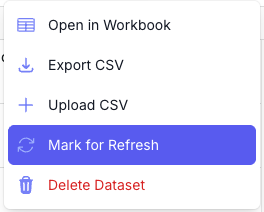
2) Check what changed
To see updates, list your refresh batches, then inspect the jobs inside each batch. For each place, compare thejob_metadata.last_enriched timestamp (and, if needed, the output values) against your prior snapshot.
List recent batches
Use this to find the batch IDs you want to review (especially the batches you marked for refresh). Expectbatches[] with id, status, status_counts, and refresh so you can pick the batch IDs to inspect.
List batches API reference
Fetch a batch to get its place IDs
Use this to see which place IDs are included in a specific batch. Expect ajobs object with arrays by status; jobs.completed can be large, so you’ll typically sample or page through.
Get batch status API reference
Fetch a job by place ID
Use this to inspect the updated enrichment results for each place so you can scan for changes. Expectjob_metadata.last_enriched (timestamp with microseconds) plus attribute_status and outputs for validation.
Get a single enrichment job API reference
Inspect last_enriched
Example response (trimmed). Focus on job_metadata.last_enriched:
- Key field:
job_metadata.last_enrichedindicates the most recent enrichment timestamp for that place. - A refresh can complete without changing
last_enriched. That means the data matched the prior enrichment and you are not charged for that refresh. - Use
job_metadata.last_enrichedto confirm a refresh ran (e.g., a timestamp on or after the 9th of the month). - If you need a deeper diff, compare the
outputsobject to your stored snapshot.